
For this you need Visual Studio 2013. You can download Visual Studio 2013 using the following link: Visual Studio Community 2013.
In traditional web applications, the client (browser) initiates the communication with the server by requesting a page. The server then processes the request and sends the HTML of the page to the client. In subsequent interactions with the page, for example the user navigates to a link or submits a form with data, a new request is sent to the server and the flow starts again. The server processes the request and sends a new page to the browser in response to the new action requested by the client.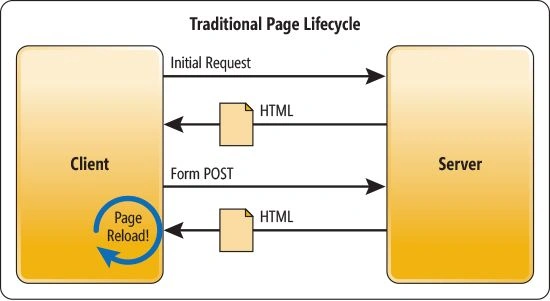
Image 1.
In Single-Page Applications (SPAs) the entire page is loaded into the browser after the initial request, but subsequent interactions take place using Ajax requests. This means that the browser must update only the portion of the page that has changed; there is no need to reload the entire page. The SPA approach reduces the time taken by the application to respond to user actions, resulting in a more fluid experience.
Single-Page Applications (SPAs) are Web apps that load a single HTML page and dynamically update that page as the user interacts with the app.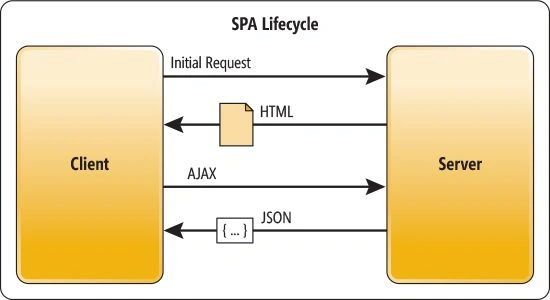
Image 2.
Now we will learn this by creating a sample application. In this SPA example I will do CRUD operations on the Student table using the Web API and MVC.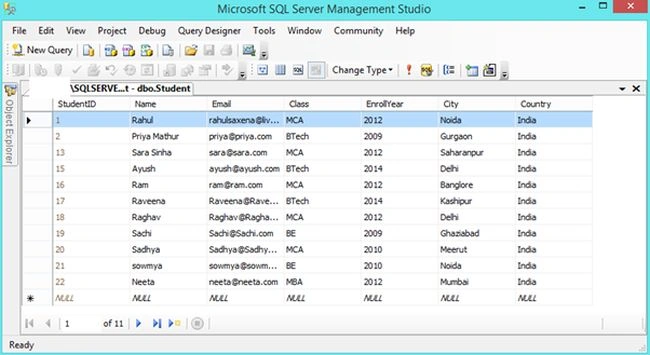
Image 3.
The following is my Data Table in design mode: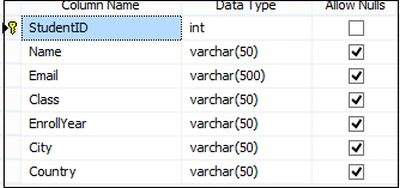
Image 4.
The script of my Student Table is:
- CREATE TABLE [dbo].[Student](
- [StudentID] [int] IDENTITY(1,1) NOT NULL,
- [Name] [varchar](50) NULL,
- [Email] [varchar](500) NULL,
- [Class] [varchar](50) NULL,
- [EnrollYear] [varchar](50) NULL,
- [City] [varchar](50) NULL,
- [Country] [varchar](50) NULL,
- CONSTRAINT [PK_Student] PRIMARY KEY CLUSTERED
- (
- [StudentID] ASC
- )WITH (PAD_INDEX = OFF, STATISTICS_NORECOMPUTE = OFF, IGNORE_DUP_KEY = OFF, ALLOW_ROW_LOCKS = ON, ALLOW_PAGE_LOCKS = ON) ON [PRIMARY]
- ) ON [PRIMARY]
- GO
- SET ANSI_PADDING OFF
- GO
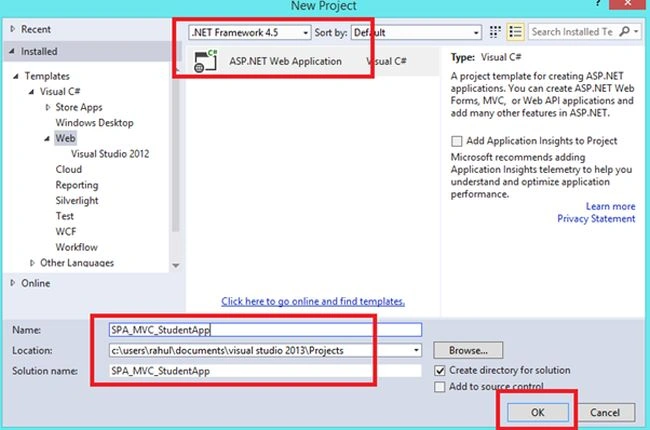
Image 5.
Select Web -> ASP.NET Web Application then provide I a name. Then click OK.
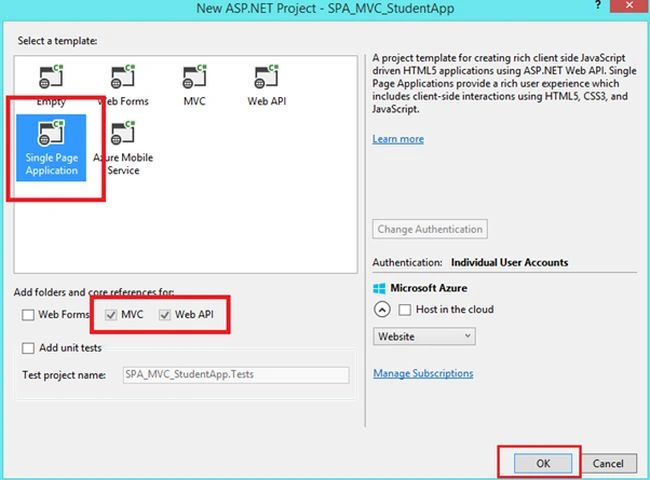
Image 6.
Select Single Page Application from the template option. Then click OK.
Now right-click on the Models Folder then select Add -> ADO.NET Entity Data Model.
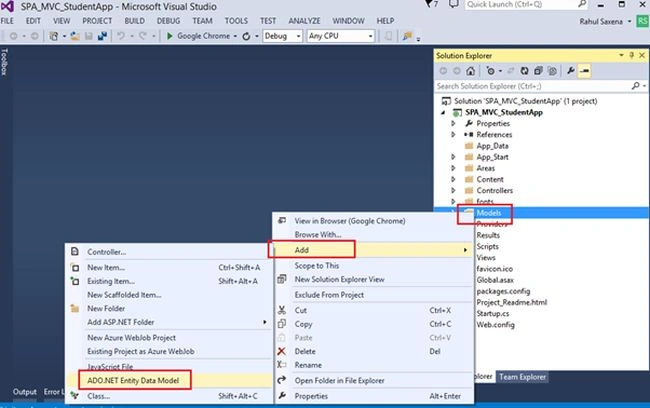
Image 7.
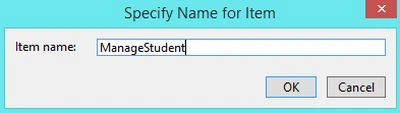
Image 8.
Provide It a name.
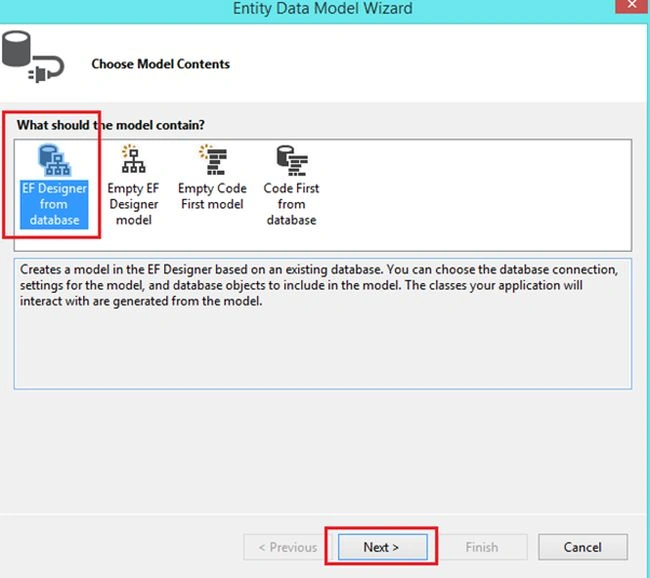
Image 9.
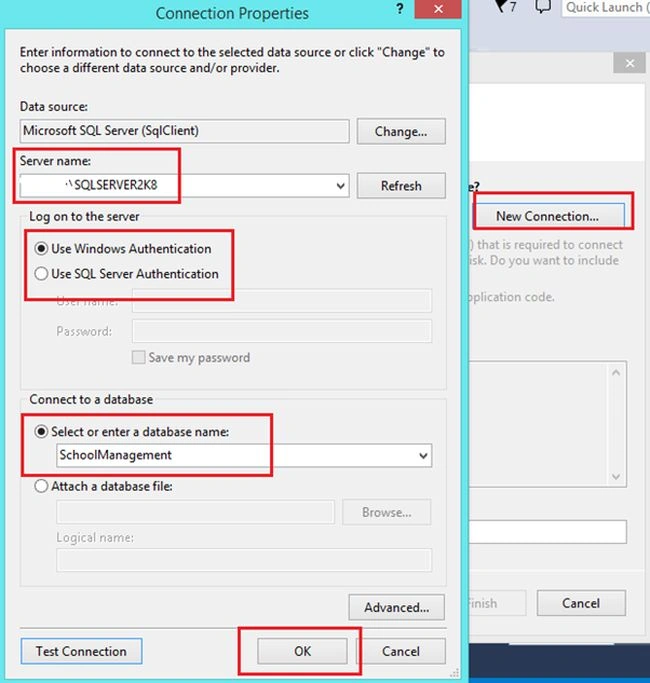
Image 10.
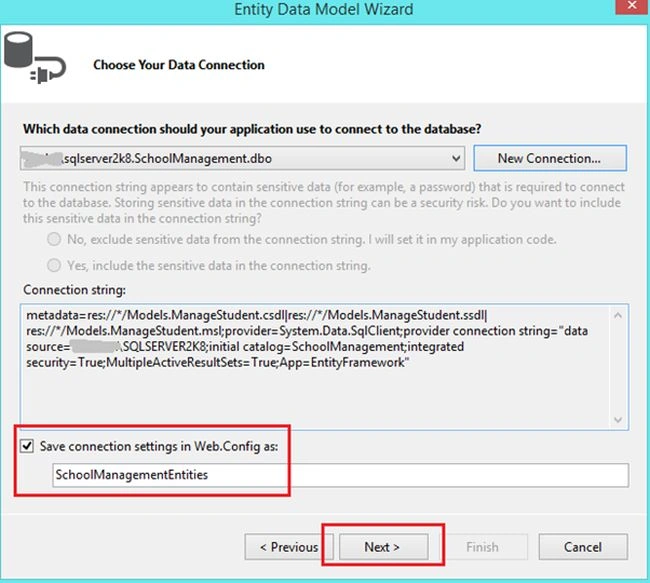
Image 11.
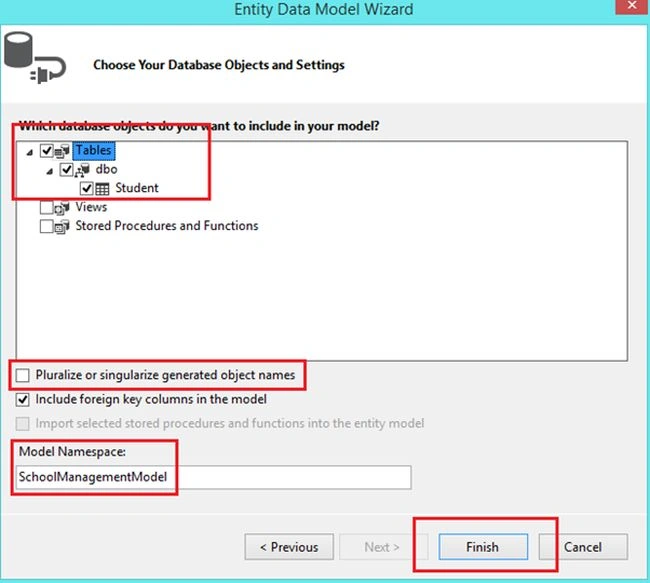
Image 12.
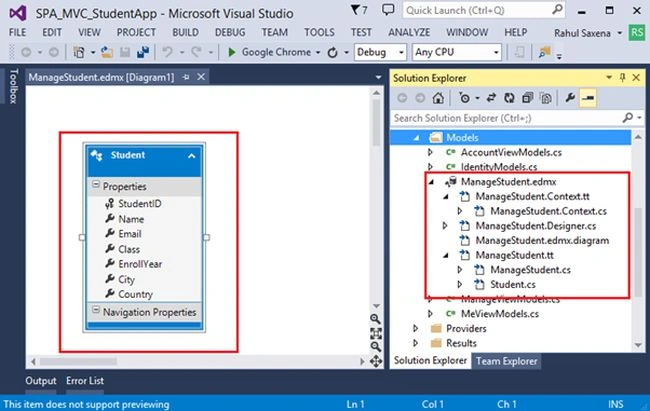
Image 13.
Now we will add AngularJS references using NuGet. Right-click on Solution Explorer.
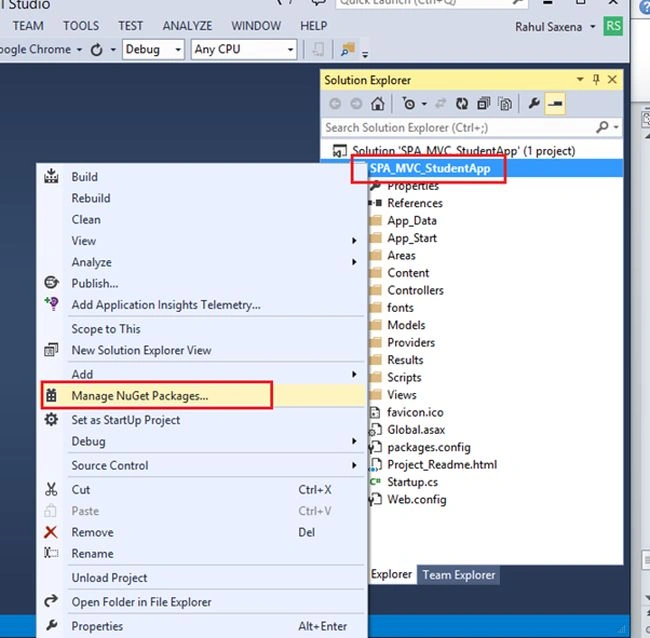
Image 14.
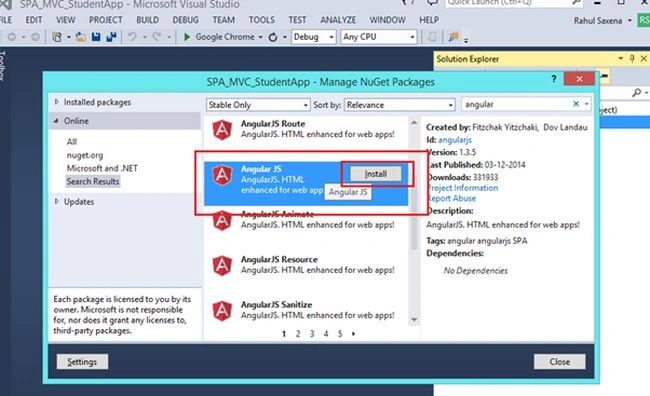
Image 15.
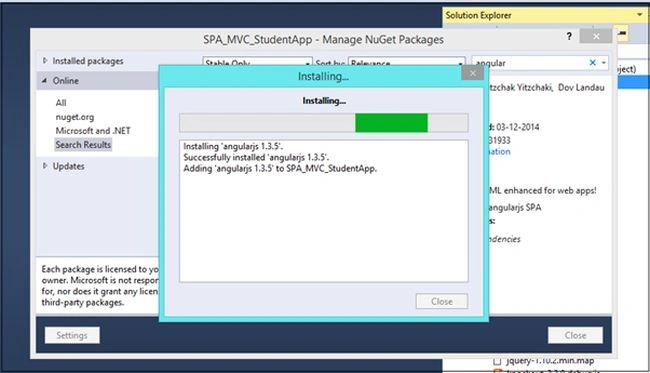
Image 16.
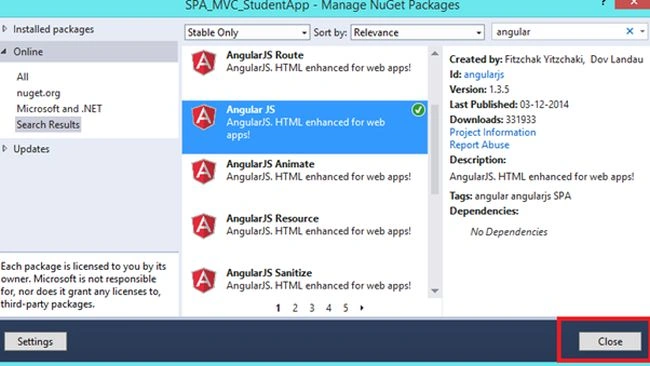
Image 17.
Now we will add a Web API so right-click on the controller folder then select Add -> Controller.
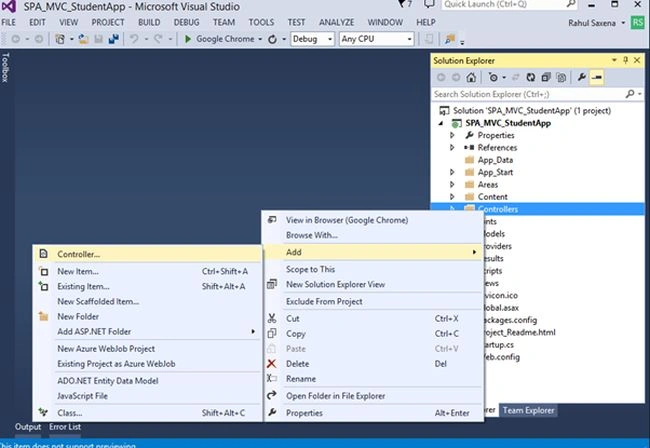
Image 18.
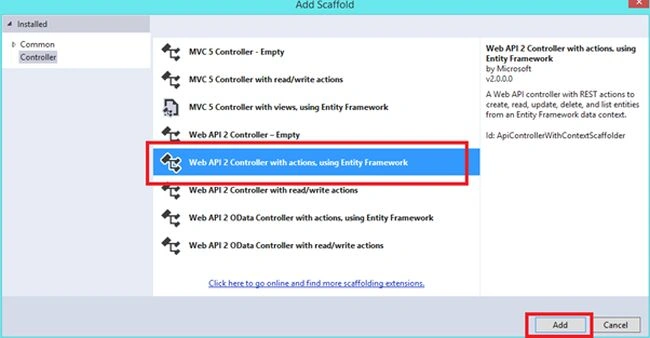
Image 19.
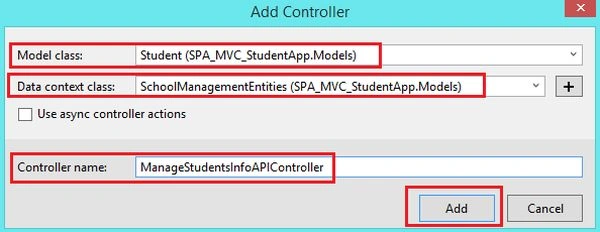
Image 20.
ManageStudentsInfoAPIController.cs is:
- using System;
- using System.Collections.Generic;
- using System.Data;
- using System.Data.Entity;
- using System.Data.Entity.Infrastructure;
- using System.Linq;
- using System.Net;
- using System.Net.Http;
- using System.Web.Http;
- using System.Web.Http.Description;
- using SPA_MVC_StudentApp.Models;
- namespace SPA_MVC_StudentApp.Controllers
- {
- public class ManageStudentsInfoAPIController : ApiController
- {
- private SchoolManagementEntities db = new SchoolManagementEntities();
- // GET: api/ManageStudentsInfoAPI
- public IQueryable<Student> GetStudent()
- {
- return db.Student;
- }
- // GET: api/ManageStudentsInfoAPI/5
- [ResponseType(typeof(Student))]
- public IHttpActionResult GetStudent(int id)
- {
- Student student = db.Student.Find(id);
- if (student == null)
- {
- return NotFound();
- }
- return Ok(student);
- }
- // PUT: api/ManageStudentsInfoAPI/5
- [ResponseType(typeof(void))]
- public IHttpActionResult PutStudent(int id, Student student)
- {
- if (!ModelState.IsValid)
- {
- return BadRequest(ModelState);
- }
- if (id != student.StudentID)
- {
- return BadRequest();
- }
- db.Entry(student).State = EntityState.Modified;
- try
- {
- db.SaveChanges();
- }
- catch (DbUpdateConcurrencyException)
- {
- if (!StudentExists(id))
- {
- return NotFound();
- }
- else
- {
- throw;
- }
- }
- return StatusCode(HttpStatusCode.NoContent);
- }
- // POST: api/ManageStudentsInfoAPI
- [ResponseType(typeof(Student))]
- public IHttpActionResult PostStudent(Student student)
- {
- if (!ModelState.IsValid)
- {
- return BadRequest(ModelState);
- }
- db.Student.Add(student);
- db.SaveChanges();
- return CreatedAtRoute("DefaultApi", new { id = student.StudentID }, student);
- }
- // DELETE: api/ManageStudentsInfoAPI/5
- [ResponseType(typeof(Student))]
- public IHttpActionResult DeleteStudent(int id)
- {
- Student student = db.Student.Find(id);
- if (student == null)
- {
- return NotFound();
- }
- db.Student.Remove(student);
- db.SaveChanges();
- return Ok(student);
- }
- protected override void Dispose(bool disposing)
- {
- if (disposing)
- {
- db.Dispose();
- }
- base.Dispose(disposing);
- }
- private bool StudentExists(int id)
- {
- return db.Student.Count(e => e.StudentID == id) > 0;
- }
- }
- }
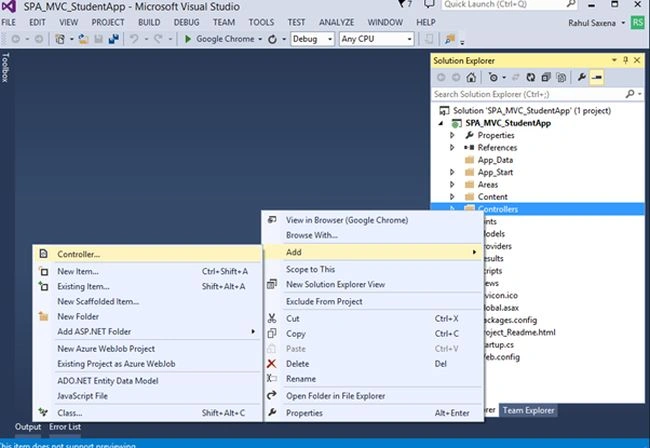
Image 21.
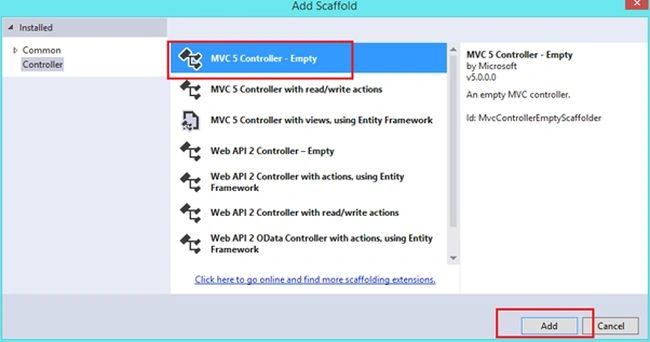
Image 22.
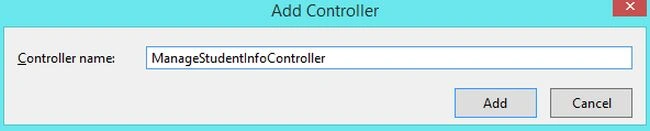
Image 23.
After adding ManageStudentInfo Controller we need to add a view.
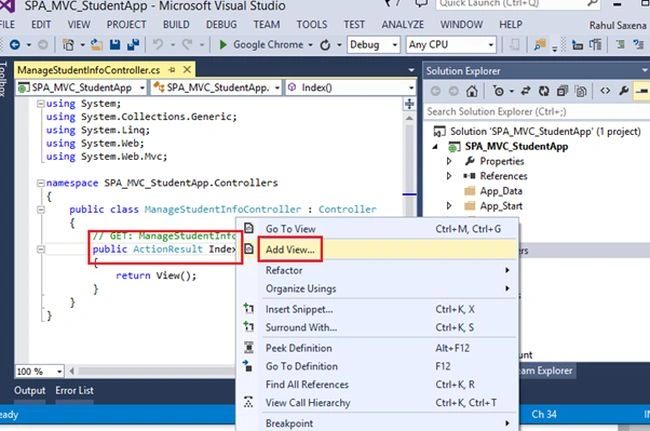
Image 24.
Index.cshtml
- @{
- ViewBag.Title = "SPA";
- Layout = "~/Views/Shared/_Layout.cshtml";
- }
- <link href="~/Content/bootstrap.min.css" rel="stylesheet" />
- <body data-ng-app="ApplicationModule">
- <div>
- <div>
- <div>
- <table cellpadding="5" cellspacing="6" width="100%" style="background-color:whitesmoke; border:solid 4px green;">
- <tr>
- <td style="border: solid 1px gray; width:170px; text-align:center;"><a href="showstudents"> Show All Students </a></td>
- <td style="border: solid 1px gray; width:170px; text-align:center;"><a href="addstudent"> Add New Student </a></td>
- <td></td>
- </tr>
- </table>
- </div>
- <div>
- <div data-ng-view></div>
- </div>
- </div>
- </div>
- </body>
- @section scripts{
- <script type="text/javascript" src="@Url.Content("~/Scripts/angular.js")"></script>
- <script type="text/javascript" src="@Url.Content("~/Scripts/angular-route.min.js")"></script>
- <script type="text/javascript" src="@Url.Content("~/MyScripts/Module.js")"></script>
- <script src="~/MyScripts/Services.js"></script>
- <script type="text/javascript" src="@Url.Content("~/MyScripts/ShowStudentsController.js")"></script>
- <script type="text/javascript" src="@Url.Content("~/MyScripts/AddStudentController.js")"></script>
- <script type="text/javascript" src="@Url.Content("~/MyScripts/EditStudentController.js")"></script>
- <script type="text/javascript" src="@Url.Content("~/MyScripts/DeleteStudentController.js")"></script>
- }
Here in this example we will perform the following operations:
- ShowAllStudent
- AddStudent
- EditStudent
- DeleteStudent
So we will add a partial view for all these. So right-click on Views then select the ManageStudentInfo folder. Like the following. 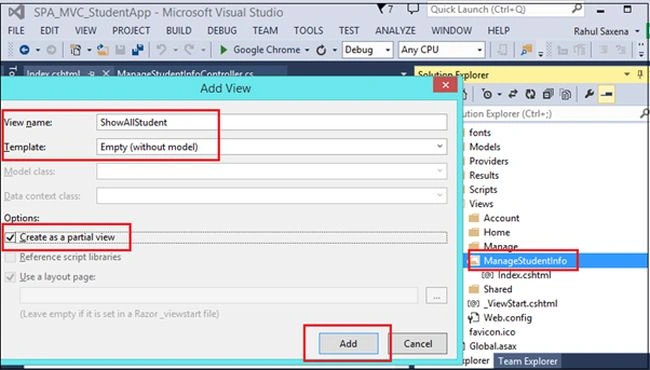
Image 25.
ShowAllStudent.cshtml
- <table><tr><td height="10px"></td></tr></table>
- <table cellpadding="4" cellspacing="4" width="90%" align="center"
- style="background-color: skyblue; border:solid 2px red; padding-top:20px;">
- <thead>
- <tr style="background-color:#F5F5F5;">
- <th>Student ID</th>
- <th>Name</th>
- <th>Email</th>
- <th>Class</th>
- <th>Enroll Year</th>
- <th>City</th>
- <th>Country</th>
- <th></th>
- <th></th>
- </tr>
- </thead>
- <tbody>
- <tr data-ng-repeat="Stud in Students">
- <td>{{Stud.studentID}}</td>
- <td>{{Stud.name}}</td>
- <td>{{Stud.email}}</td>
- <td>{{Stud.class}}</td>
- <td>{{Stud.enrollYear}}</td>
- <td>{{Stud.city}}</td>
- <td>{{Stud.country}}</td>
- <td><a ng-click="editStudent(Stud.studentID)">Edit</a></td>
- <td><a ng-click="deleteStudent(Stud.studentID)">Delete</a></td>
- </tr>
- </tbody>
- </table>
AddStudent.cshtml
- @{
- ViewBag.Title = "Add New Student";
- }
- <table><tr><td height="10px"></td></tr></table>
- <table cellpadding="4" cellspacing="4" width="70%" align="center" style="background-color: skyblue;
- border:solid 2px red; padding-top:20px;">
- <tr><td colspan="3" style="background-color:gray; font-size:18pt;
- font-weight:bold; height:30px; text-align:center;">Add New Student</td></tr>
- <tr>
- <td style="text-align:right;">Student ID</td>
- <td><input type="text" ng-model="StudentID" /> </td>
- </tr>
- <tr>
- <td style="text-align:right;">Name</td>
- <td><input type="text" ng-model="Name" /> </td>
- </tr>
- <tr>
- <td style="text-align:right;">Email</td>
- <td><input type="text" ng-model="Email" /> </td>
- </tr>
- <tr>
- <td style="text-align:right;">Class</td>
- <td><input type="text" ng-model="Class" /> </td>
- </tr>
- <tr>
- <td style="text-align:right;">Enroll Year</td>
- <td><input type="text" ng-model="EnrollYear" /> </td>
- </tr>
- <tr>
- <td style="text-align:right;">City</td>
- <td><input type="text" ng-model="City" /> </td>
- </tr>
- <tr>
- <td style="text-align:right;">Country</td>
- <td><input type="text" ng-model="Country" /> </td>
- </tr>
- <tr>
- <td></td>
- <td>
- <input type="button" value="Save" data-ng-click="save()" />
- </td>
- </tr>
- </table>
- @{
- ViewBag.Title = "Delete Student";
- }
- <table><tr><td height="10px"></td></tr></table>
- <table cellpadding="4" cellspacing="4" width="70%" align="center" style="background-color: skyblue; border:solid 2px red; padding-top:20px;">
- <tr><td colspan="3" style="background-color:gray; font-size:18pt; font-weight:bold; height:30px; text-align:center;">Delete Student Information</td></tr>
- <tr>
- <td style="text-align:right;">Student ID</td>
- <td>{{Student.studentID}} </td>
- </tr>
- <tr>
- <td style="text-align:right;">Name # </td>
- <td> {{Student.name}} </td>
- </tr>
- <tr>
- <td style="text-align:right;">Email # </td>
- <td>{{Student.email}} </td>
- </tr>
- <tr>
- <td style="text-align:right;">Class # </td>
- <td>{{Student.class}} </td>
- </tr>
- <tr>
- <td style="text-align:right;">Enroll Year # </td>
- <td>{{Student.enrollYear}} </td>
- </tr>
- <tr>
- <td style="text-align:right;">City # </td>
- <td>{{Student.city}} </td>
- </tr>
- <tr>
- <td style="text-align:right;">Country # </td>
- <td>{{Student.country}} </td>
- </tr>
- <tr>
- <td></td>
- <td>
- <input type="button" value="Delete" ng-click="delete()" />
- </td>
- </tr>
- </table>
- @{
- ViewBag.Title = "Edit Student";
- }
- <table><tr><td height="10px"></td></tr></table>
- <table cellpadding="4" cellspacing="4" width="70%" align="center" style="background-color: skyblue; border:solid 2px red; padding-top:20px;">
- <tr><td colspan="3" style="background-color:gray; font-size:18pt; font-weight:bold; height:30px; text-align:center;">Edit Student Information</td></tr>
- <tr>
- <td style="text-align:right;">Student ID</td>
- <td><input type="text" ng-model="Student.studentID" /> </td>
- </tr>
- <tr>
- <td style="text-align:right;">Name</td>
- <td><input type="text" ng-model="Student.name" /> </td>
- </tr>
- <tr>
- <td style="text-align:right;">Email</td>
- <td><input type="text" ng-model="Student.email" /> </td>
- </tr>
- <tr>
- <td style="text-align:right;">Class</td>
- <td><input type="text" ng-model="Student.class" /> </td>
- </tr>
- <tr>
- <td style="text-align:right;">Enroll Year</td>
- <td><input type="text" ng-model="Student.enrollYear" /> </td>
- </tr>
- <tr>
- <td style="text-align:right;">City</td>
- <td><input type="text" ng-model="Student.city" /> </td>
- </tr>
- <tr>
- <td style="text-align:right;">Country</td>
- <td><input type="text" ng-model="Student.country" /> </td>
- </tr>
- <tr>
- <td></td>
- <td>
- <input type="button" value="Save" ng-click="save()" />
- <br />
- <div>{{error}}</div>
- </td>
- </tr>
- </table>
- using System;
- using System.Collections.Generic;
- using System.Linq;
- using System.Web;
- using System.Web.Mvc;
- namespace SPA_MVC_StudentApp.Controllers
- {
- public class ManageStudentInfoController : Controller
- {
- // GET: ManageStudentInfo
- public ActionResult Index()
- {
- return View();
- }
- public ActionResult AddNewStudent()
- {
- return PartialView("AddStudent");
- }
- public ActionResult ShowStudents()
- {
- return PartialView("ShowAllStudent");
- }
- public ActionResult EditStudent()
- {
- return PartialView("EditStudent");
- }
- public ActionResult DeleteStudent()
- {
- return PartialView("DeleteStudent");
- }
- }
- }
And add the following JavaScript files.
- Module.js
- Services.js
- ShowStudentsController.js
- AddStudentController.js
- EditStudentController.js
- DeleteStudentController.js
Now provide the following code in every JavaScript file.
Module.js
- var app = angular.module("ApplicationModule", ["ngRoute"]);
- app.factory("ShareData", function () {
- return { value: 0 }
- });
- //Showing Routing
- app.config(['$routeProvider', '$locationProvider', function ($routeProvider, $locationProvider) {
- debugger;
- $routeProvider.when('/showstudents',
- {
- templateUrl: 'ManageStudentInfo/ShowStudents',
- controller: 'ShowStudentsController'
- });
- $routeProvider.when('/addstudent',
- {
- templateUrl: 'ManageStudentInfo/AddNewStudent',
- controller: 'AddStudentController'
- });
- $routeProvider.when("/editStudent",
- {
- templateUrl: 'ManageStudentInfo/EditStudent',
- controller: 'EditStudentController'
- });
- $routeProvider.when('/deleteStudent',
- {
- templateUrl: 'ManageStudentInfo/DeleteStudent',
- controller: 'DeleteStudentController'
- });
- $routeProvider.otherwise(
- {
- redirectTo: '/'
- });
- $locationProvider.html5Mode(true).hashPrefix('!')
- }]);
- app.service("SPACRUDService", function ($http) {
- //Read all Students
- this.getStudents = function () {
- return $http.get("/api/ManageStudentInfoAPI");
- };
- //Fundction to Read Student by Student ID
- this.getStudent = function (id) {
- return $http.get("/api/ManageStudentInfoAPI/" + id);
- };
- //Function to create new Student
- this.post = function (Student) {
- var request = $http({
- method: "post",
- url: "/api/ManageStudentInfoAPI",
- data: Student
- });
- return request;
- };
- //Edit Student By ID
- this.put = function (id, Student) {
- var request = $http({
- method: "put",
- url: "/api/ManageStudentInfoAPI/" + id,
- data: Student
- });
- return request;
- };
- //Delete Student By Student ID
- this.delete = function (id) {
- var request = $http({
- method: "delete",
- url: "/api/ManageStudentInfoAPI/" + id
- });
- return request;
- };
- });
- app.controller('ShowStudentsController', function ($scope, $location, SPACRUDService, ShareData) {
- loadAllStudentsRecords();
- function loadAllStudentsRecords()
- {
- var promiseGetStudent = SPACRUDService.getStudents();
- promiseGetStudent.then(function (pl) { $scope.Students = pl.data },
- function (errorPl) {
- $scope.error = errorPl;
- });
- }
- //To Edit Student Information
- $scope.editStudent = function (StudentID) {
- ShareData.value = StudentID;
- $location.path("/editStudent");
- }
- //To Delete a Student
- $scope.deleteStudent = function (StudentID) {
- ShareData.value = StudentID;
- $location.path("/deleteStudent");
- }
- });
- app.controller('AddStudentController', function ($scope, SPACRUDService) {
- $scope.StudentID = 0;
- $scope.save = function () {
- var Student = {
- StudentID: $scope.StudentID,
- Name: $scope.Name,
- Email: $scope.Email,
- Class: $scope.Class,
- EnrollYear: $scope.EnrollYear,
- City: $scope.City,
- Country: $scope.Country
- };
- var promisePost = SPACRUDService.post(Student);
- promisePost.then(function (pl) {
- alert("Student Saved Successfully.");
- },
- function (errorPl) {
- $scope.error = 'failure loading Student', errorPl;
- });
- };
- });
- app.controller("EditStudentController", function ($scope, $location, ShareData, SPACRUDService) {
- getStudent();
- function getStudent() {
- var promiseGetStudent = SPACRUDService.getStudent(ShareData.value);
- promiseGetStudent.then(function (pl)
- {
- $scope.Student = pl.data;
- },
- function (errorPl) {
- $scope.error = 'failure loading Student', errorPl;
- });
- }
- $scope.save = function () {
- var Student = {
- StudentID: $scope.Student.studentID,
- Name: $scope.Student.name,
- Email: $scope.Student.email,
- Class: $scope.Student.class,
- EnrollYear: $scope.Student.enrollYear,
- City: $scope.Student.city,
- Country: $scope.Student.country
- };
- var promisePutStudent = SPACRUDService.put($scope.Student.studentID, Student);
- promisePutStudent.then(function (pl)
- {
- $location.path("/showstudents");
- },
- function (errorPl) {
- $scope.error = 'failure loading Student', errorPl;
- });
- };
- });
- app.controller("DeleteStudentController", function ($scope, $location, ShareData, SPACRUDService) {
- getStudent();
- function getStudent() {
- var promiseGetStudent = SPACRUDService.getStudent(ShareData.value);
- promiseGetStudent.then(function (pl) {
- $scope.Student = pl.data;
- },
- function (errorPl) {
- $scope.error = 'failure loading Student', errorPl;
- });
- }
- $scope.delete = function () {
- var promiseDeleteStudent = SPACRUDService.delete(ShareData.value);
- promiseDeleteStudent.then(function (pl) {
- $location.path("/showstudents");
- },
- function (errorPl) {
- $scope.error = 'failure loading Student', errorPl;
- });
- };
- });
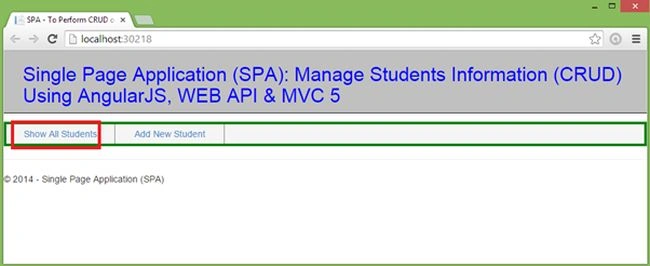
Image 26.
Now click on Show All Students.
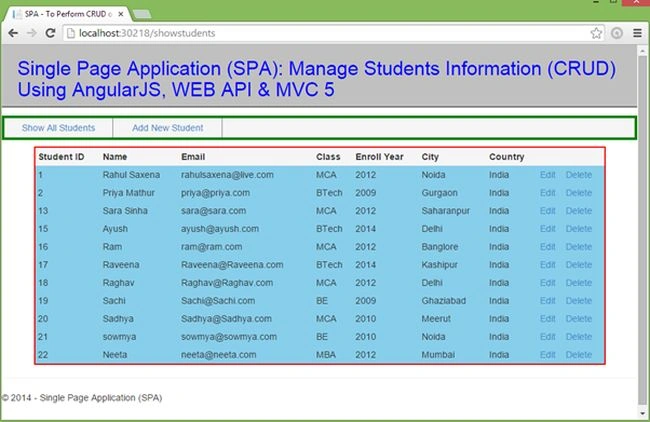
Image 27.
Now click on Add New Student.
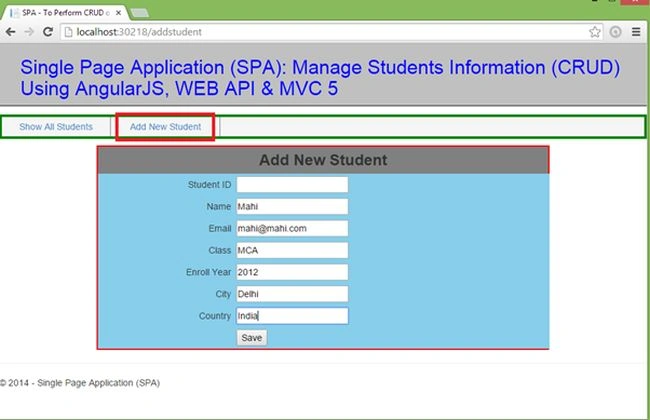
Image 28.
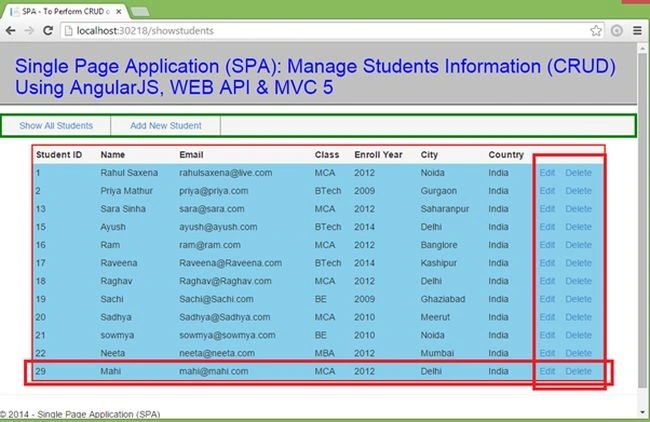
Image 29.
Now click on Edit.
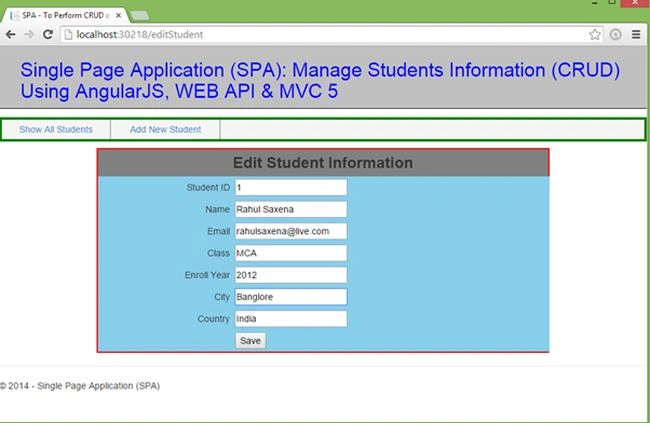
Image 30.
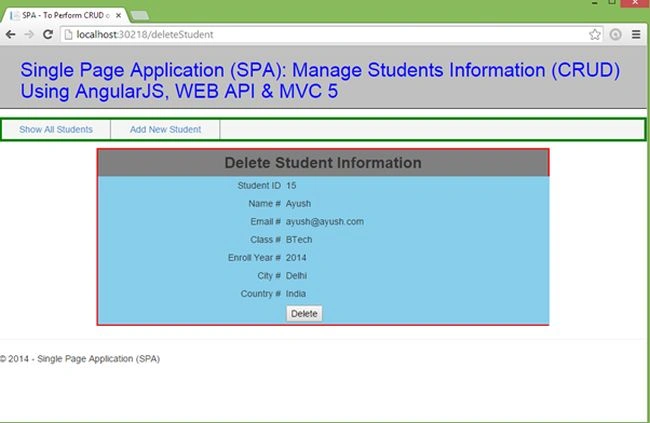
Image 31.


Shrinivas ReddyPosted Dec 5, 2018, 2:23 AM EST
Great work, but sorry to say your project has too many bugs. Good topic though.
Chandra MouliPosted Oct 30, 2018, 4:11 AM EDT
Hi Rahul, it is easy to understand the single page application concept but if reload the page it will throwing 404 error like "Server Error in '/' Application.The resource cannot be found.Description: HTTP 404. The resource you are looking for (or one of its dependencies) could have been removed, had its name changed, or is temporarily unavailable. Please review the following URL and make sure that it is spelled correctly".
Bhawan BhanguPosted Jun 20, 2018, 9:34 AM EDT
In Module.js, Just add $locationProvider.html5Mode({ enabled: true, requireBase: false });
nagamani ptPosted May 8, 2018, 1:51 AM EDT
I like this article. It is easy to understand the MVC. Thanks for your code
Katakam PradeepPosted Mar 18, 2018, 4:03 PM EDT
Hi Rahul, The article is very good. Can you provide the route configuration process of mvc controller and api controller ? How mvc controller talks to the web api controller?
ANTONIO HERNANDEZPosted Mar 10, 2018, 6:34 PM EST
Excellent article, I could build it and it worked, thanks.
ghasem dehPosted Oct 30, 2017, 11:33 PM EDT
Hi dear rahul , i am try create first project with your tutorial but in add controller (image 19) send this error for me : http://s9.picofile.com/file/8277187968/Capture.PNG / please help me !
Vijayakumara NvPosted Oct 2, 2017, 11:17 PM EDT
Good work, keep it up..
vaibhav parmarPosted Jul 4, 2017, 4:50 AM EDT
How can we get the create form?I followed all the steps one by one but not getting create view here.Please correct the code as early as possible and add the code for the create Student how we call Create student http method?
Mohamed rafeequePosted May 6, 2017, 10:07 AM EDT
Please also explain the project functionality.
Alo ChakmaPosted Feb 24, 2017, 5:43 AM EST
Hi Rahul, I am new to Angular. I have followed the project step by step. For some reason, the edit controller is not getting hit. Once I pass the hard-coded value for the student id, the editStudent.cshtml shows up. I wonder where the problem lies. Please let me know where I need to fix the problem.
Arvind SahuPosted Jan 5, 2017, 4:26 AM EST
Hi .... i am new to angular.. not too much familiar... there is some problem in tutorial.. i created step by step.. but not getting desired output.. i am not getting the Index view...with the tab- AddStudent and ShowAllStudent EditStudent and editStudent.
Alok DagarPosted Nov 28, 2016, 11:45 PM EST
$locationProvider.html5Mode({ enabled: true, requireBase: false });
Alok DagarPosted Nov 28, 2016, 11:45 PM EST
And add the following line code in module.js since the partial views were not getting rendered in the index view using the above code
Alok DagarPosted Nov 28, 2016, 11:43 PM EST
Geat article... working fine... for those having trouble running code.. just check.... the name of api controller should be similar to the one mentioned in services.js
Sivasankari SPosted Oct 28, 2016, 5:49 AM EDT
Nice article
Pushpendra SinghPosted Oct 24, 2016, 9:59 PM EDT
Hi Rahul.... M new to angular.. not too much familiar... there is some prblm in tutorial.. i created step by step.. but not getting desired output.. infact controller is not hitting... plz update the tutorial.. or send the code...Lots of refence are missing and all.... data is not fetching from database....plz help ..
greg dorianPosted Jul 29, 2016, 1:20 PM EDT
Hi rahul, One question How do I Make a Master details like this; Person that has income and credit history using WebAPI, one master 2 details??
Pramod GehlotPosted Jul 19, 2016, 12:39 AM EDT
Hello Rahul I am using same code according to you but i am showing all student /ManageStudentInfo/showstudents there my data does not bind, please can u send me code.
Sabina AkterPosted May 12, 2016, 3:02 AM EDT
I am using VS2015 and do the same as you do but cant get any result and got ""Server Error in '/' Application" .cant debug and also able to see them exactly {{Stud.StudentID},{{Stud.name} in showAllStudent page......Please reply whats wrong with me?
vamsi BPosted Apr 18, 2016, 1:42 PM EDT
I am added class model and data context .following is my error "Unable to retrieve metadata for 'Project.Models.LoginModel'. One or more validation errors were detected during model generation: System.Data.Entity.Edm.EdmEntityType: : EntityType 'LoginModel' has no key defined. Define the key for this EntityType. System.Data.Entity.Edm.EdmEntitySet: EntityType: EntitySet 'LoginModels' is based on type 'LoginModel' that has no keys defined"
vani yadavPosted Feb 23, 2016, 9:34 PM EST
hi iam getting HTTP 404. The resource you are looking for (or one of its dependencies) could have been removed, had its name changed, or is temporarily unavailable. Please review the following URL and make sure that it is spelled correctly.
Rupali ShindePosted Feb 8, 2016, 6:42 PM EST
Really good article for MVC with AngularJS, Thanks for sharing
Ankush BandPosted Nov 28, 2015, 12:45 AM EST
very helping tutorial sir..
Hassan FaghihiPosted Nov 7, 2015, 10:43 PM EST
I'm wonder if it's just new angular js, but ignoring the usage of prefix, cause 'refresh' to fail.
Bruno PétersonPosted Nov 2, 2015, 5:32 AM EST
Good one. Thanks!
Ganesh VermaPosted Nov 1, 2015, 11:57 PM EST
Can you please update the sample code this not working getting lot of reference error
Bharath PeggemPosted Oct 28, 2015, 12:54 AM EDT
Good article Rahul Ji. am the new AngularJS, its helps to me
Sheshadri RPosted Oct 24, 2015, 9:37 AM EDT
Nice article..How to create api for multiple table using ef..
Rahul Kumar SaxenaTOP 100Posted Oct 18, 2015, 8:08 AM EDT
Thanks Abolfazl RoshanZamir
Arweb AroshanzamirPosted Oct 17, 2015, 11:10 PM EDT
Nice Article ..thx
Rahul Kumar SaxenaTOP 100Posted Oct 4, 2015, 8:30 PM EDT
Thank u Nilesh Jadav
Rahul Kumar SaxenaTOP 100Posted Oct 4, 2015, 8:29 PM EDT
Thank. u abhishek Singh
Nilesh JadavPosted Oct 3, 2015, 5:27 AM EDT
Great Work sir!
Abhishek KumarPosted Sep 21, 2015, 2:53 AM EDT
Nice article Rahul...
Rahul Kumar SaxenaTOP 100Posted Aug 16, 2015, 1:54 AM EDT
Thanks Priti Kumari
Priti KumariPosted Aug 10, 2015, 4:18 AM EDT
Good article!!
Prashant KoliPosted Jul 27, 2015, 8:17 AM EDT
Add <base href="/"> after <head> in _Layout.cshtml under shared folder in views.Error reason, if u go through angular js documnetation u can see for ver 1.41 this has to be added... Hope this will help you.
Prashant KoliPosted Jul 27, 2015, 8:17 AM EDT
I had to follow below suggestion to make my code working:
Prashant KoliPosted Jul 27, 2015, 8:16 AM EDT
Nice Article.
ajay sharmaPosted Jul 27, 2015, 2:35 AM EDT
Hi Ahmed Amen, What have you changed for working with angularjs 1.41,i still have same issue with newer version....Plesae help
George VarghesePosted Jul 24, 2015, 1:37 PM EDT
Add <base href="/"> after <head> in _Layout.cshtml under shared folder in views.Error reason, if u go through angular js documnetation u can see for ver 1.41 this has to be added... Hope this will help you.
Ahmed AmenPosted Jul 5, 2015, 2:54 AM EDT
Nice Work - i edit it and it works on angularjs 1.41, but the only problem i had - when refresh page like "http://localhost:51798/showstudents" get Server Error in '/' Application - so please how i can make it works ?
PrashanthPosted Jun 13, 2015, 7:34 AM EDT
So It this work only with Angular 1.2.18. We tried with 1.4. Can you please let us know which versions it will support.
PrashanthPosted Jun 13, 2015, 7:33 AM EDT
Hi Rahul, It is too good post to learn AngularJS with MVC and WebAPI. Thank you so much for that.
Rahul Kumar SaxenaTOP 100Posted May 20, 2015, 11:32 PM EDT
Thanks Vinita Singh
Rahul Kumar SaxenaTOP 100Posted May 20, 2015, 11:32 PM EDT
Thanks Er Abhiyutya Shukla
Rahul Kumar SaxenaTOP 100Posted May 20, 2015, 11:31 PM EDT
Thanks Shilpa Pradeep
Rahul Kumar SaxenaTOP 100Posted May 20, 2015, 11:31 PM EDT
are you trying to access how All Studetns by writting in URL directly ???
AngeloPosted May 13, 2015, 11:06 PM EDT
Sorry it got posted before I finished typing. If I download the attached code, the "Add Student" works but the "Show All Studetns" does not work. Thanks
AngeloPosted May 13, 2015, 11:05 PM EDT
The resource cannot be found.Description: HTTP 404. The resource you are looking for (or one of its dependencies) could have been removed, had its name changed, or is temporarily unavailable. Please review the following URL and make sure that it is spelled correctly. Requested URL: /addstudent
AngeloPosted May 13, 2015, 11:04 PM EDT
Thanks Rahul. I am now able to see the correct page., but when I click "Add New Student", I get the following error
Rahul Kumar SaxenaTOP 100Posted May 12, 2015, 7:39 PM EDT
Hi Angelo Check in your Route.config file inside App_Start folder .. Which Controller & Action Method you have as default...
AngeloPosted May 12, 2015, 6:14 PM EDT
When I followed the instructions and ran the application, I get a logon page. Am I doing anything wrong?
Shilpa PradeepPosted Apr 28, 2015, 10:21 PM EDT
Hi Rahul , Its a very good appa. however this appa works only with Angular JS 1.3.5 but not with Angular JS 1.3.15. Can you tell me where am i going wrong?
Amit KumarPosted Apr 27, 2015, 8:59 PM EDT
How you will handle , if I have multiple MVC controller, as here your ng-view is inside Index view of ManageStudentInfo controller. in my case I have multiple controller.
Rahul Kumar SaxenaTOP 100Posted Apr 24, 2015, 5:00 AM EDT
Thanks Abolfazl RoshanZamir..
Arweb AroshanzamirPosted Apr 24, 2015, 4:39 AM EDT
Thank you Rahul Saxena.. the bset article...very good
Rahul Kumar SaxenaTOP 100Posted Apr 20, 2015, 10:04 AM EDT
Thanks Anatoli Rostovtsev ...
Rahul Kumar SaxenaTOP 100Posted Apr 20, 2015, 10:04 AM EDT
Thanks Yazan Rawashdeh
Rahul Kumar SaxenaTOP 100Posted Apr 20, 2015, 10:03 AM EDT
Thanks Vinita Singh..
Rahul Kumar SaxenaTOP 100Posted Apr 20, 2015, 10:03 AM EDT
Agree Srinivasan K K... Here In This Application I used Partial Views...
Srinivasan K KPosted Apr 19, 2015, 10:20 PM EDT
Rahul Saxena, Helpful article. If you don't mind I have a concern with this article. If I am anything wrong about it, clear my point. If we go for SPA then we should have views as partials for angular rather than having views in MVC. Here you've given views in MVC without use of partials. What's your point of view?
Rahul Kumar SaxenaTOP 100Posted Apr 16, 2015, 3:58 AM EDT
Thanks Krishna Mangore
krishna mangorePosted Apr 2, 2015, 1:16 AM EDT
I am new to the angularjs with web Api, this one is gr8 article.........thank's Rahul :)
Rahul Kumar SaxenaTOP 100Posted Mar 11, 2015, 10:04 AM EDT
Thank u Gowtham Rajamanickam
Gowtham RajamanickamTOP 100Posted Mar 11, 2015, 5:49 AM EDT
good one....
Rahul Kumar SaxenaTOP 100Posted Mar 10, 2015, 10:25 AM EDT
Thanks Anatoli Rostovtsev...
Rahul Kumar SaxenaTOP 100Posted Mar 10, 2015, 10:25 AM EDT
Thanks Nishad Ebrahim...
Nishad EbrahimPosted Mar 10, 2015, 7:23 AM EDT
well done. i was looking for some sample like this
Rahul Kumar SaxenaTOP 100Posted Mar 4, 2015, 6:39 PM EST
thanks Harpreet Singh...
Rahul Kumar SaxenaTOP 100Posted Mar 4, 2015, 6:39 PM EST
Thanks Vitha wadje...
Rahul Kumar SaxenaTOP 100Posted Mar 4, 2015, 6:38 PM EST
Thanks Tom mohan..
Rahul Kumar SaxenaTOP 100Posted Mar 4, 2015, 6:38 PM EST
Thanks Srinivasan KK..
Harpreet SinghPosted Mar 4, 2015, 9:00 AM EST
Very nice bro :)
Vithal WadjeTOP 100Posted Mar 4, 2015, 7:24 AM EST
nice keep it up
Tom MohanPosted Mar 4, 2015, 4:03 AM EST
Its awesome .
Gaurav GuptaPosted Mar 4, 2015, 3:07 AM EST
Can U plz explain... why $locationProvider.html5Mode(true).hashPrefix('!') used in module.js???
Srinivasan K KPosted Mar 4, 2015, 2:54 AM EST
well done.
Rahul Kumar SaxenaTOP 100Posted Mar 3, 2015, 7:16 PM EST
Thanks Anatoli Rostovtsev
Rahul Kumar SaxenaTOP 100Posted Mar 3, 2015, 7:15 PM EST
Thnanks Hemant Sudehely...
Rahul Kumar SaxenaTOP 100Posted Mar 3, 2015, 7:15 PM EST
Thanks Mohamed Mousa
Hemant SudehelyPosted Mar 3, 2015, 8:44 AM EST
Good work
Mohamed MousaPosted Feb 27, 2015, 11:33 PM EST
Good job
Rahul Kumar SaxenaTOP 100Posted Feb 25, 2015, 11:37 PM EST
Thanks Sumit...
Rahul Kumar SaxenaTOP 100Posted Feb 25, 2015, 11:36 PM EST
Thanks Abhishek Maitrey...
Sumit ThakurPosted Feb 21, 2015, 10:26 AM EST
Great Article
Rick StonePosted Jan 27, 2015, 11:02 AM EST
If I bookmark a page (other than the initial starting page) then go to a bookmark (or even if I hit refresh) I will get a 404 error. How can this be avoided?
Arweb AroshanzamirPosted Jan 17, 2015, 1:10 AM EST
good job Rahul Saxena...very usefull...
Dinesh BeniwalTOP 10Posted Jan 16, 2015, 8:54 PM EST
Congratulations Rahul Saxena article of the day on Asp.NET.
Michal HabalcikPosted Jan 8, 2015, 10:44 PM EST
One thing to add, SPAs are not really SEO friendly as google loves content-rich websites. So if a goal is to dominate in top Google's spots, SPA is not an option.
Abhishek MaitreyPosted Jan 8, 2015, 10:30 PM EST
nicely written article and could be a great help for a novice. well done Rahul. --@abhimaitrey
Humayun Kabir MamunPosted Dec 18, 2014, 12:18 AM EST
Very Helpful
Mahesh ChandTOP 10Posted Dec 15, 2014, 8:23 PM EST
Good job Rahul.
Saineshwar BageriPosted Dec 15, 2014, 6:23 PM EST
nice article
Nimit JoshiTOP 100Posted Dec 15, 2014, 5:50 PM EST
Very Nice and Informative Article....
Michal HabalcikPosted Dec 15, 2014, 10:23 AM EST
SPAs are now trendy and look and perform extremelly well when done properly. Great article overall, maybe some more explanation would be helpfull.
Abhishek KumarPosted Dec 15, 2014, 2:53 AM EST
very informative article Rahul..Thanks for this...
Manish Kumar ChoudharyPosted Dec 14, 2014, 11:42 PM EST
Nice one..