
Introduction
Today I encountered the issue "Unable to launch the IIS Express Web Server" while I was running my Visual Studio 2012. So I thought of sharing how to resolve that issue. I hope it will help someone.
Please read this article in my blog.
Background
In my team we have 5 to 10 members. Since we wanted to do a build for our current application, I used "Get the Latest files from the server". (We are using TFS.) Then when I run my application I was getting this error.
The cause of this error is, someone has checked in the solution file with his port number (the port number he was using). When I took the latest, it was set in my solution file also. We must take the latest solution file only when it is required. So here I will share the remedy for the preceding issue.
Procedure to solve this issue
Step 1
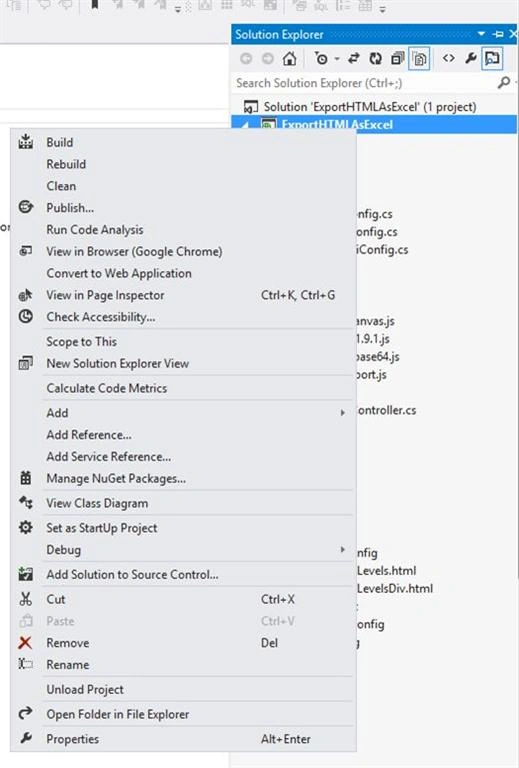
Right-click on your solution and select Properties as shown in the following figure.
Step 2
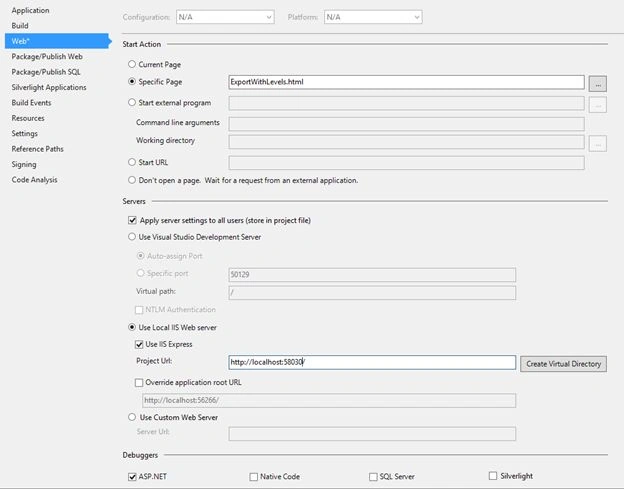
Select “Web” from the left menu.
Step 3
Under “Use local IIS server” change the port number from http://localhost:58030/ to another one.
Step 4
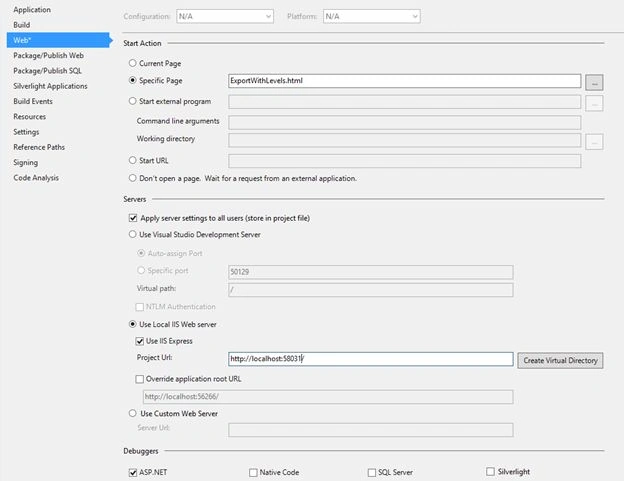
Here I have changed http://localhost:58030/ to http://localhost:58031/ .
Bingo! We have done it.

Step 5
Now please run again your application. The issue will be solved.
Kindest Regards
Sibeesh
http://sibeeshpassion.com/
Background
In my team we have 5 to 10 members. Since we wanted to do a build for our current application, I used "Get the Latest files from the server". (We are using TFS.) Then when I run my application I was getting this error.
The cause of this error is, someone has checked in the solution file with his port number (the port number he was using). When I took the latest, it was set in my solution file also. We must take the latest solution file only when it is required. So here I will share the remedy for the preceding issue.
Procedure to solve this issue
Step 1
Right-click on your solution and select Properties as shown in the following figure.
Step 2
Select “Web” from the left menu.
Step 3
Under “Use local IIS server” change the port number from http://localhost:58030/ to another one.
Step 4
Here I have changed http://localhost:58030/ to http://localhost:58031/ .
Bingo! We have done it.
Step 5
Now please run again your application. The issue will be solved.
Kindest Regards
Sibeesh
http://sibeeshpassion.com/


Rohin SharmaPosted Feb 29, 2024, 12:53 AM EST
I have try above solution to my api but problem still "Unable to Launch the IIS Express Web Server" persists .
Rashmi RansinghPosted Sep 9, 2019, 1:47 PM EDT
Thank you sir, it worked for me, you are saving lives. Otherwise using these apps with these errors would have killed developers. People who hav this issue, still. please run VS as an administrator and try using the steps.
Dharmendra Kumar PanditPosted Sep 3, 2019, 4:52 PM EDT
Thank you sir your article is working fine.....
Prasad KulkarniPosted Jun 14, 2019, 9:32 PM EDT
It don't worked pls help me alternate solution.
kathir mPosted Nov 15, 2018, 8:53 PM EST
Delete .vs folder is worked for me, thank you
Gustavo ZatorrePosted Sep 25, 2018, 2:25 AM EDT
Excellent, it worked ok. thanks
Dinesh Kumar SharmaPosted Jan 4, 2018, 4:40 AM EST
You have change project url port on Step-2 screenshot and save after that run fine.
Indranil DasPosted Oct 25, 2017, 10:37 PM EDT
It didn't worked for me. I have two separate projects. From 1st project i am able to run. But from second it gives error "Port '80' is in use". My project url is "http://localhost/XXXXX". I tried changing it to "http://localhost:58031/" or "http://localhost:58031/XXXXX" from local IIS; but it didn't worked. My VS version is 2015
Amanullah HoquePosted Oct 13, 2017, 10:07 PM EDT
Not solve. Still Same problem. VS 2015 Enterprise version
Sibeesh VenuTOP 100Posted Nov 15, 2016, 3:59 AM EST
Upendra Pratap Shahi Thanks much for your feedback.
Sibeesh VenuTOP 100Posted Nov 15, 2016, 3:58 AM EST
Manav Pandya Glad it helped you. Thank you
Upendra Pratap ShahiPosted Nov 14, 2016, 12:35 AM EST
Nice one share Sibeesh Venu sir..............................
Manav PandyaPosted Nov 12, 2016, 5:20 AM EST
I have encountered this one today and see i have solved , thanks sir
Sibeesh VenuTOP 100Posted May 4, 2016, 8:57 AM EDT
Sr Karthiga Thanks much
Sr KarthigaPosted Feb 23, 2016, 2:45 PM EST
good one
Sr KarthigaPosted Feb 23, 2016, 2:45 PM EST
Nice explanation
Sibeesh VenuTOP 100Posted Sep 2, 2015, 2:52 AM EDT
Rakesh Chavda Thank you
Sibeesh VenuTOP 100Posted Sep 2, 2015, 2:52 AM EDT
Upendra Pratap Shahi Thank you
RakeshPosted Sep 2, 2015, 2:49 AM EDT
Good info
Upendra Pratap ShahiPosted Sep 1, 2015, 11:09 PM EDT
nice share sir
Sibeesh VenuTOP 100Posted Sep 1, 2015, 9:12 PM EDT
Ankit Bansal Thank you
Sibeesh VenuTOP 100Posted Sep 1, 2015, 9:11 PM EDT
Karthikeyan K Thank you.
Ankit BansalPosted Sep 1, 2015, 8:43 PM EDT
good one..buddy
Karthikeyan KPosted Sep 1, 2015, 8:37 PM EDT
Good one Sibeesh sir...Thanks for shairng
Sibeesh VenuTOP 100Posted Sep 1, 2015, 8:25 PM EDT
Yashwanth Muthineni Thank you
Sibeesh VenuTOP 100Posted Sep 1, 2015, 8:24 PM EDT
Rahul Prajapat Thank you
Sibeesh VenuTOP 100Posted Sep 1, 2015, 8:24 PM EDT
Pankaj Kumar Choudhary Thank you
Sibeesh VenuTOP 100Posted Sep 1, 2015, 8:24 PM EDT
Rajeesh Menoth Thank you
Sibeesh VenuTOP 100Posted Sep 1, 2015, 8:24 PM EDT
Mohammed Ibrahim Thank you
Yashwanth MuthineniPosted Sep 1, 2015, 8:18 PM EDT
Nice Article sir
Rahul PrajapatPosted Sep 1, 2015, 6:55 PM EDT
Nice share sir
Pankaj Kumar ChoudharyTOP 100Posted Sep 1, 2015, 10:42 AM EDT
Nice Article Sir..........
Rajeesh MenothPosted Sep 1, 2015, 10:41 AM EDT
Nice One, Thank you for sharing..
Mohammed IbrahimPosted Sep 1, 2015, 10:23 AM EDT
nice
Shridhar SharmaPosted Sep 1, 2015, 8:36 AM EDT
Hi Sibeesh ,I am unable to open IIS Manager in my Windows 7 Home Basic.How can I open IIS Manager in Windows 7 Home Basic ? Should I upgrade to other versions of Windows(professional or ultimate)?
Sibeesh VenuTOP 100Posted May 19, 2015, 8:32 PM EDT
ramu nunna Welcome. Thank you
Sibeesh VenuTOP 100Posted May 19, 2015, 8:32 PM EDT
Priya Dharshini Thank you !. Glad it helped you.
Ram NunnaPosted May 19, 2015, 7:41 PM EDT
Thanks
Priya DharshiniPosted May 7, 2015, 11:04 PM EDT
Thanks a lot. Helped me really.
Sibeesh VenuTOP 100Posted Jan 21, 2015, 5:13 PM EST
Sumit Jolly Yeah sir, I could understand. And that option is also a good one. I think you have experience in hand in all the technology... Great sir. Thanks for your suggestion.
Guest UserPosted Jan 21, 2015, 2:18 PM EST
@Shibeesh Venu that's fine you dont want to kill that port. I was jus giving an option.
Sibeesh VenuTOP 100Posted Jan 21, 2015, 4:11 AM EST
Sumit Jolly But I don't want to kill that existing port, since it may be used by others also
Sibeesh VenuTOP 100Posted Jan 21, 2015, 4:10 AM EST
Sumit Jolly Yeah, Thanks for your update.
Guest UserPosted Jan 21, 2015, 3:55 AM EST
You can do via Task manager or via comamnd prompt!
Guest UserPosted Jan 21, 2015, 3:54 AM EST
The other way to keep the same port is to kill existing port!