
This example shows how to split files and merge files in C# .Net.
FileStream Open File [C#]
By using the FileStream class, files can be opened for reading or writing; this article is about how to load and save files using FileStream in C#. The FileStream class has "FileMode" and "FileAccess" enumerations as parameters.
[C#] Open existing file for reading
C#
FileStream fileStream = new FileStream(@"c:\file.txt", FileMode.Open, FileAccess.Read);Prepare Windows form:
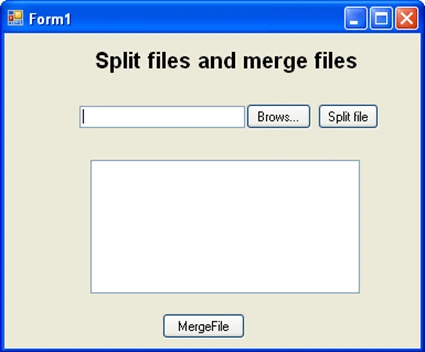
C#
using System;
using System.Collections.Generic;
using System.ComponentModel;
using System.Data;
using System.Drawing;
using System.Linq;
using System.Text;
using System.Windows.Forms;
using System.IO;

namespace Splitfiles
{
    public partial class Form1 : Form
    {
        public FileStream fs;
        string mergeFolder;
        public Form1()
        {
            InitializeComponent();
        }
        List<string> Packets = new List<string>();
        //Merge file is stored in drive
        string SaveFileFolder = @"c:\";

        //Code Under Brows button:

        private void brows_Click(object sender, EventArgs e)
        {
            try
            {
                openFileDialog1.ShowDialog();
                txtBrowsFile.Text = openFileDialog1.FileName;
                fs = new FileStream(txtBrowsFile.Text, FileMode.Open, FileAccess.Read);
                int FileLength = (int)fs.Length / 1024;
                string name = Path.GetFileName(txtBrowsFile.Text);
            }
            catch (Exception ex)
            {
                lblSendingResult.Text = "EXCEPTION:" + ex;
            }
        }
        //Code Under Split button:

        private void btnSplit_Click(object sender, EventArgs e)
        {
            SplitFile(txtBrowsFile.Text, Convert.ToInt32(5));
            listBox1.Items.Add(Packets[0].ToString());
            listBox1.Items.Add(Packets[1].ToString());
            listBox1.Items.Add(Packets[2].ToString());
            listBox1.Items.Add(Packets[3].ToString());
            listBox1.Items.Add(Packets[4].ToString());
        }

        public bool SplitFile(string SourceFile, int nNoofFiles)
        {
            bool Split = false;
            try
            {
                FileStream fs = new FileStream(SourceFile, FileMode.Open, FileAccess.Read);
                int SizeofEachFile = (int)Math.Ceiling((double)fs.Length / nNoofFiles);
                for (int i = 0; i < nNoofFiles; i++)
                {
                    string baseFileName = Path.GetFileNameWithoutExtension(SourceFile);
                    string Extension = Path.GetExtension(SourceFile);
                    FileStream outputFile = new FileStream(Path.GetDirectoryName(SourceFile) + "\\" + baseFileName + "." +
                        i.ToString().PadLeft(5, Convert.ToChar("0")) + Extension + ".tmp", FileMode.Create, FileAccess.Write);
                    mergeFolder = Path.GetDirectoryName(SourceFile);
                    int bytesRead = 0;
                    byte[] buffer = new byte[SizeofEachFile];
                    if ((bytesRead = fs.Read(buffer, 0, SizeofEachFile)) > 0)
                    {
                        outputFile.Write(buffer, 0, bytesRead);
                        //outp.Write(buffer, 0, BytesRead);
                        string packet = baseFileName + "." + i.ToString().PadLeft(3, Convert.ToChar("0")) + Extension.ToString();
                        Packets.Add(packet);
                    }
                    outputFile.Close();
                }
                fs.Close();
            }
            catch (Exception Ex)
            {
                throw new ArgumentException(Ex.Message);
            }
            return Split;
        }

        //Code Under Merge button:
        //Files have been merged and saved at location C:\\"
        private void btnMergeFile_Click(object sender, EventArgs e)
        {
            MergeFile(mergeFolder);
        }

        public bool MergeFile(string inputfoldername1)
        {
            bool Output = false;
            try
            {
                string[] tmpfiles = Directory.GetFiles(inputfoldername1, "*.tmp");
                FileStream outPutFile = null;
                string PrevFileName = "";
                foreach (string tempFile in tmpfiles)
                {
                    string fileName = Path.GetFileNameWithoutExtension(tempFile);
                    string baseFileName = fileName.Substring(0, fileName.IndexOf(Convert.ToChar(".")));
                    string extension = Path.GetExtension(fileName);
                    if (!PrevFileName.Equals(baseFileName))
                    {
                        if (outPutFile != null)
                        {
                            outPutFile.Flush();
                            outPutFile.Close();
                        }
                        outPutFile = new FileStream(SaveFileFolder + "\\" + baseFileName + extension, FileMode.OpenOrCreate, FileAccess.Write);
                    }
                    int bytesRead = 0;
                    byte[] buffer = new byte[1024];
                    FileStream inputTempFile = new FileStream(tempFile, FileMode.OpenOrCreate, FileAccess.Read);
                    while ((bytesRead = inputTempFile.Read(buffer, 0, 1024)) > 0)
                        outPutFile.Write(buffer, 0, bytesRead);
                    inputTempFile.Close();
                    File.Delete(tempFile);
                    PrevFileName = baseFileName;
                }
                outPutFile.Close();
                lblSendingResult.Text = "Files have been merged and saved at location C:\\";
            }
            catch
            {
            }
            return Output;

        }
    }
}

Nam HoàngPosted Apr 18, 2018, 12:16 AM EDT
If File is audio ? help me please
Aparajita RajoriaPosted Feb 12, 2018, 7:49 PM EST
Sir when i am uploading and split any PDF document it does not split properly and not merging. Sir could you please tell how to merge multiple PDF files?
snowal rajPosted Nov 14, 2017, 10:12 AM EST
Can u please tell me how to split in time wise
Patrick MuofheePosted Jul 9, 2017, 11:41 PM EDT
Good Day Sir can this code also work to split Pdf File too?
Hai DangPosted Jul 6, 2017, 5:22 PM EDT
Thanks Krishna so much!
mohan rajPosted Sep 6, 2016, 3:08 AM EDT
Sir cld u pls tell how to merge files
Devraj KapdiPosted Aug 29, 2013, 10:06 PM EDT
hello sir .. can u please tell me how to merge the splitted files on FTP. i sent the splited files on my FTP location now wnt to merge that.
Alok KumarPosted Aug 5, 2013, 10:42 AM EDT
Really a good article and code.
Thanh Bang TranPosted May 9, 2013, 8:37 AM EDT
Hey, Can you help me? I have a project send and recieve file through LAN use C#, but I have a matter. After I had sent packets from client to server I joined it. But when I analyse it, it haven't readed. Please help me. that's my project http://www.mediafire.com/?jt7hnxbxs7o2ori. I need your help immediately. Please, Thank you very much.
khizarPosted Oct 17, 2012, 11:38 PM EDT
great work
Ejas ShaikPosted Feb 21, 2012, 6:17 AM EST
nice one but here problem is that split option works fine, but when i click merge option it is not taking the .000 file when i previous spitted..
faizal ahamdPosted Dec 29, 2011, 11:31 PM EST
I rate you 5
Felice MassaroPosted Nov 11, 2011, 3:13 AM EST
Hi, Very interesting article. Lets suppose you wont to split the file in 500 parts, how would you modify the code? Thanks for helping.
Boris DobPosted Apr 28, 2011, 2:02 PM EDT
BIG THANKS, I will use this many times !