
Introduction
In our day-to-day programming, we often perform tasks in SQL Server that are lengthy when done manually, hence, SQL server has created some internal stored procedures to help developers and make their task easy. This stored procedure list can be found when you navigate to database name > Programmability > Stored Procedures > System Stored Procedures. These procedures cover a wide range of functionalities, from retrieving object information to managing server activity and configuration settings.
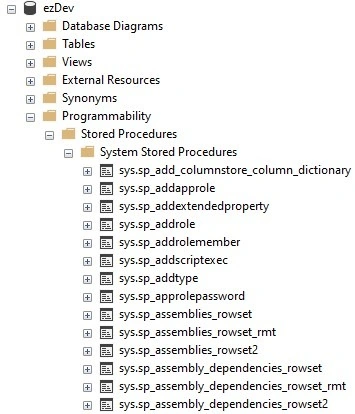
SQL Server internal stored procedures that you should use
- sp_help: This versatile stored procedure provides detailed information about various database objects, including tables, views, and stored procedures. By simply specifying the object name as a parameter, developers can quickly access crucial details such as column information, data types, and indexes.
ExampleSQL
sp_help 'ObjectName'SQLsp_help 'YourTableName' - sp_who: It displays information about current users, sessions, and processes connected to the SQL Server instance.
SQL
sp_who - sp_who2: It is similar to sp_who, but with more detailed statistics, including CPU and I/O usage, facilitating better monitoring and management of server resources.
SQL
sp_who2 - sp_lock: For developers dealing with concurrency issues,
sp_lockcomes in handy by displaying information about locks held on the database. Understanding lock states and types is crucial for optimizing performance and resolving deadlock situations.SQLsp_lock - sp_spaceused: It returns the amount of disk space used by a database or a specific table, enabling proactive space management strategies.
SQL
sp_spaceused 'ObjectName' - sp_configure: Configuration settings play a significant role in SQL Server performance and security.
sp_configureallows developers to view and modify these settings, ensuring optimal server configuration aligned with application requirements and best practices.SQLsp_configure - sp_helptext: It retrieves the definition of a stored procedure, function, or view.
SQL
sp_helptext 'StoredProcedureName' - sp_recompile: To ensure the efficient execution of stored procedures, triggers, or user-defined functions,
sp_recompileforces a recompilation of these objects. This procedure is particularly useful when making significant schema changes or optimizing query performance.SQLsp_recompile 'StoredProcedureName' - sp_depends: It lists objects that depend on a specified object and objects on which the specified object depends.
SQL
sp_depends 'ObjectName' - sp_monitor: Monitoring SQL Server activity is essential for identifying performance bottlenecks and optimizing resource utilization.
sp_monitorprovides real-time insights into CPU usage, I/O statistics, and the number of active processes, empowering developers to take proactive measures to enhance server performance.SQLsp_monitor - sp_helpindex: Indexes play a critical role in query optimization and data retrieval efficiency. With
sp_helpindex, developers can access detailed information about indexes defined on a table, enabling informed decisions regarding index creation, modification, or removal.SQLsp_helpindex 'TableName'; - sp_executesql: Dynamic SQL execution is a common requirement in many database applications.
sp_executesqlallows developers to execute parameterized SQL statements or batches, enhancing security and performance by preventing SQL injection attacks and optimizing query plan reuse.SQLEXEC sp_executesql @statement = N'SELECT * FROM TableName WHERE ColumnName = @Value', @params = N'@Value int', @Value = 123; - sp_rename: Renaming database objects is a routine task in database maintenance and schema evolution.
sp_renamesimplifies this process by providing a straightforward mechanism to rename tables, columns, indexes, and other user-created objects.SQLsp_rename 'OldTableName', 'NewTableName'; - sp_helpdb: Managing multiple databases within an SQL Server instance requires access to comprehensive information about each database.
sp_helpdbfacilitates this by providing metadata about all databases, including their size, status, and compatibility level.SQLsp_helpdb - sp_helpconstraint: Constraints ensure data integrity and enforce business rules within a database.
sp_helpconstraintoffers insights into constraints defined on a table, aiding developers in understanding and managing database integrity constraints effectively.SQLsp_helpconstraint 'TableName' - sp_columns: Retrieving metadata about table columns is a common task during database development and maintenance.
sp_columnssimplifies this process by providing detailed information about columns in a specified table or view.SQLsp_columns 'TableName' - sp_indexoption: Fine-tuning index options is essential for optimizing query performance and storage efficiency.
sp_indexoptionallows developers to set various options for indexes, such as fill factor and index padding, aligning index configuration with application requirements.SQLsp_indexoption 'TableName', 'IndexName', 'OptionName', 'OptionValue' - sp_refreshview: Views provide a logical abstraction layer over database tables, enhancing data accessibility and security.
sp_refreshviewupdates the metadata associated with a view, ensuring consistency between the view definition and underlying tables.SQLsp_refreshview 'ViewName' - sp_resetstatus: In certain scenarios, such as after a database restore operation, resetting the status of a database may be necessary.
sp_resetstatussimplifies this task by resetting database status flags, and facilitating database recovery and maintenance operations.SQLsp_resetstatus 'DatabaseName' - sp_dboption: Database-level options influence various aspects of database behavior and configuration.
sp_dboptionenables developers to view and modify these options, ensuring alignment with application requirements and organizational policies.SQLsp_dboption 'DatabaseName', 'OptionName', 'OptionValue' - sp_adduser and sp_addlogin: Managing user access and permissions is critical for database security.
sp_adduserandsp_addloginfacilitate the creation of new database users and logins, streamlining the user management process.SQLsp_adduser 'UserName', 'LoginName' - sp_change_users_login: Synchronizing SQL Server logins with database users is essential for maintaining access control integrity.
sp_change_users_loginoffers automated solutions for resolving orphaned users and ensuring seamless user authentication.SQLsp_change_users_login 'Auto_Fix', 'UserName' - sp_help_job: It returns information about SQL Server Agent jobs.
SQL
msdb.dbo.sp_help_job - sp_help_jobstep: It provides information about steps within SQL Server Agent jobs.
SQL
msdb.dbo.sp_help_jobstep @job_id = 'JobID' - sp_help_jobhistory: It retrieves the execution history of SQL Server Agent jobs.
SQL
msdb.dbo.sp_help_jobhistory @job_name = 'JobName' - sp_cycle_errorlog: Managing error logs is essential for diagnosing and troubleshooting SQL Server issues.
sp_cycle_errorlogsimplifies this task by cycling the error log files, ensuring that log files remain manageable in size and facilitating efficient error log analysis.SQLsp_cycle_errorlog - sp_help_revlogin: Migrating SQL Server logins between instances or recreating logins for disaster recovery scenarios requires careful planning and execution.
sp_help_revlogingenerates T-SQL scripts to recreate SQL Server logins, simplifying the login migration or recovery process.SQLsp_help_revlogin - sp_procoption: Configuring stored procedure options can enhance automation and streamline administrative tasks.
sp_procoptionenables developers to set options for stored procedures, such as auto-execution on SQL Server startup, facilitating task automation and scheduling.SQLsp_procoption 'ProcedureName', 'OptionName', 'OptionValue' - sp_addextendedproc and sp_dropextendedproc: Extended stored procedures provide additional functionality beyond the capabilities of standard SQL Server procedures. These stored procedures simplify the management of extended procedures by facilitating their addition or removal from the server.
SQL
sp_addextendedproc 'ExtendedProcName', 'DLLName' sp_dropextendedproc 'ExtendedProcName' - sp_spaceReclaim: Reclaiming space from dropped variable-length columns in tables or indexed views is essential for optimizing storage utilization.
sp_spaceReclaimautomates this process, helping developers reclaim wasted space and improve database performance.SQLsp_spaceReclaim 'TableName' - sp_monitorConfig: Monitoring SQL Server configuration options is crucial for maintaining server performance and security.
sp_monitorConfigprovides insights into current configuration settings and allows administrators to modify these settings as needed, ensuring optimal server configuration.SQLsp_monitorConfig
Conclusion
SQL Server provides a plethora of internal stored procedures to assist developers in their day-to-day tasks. These stored procedures help streamline various operations such as retrieving object information, managing sessions and locks, monitoring server activity, configuring settings, and much more. By leveraging these internal stored procedures, developers can enhance their productivity, optimize performance, and simplify database administration.

Join the conversation! Your thoughts help the community grow.