
Thank you for reading my previous articles on AngularJS. If you have not read them, then study from the following links. After reading them it will be easier to understand today’s topic.
- Overview Of AngularJS: Part 1
- Start With AngularJS: Part 2
- Start With AngularJS: Part 3
- Start With AngularJS Part: 4
- Start With AngularJS: Part 5
- Start With AngularJS: Part 6
- Start With AngularJS: Part 7
- Start With AngularJS: Part 8
- Start With AngularJS: Part 9
Injector
Gets the injector for the current element or its parent. This allows you to ask for dependencies defined for the modules in these elements.
Example:
- app.controller("MyCtrl", function ($scope, $injector) {
- $scope.doSomething = function () {
- var s1 = $injector.get('s1')
Resolves dependencies and injects them into a function.
Example:
- fnctrl3["$inject"] = ["$scope", "$rootScope"];
- app.controller("ctrl3", fnctrl3);
Dependency Injection (DI) is a design pattern where dependencies are defined in an application as part of the configuration. AngularJS uses dependency injection to load module dependencies when an application first starts. Dependency injection also helps to make an application more testable. That is one of the main advantages of using AngularJS to build JavaScript applications. AngularJS applications are much easier to test than applications written with most JavaScript frameworks.
To facilitate this configuration, AngularJS provides three ways to declare dependencies.
Directly using the parameters of a function, as we can see in the following example:
- function User Controller($scope, $http, $resource, $ownservice)
- {
- Var user;
- $scope.User = {
- name: "Shiva",
- age: "27"
- }
- }
- Using an array, as shown here:
- User. Controller ('User Controller', ['$scope','$http' function ($scope, $http)
- {...}]);
- Using the $inject property, as follows:
- User Controller var = function ($scope, $http)
- {...};
- User Controller $ inject = ['$scope','$http'];
- user.Module.controller ('User Controller' User Controller);
AngularJS use dependency with several types:
- Value
- Factory
- Service
- Provider
- Constant
This all you learn in my previous video part six,
- Now create a demo project.
- Open Visual Studio.
- Create new folder on desktop.
- Open that folder on Visual Studio & add html file name with Dependency.
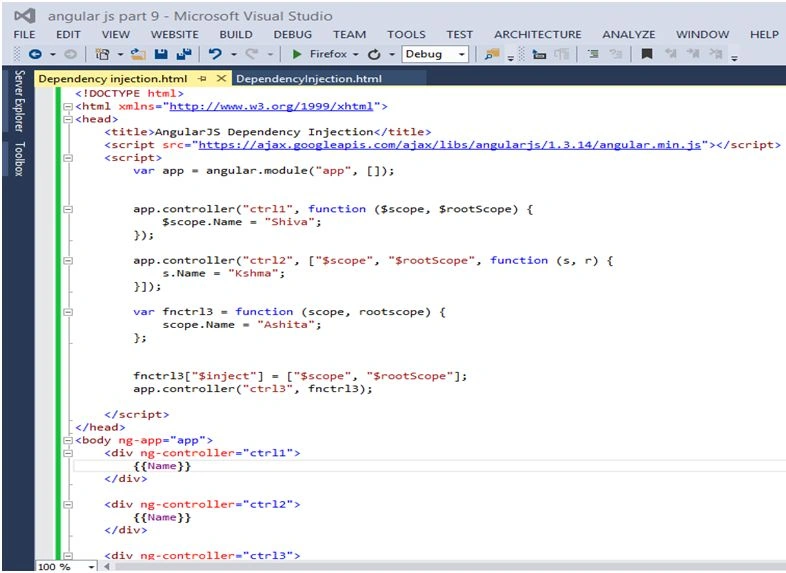
- <!DOCTYPEhtml>
- <html xmlns="http://www.w3.org/1999/xhtml">
- <head>
- <title>AngularJS Dependency Injection</title>
- <script src="https://ajax.googleapis.com/ajax/libs/angularjs/1.3.14/angular.min.js">
- </script>
- <script>
- var app = angular.module("app", []);
- app.controller("ctrl1", function ($scope, $rootScope)
- {
- $scope.Name = "Shiva";
- });
- app.controller("ctrl2", ["$scope", "$rootScope", function (s, r)
- {
- s.Name = "Kshma";
- }]);
- var fnctrl3 = function (scope, rootscope)
- {
- scope.Name = "Ashita";
- };
- fnctrl3["$inject"] = ["$scope", "$rootScope"];
- app.controller("ctrl3", fnctrl3);
- </script>
- </head>
- <body ng-app="app">
- <div ng-controller="ctrl1"> {{Name}}
- </div>
- <div ng-controller="ctrl2"> {{Name}}
- </div>
- <div ng-controller="ctrl3"> {{Name}}
- </div>
- </body>#ff0000</html>
Output:
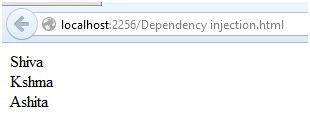
Hope you all understood about inject, injector, and dependency injection.
Read more articles on AngularJS:


Kumaresh RajalingamPosted Feb 12, 2016, 11:35 PM EST
Good one
Shiva ShuklaPosted Feb 8, 2016, 1:46 AM EST
thank you Debasis Saha Sibeesh Venu sir Nitin Pandit sir & nandeep
Nanddeep NachanTOP 100Posted Feb 7, 2016, 11:02 PM EST
Nice share
Nitin PanditTOP 100Posted Feb 7, 2016, 7:11 PM EST
Nice article dear it'll be very great if you add more details :)
Sibeesh VenuTOP 100Posted Feb 7, 2016, 7:04 PM EST
Nice Share
Debasis SahaTOP 100Posted Feb 7, 2016, 6:59 PM EST
Good One..
Shiva ShuklaPosted Feb 7, 2016, 9:51 AM EST
thankyou Kumaresh Rajalingam & Santhakumar Munuswamy
Santhakumar MunuswamyPosted Feb 7, 2016, 8:11 AM EST
Thanks for nice article
Kumaresh RajalingamPosted Feb 7, 2016, 2:24 AM EST
Nice share sir
Shiva ShuklaPosted Feb 6, 2016, 8:01 PM EST
thank you Amit Singh
Amit Kumar SinghPosted Feb 6, 2016, 7:59 PM EST
Nice Explain