
Thank you for reading my previous articles on AngularJS. If you have not read them, then study from the following links. After reading them it will be easier to understand today’s topics.
- Overview Of AngularJS: Part 1
- Start With AngularJS: Part 2
- Start With AngularJS: Part 3
- Start With AngularJS Part 4
- Start With AngularJS: Part 5
- Start With AngularJS: Part 6
- Start With AngularJS: Part 7
- Start With AngularJS: Part 8
$broadcast
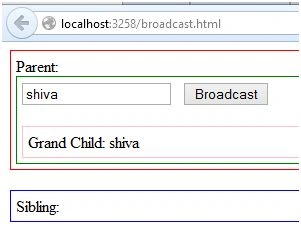
Sends an event from the current scope down to all of the child scopes. The arguments are the name of the event and an object used to provide supplementary data with the event.
- $rootScope. Broadcast ("Address code", {
- type: type, Address code: Address
- });
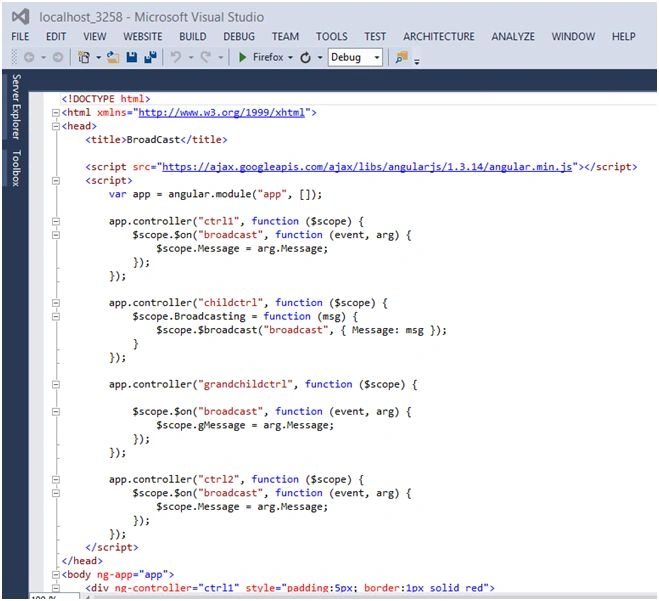
- <!DOCTYPE html>
- <html xmlns="http://www.w3.org/1999/xhtml">
- <head>
- <title>BroadCast</title>
- <script src="https://ajax.googleapis.com/ajax/libs/angularjs/1.3.14/angular.min.js">
- </script>
- <script>
- var app = angular.module("app", []);
- app.controller("ctrl1", function ($scope)
- {
- $scope.$on("broadcast", function (event, arg)
- {
- $scope.Message = arg.Message;
- });
- });
- app.controller("childctrl", function ($scope)
- {
- $scope.Broadcasting = function (msg)
- {
- $scope.$broadcast("broadcast",
- {
- Message: msg
- });
- }
- });
- app.controller("grandchildctrl", function ($scope)
- {
- $scope.$on("broadcast", function (event, arg)
- {
- $scope.gMessage = arg.Message;
- });
- });
- app.controller("ctrl2", function ($scope)
- {
- $scope.$on("broadcast", function (event, arg)
- {
- $scope.Message = arg.Message;
- });
- });
- </script>
- </head>
- <body ng-app="app">
- <div ng-controller="ctrl1" style="padding:5px; border:1pxsolidred"> Parent: {{Message}}
- <br/>
- <div ng-controller="childctrl" style="padding:5px; border:1pxsolidgreen">
- <input type="text" ng-model="Name" />
- <input type="button" value="Broadcast" ng-click="Broadcasting(Name)" />
- <br/>
- <br/>
- <div ng-controller="grandchildctrl" style="padding:5px; border:1pxsolidpink"> Grand Child: {{gMessage}}
- </div>
- </div>
- </div>
- <br/>
- <div ng-controller="ctrl2" style="padding:5px; border:1pxsolidblue"> Sibling: {{gMessage}}
- </div>
- </body>#ff0000</html>
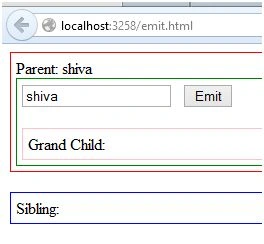
$emit: Sends an event from the current scope up to the root scope.
- Scope. $emit ('Address', message: msg);
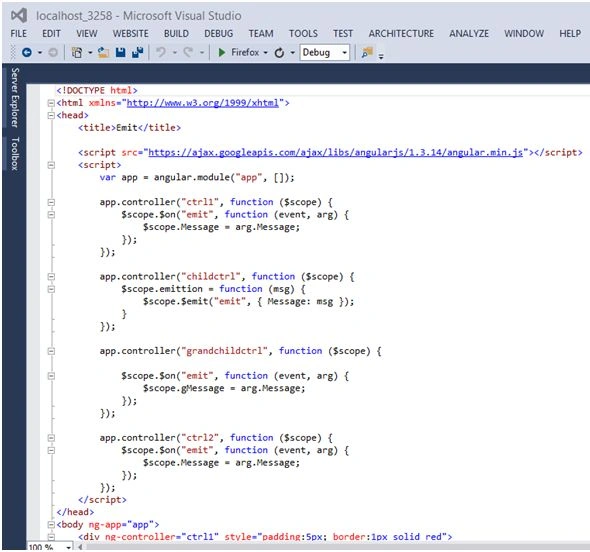
- <!DOCTYPE html>
- <html xmlns="http://www.w3.org/1999/xhtml">
- <head>
- <title>Emit</title>
- <script src="https://ajax.googleapis.com/ajax/libs/angularjs/1.3.14/angular.min.js">
- </script>
- <script>
- var app = angular.module("app", []);
- app.controller("ctrl1", function ($scope)
- {
- $scope.$on("emit", function (event, arg)
- {
- $scope.Message = arg.Message;
- });
- });
- app.controller("childctrl", function ($scope)
- {
- $scope.emittion = function (msg)
- {
- $scope.$emit("emit",
- {
- Message: msg
- });
- }
- });
- app.controller("grandchildctrl", function ($scope)
- {
- $scope.$on("emit", function (event, arg)
- {
- $scope.gMessage = arg.Message;
- });
- });
- app.controller("ctrl2", function ($scope)
- {
- $scope.$on("emit", function (event, arg)
- {
- $scope.Message = arg.Message;
- });
- });
- </script>
- </head>
- <body ng-app="app">
- <div ng-controller="ctrl1" style="padding:5px; border:1pxsolidred"> Parent: {{Message}}
- <br/>
- <div ng-controller="childctrl" style="padding:5px; border:1pxsolidgreen">
- <input type="text" ng-model="Name" />
- <input type="button" value="Emit" ng-click="emittion(Name)" />
- <br/>
- <br/>
- <div ng-controller="grandchildctrl" style="padding:5px; border:1pxsolidpink"> Grand Child: {{gMessage}}
- </div>
- </div>
- </div>
- <br/>
- <div ng-controller="ctrl2" style="padding:5px; border:1pxsolidblue"> Sibling: {{gMessage}}
- </div>
- </body>undefined
- </html>
$on: Registers a handler function that is invoked when the specified event is received by the scope.
- $scope. On ("Address", function (event, args) {
- $scope [args. Type] = args.Adress;
- });
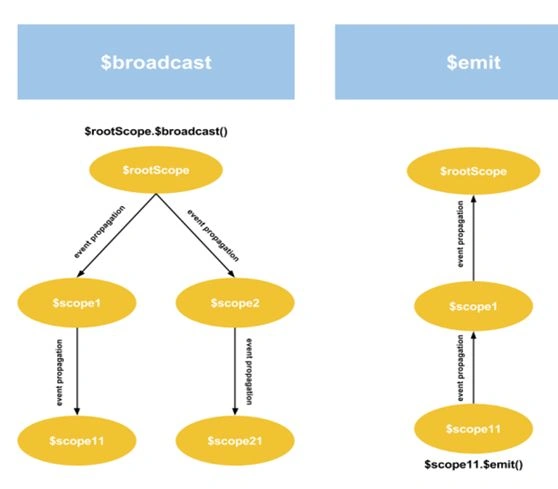
I hope you have learned about $on, $emit, and $broadcast.
Read more articles on AngularJS:


Shiva ShuklaPosted Feb 7, 2016, 9:52 AM EST
thank you Santhakumar Munuswamy & sreenivasa k
Santhakumar MunuswamyPosted Feb 7, 2016, 8:18 AM EST
Thanks for nice article
sreenivasa kPosted Feb 7, 2016, 5:22 AM EST
very nice one
Shiva ShuklaPosted Feb 6, 2016, 7:59 PM EST
thank you Debendra Dash,Vignesh Mani&Pankaj Kumar Choudhary bhai.............
Pankaj Kumar ChoudharyTOP 100Posted Feb 6, 2016, 3:07 PM EST
Nice Explain Shiva..........
Vignesh ManiTOP 100Posted Feb 6, 2016, 1:09 PM EST
Good one
Debendra DashPosted Feb 6, 2016, 10:55 AM EST
good one shiva...