This is my first article on this site I hope it will help some-one..
Introduction
A workflow is a series of distinct programming steps or phases. Each step is modeled in WF as an Activity. It has been completely reengineered from the ground up. It is a way to execute business processes and in today's applications supporting business processes we are frequently using Windows Workflow technologies as the key technical solution.
A key component of workflow design is the use of extensions to configure the environment in which the workflow activities operate, the .NET Framework provides a library of activities and custom activities can also be developed for additional functionality. The Workflow Designer is built using Windows Presentation Foundation (WPF). This enhances the activity designer experience and improves performance for large and complex workflows.
Some of the major criteria for workflows are listed below:
- Visual Representation of process
- Can be dynamically modified at run-time
- Can be long-running
Activities can be assembled visually into workflows using the Workflow Designer, a design surface that runs within Visual Studio. The designer can also be hosted in other applications.
Getting Started:
Step 1: Start Visual Studio 2010 and
select the New Project and choose Workflow Console Application give name in my
case HelloWorld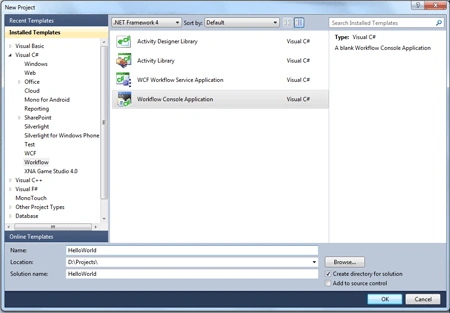
The application generates a Program.cs file and
Workflow1.xaml file which is used for the console application and workflow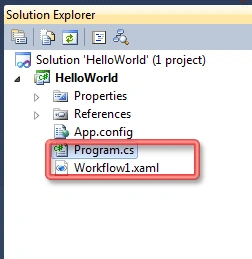
Step 2: First go to Workflow1.xaml file
initial it is empty, drag a WriteLine activity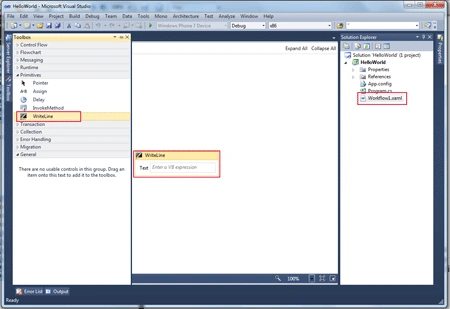
Step 3: Go to the properties of
WriteLine activity and insert the value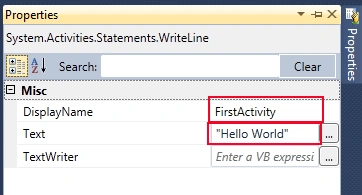
Step 4: Go to the Program.cs file and
modify the code like below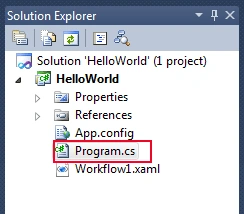
using
System;
using
System.Linq;
using
System.Activities;
using
System.Activities.Statements;
namespace
HelloWorld
{
class Program
{
static void
Main(string[] args)
{
WorkflowInvoker.Invoke(new
Workflow1());
Console.WriteLine("Press
ENTER to exit");
Console.ReadLine();
}
}
}
Step 5:
Run the application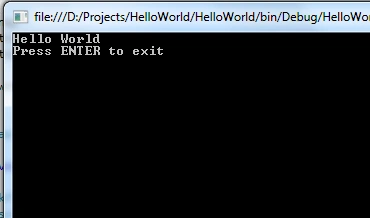
Output
Press Enter to exit the application output
Thank You I hope you like this article....


Dinesh BeniwalTOP 10Posted Aug 11, 2011, 6:37 AM EDT
Useful article, welcome to the Mindcracker Community.