
This article explains how to store HTML form data to Microsoft Excel using a VBScript.
Step 1
- Start the Excel application.
- Create Header label text for each column as in the following diagram.
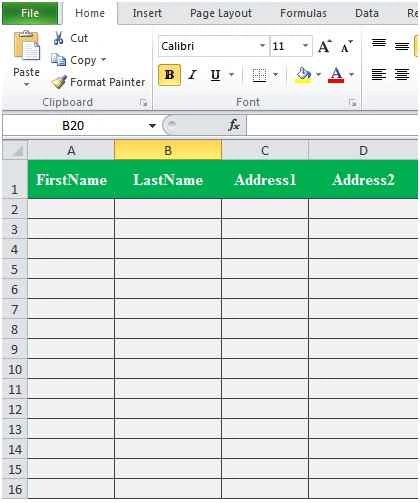
Figure 1: Data Column Header
- Save the Workbook with file extension “xlsx”.
- Open Notepad.
- Add the following code.
- <! DOCTYPE html>
- <Html>
- <Head>
- <script language="vbscript" type="text/vbscript">
- Sub Sample ()
- Dim iRow
- Set objExcel = CreateObject ("Excel. Application")
- Set objWorkbook = objExcel.Workbooks.Open ("C:\Users\Karthikeyan.K\Desktop\Book1.xlsx")
- objExcel.Application.Visible = True
- ObjWorkbook.Windows (1).Visible = True
- Set XlSheet =objWorkbook.Sheets (1)
- XlSheet.Activate
- iRow = 1
- With objExcel
- Do while .Cells (iRow, 1).value <> ""
- .Cells (iRow, 1).activate
- iRow = iRow + 1
- Loop
- .Cells (iRow, 1).value=Document.GetElementsByName ("fname") (0).Value
- .Cells (iRow, 2).value=Document.GetElementsByName ("lname") (0).Value
- .Cells (iRow, 3).value=Document.GetElementsByName ("Add1") (0).Value
- .Cells (iRow, 4).value=Document.GetElementsByName ("Add2") (0).Value
- MsgBox "Data Added Successfully”, vbinformation
- Document.GetElementsByName ("fname") (0).Value=""
- Document.GetElementsByName ("lname") (0).Value=""
- Document.GetElementsByName ("Add1") (0).Value=""
- Document.GetElementsByName ("Add2") (0).Value=""
- End With
- ObjWorkbook. Save
- ObjWorkbook. Close
- Set objWorkbook = Nothing
- Set objExcel = Nothing
- End Sub
- </script>
- <style type="text/css">
- fieldset {
- border: #00cc00 2px solid;
- padding: 10px;
- color: green;
- </style>
- <body
- <form>
- <fieldset>
- <legend>Csharpcorner</legend>
- <center>
- <img src="C:\Users\Karthikeyan.K\Desktop\Add-Male-User.png" alt="Mountain View"><br>
- First name:<br>
- <input type="text" name="fname" Value=""><br>
- Last name :< br>
- <input type="text" name="lname" Value=""><br>
- Address1 :< br>
- <input type="text" name="Add1" Value=""><br>
- Address2 :< br>
- <input type="text" name="Add2" Value=""><br>
- <br>
- <input type="button" onclick="Sample()" value="Submit" /><br>
- </center>
- </fieldset>
- <form>
- </body>
- </html>
- Save the file with the extension “.htm”.
Step 2
Follow the procedure to turn on or turn off VBScript in your Internet Explorer:
- Choose Internet Options from the Tools menu.
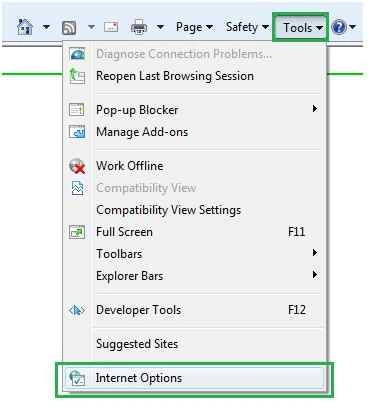
Figure 2
- Select the Security tab from the dialog box.
- Click the Custom Level button.
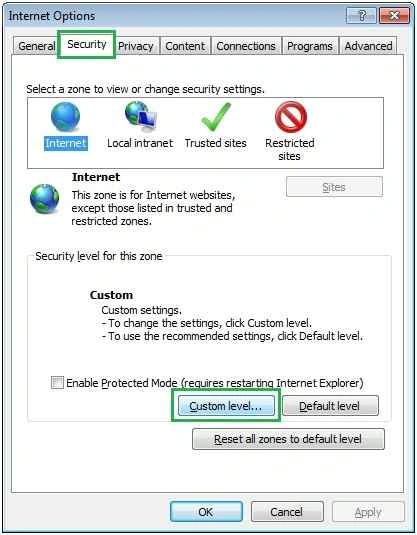
Figure 3
- Scroll down until you find the Scripting option.
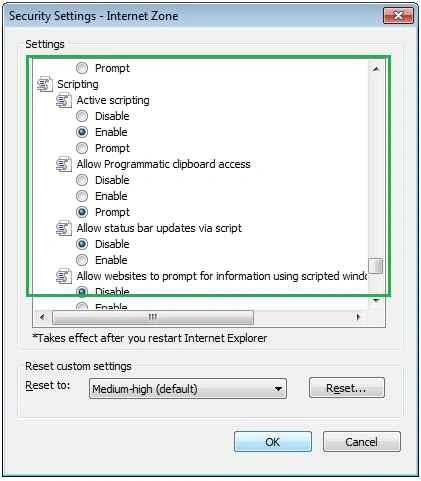
Figure 4
- Select the Enable radio button under Active scripting.
- Finally click OK and get out.
Output
- Open the HTML document.
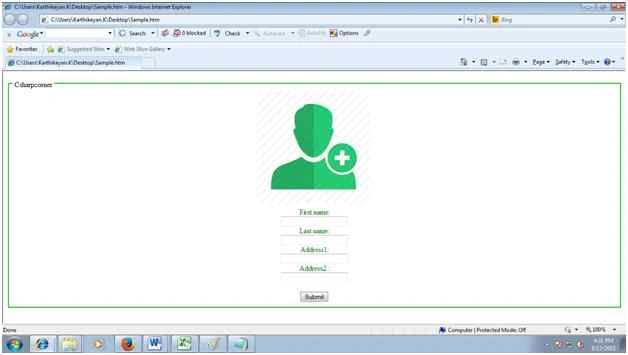
Figure 5: User Input Form
- Enter the data then press the Submit button.
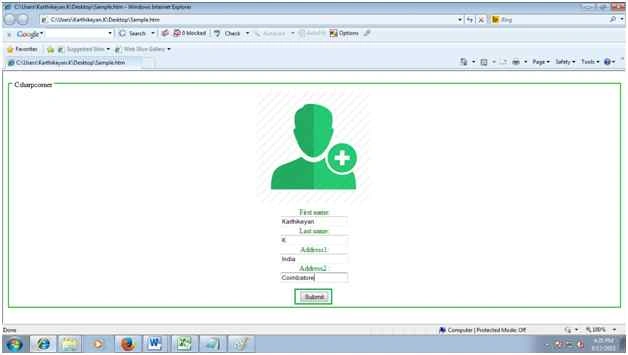
Figure 6: User input data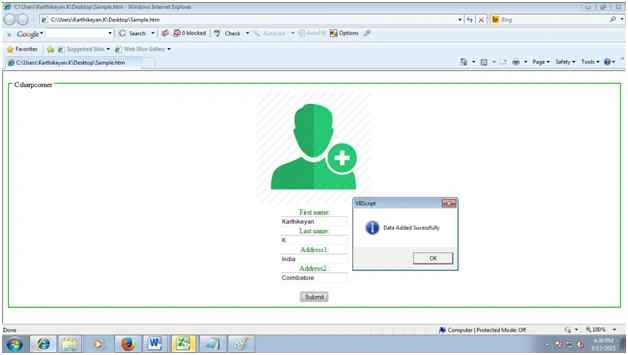
Figure 7: Data added successfully
- Open the Workbook to check sheet1's data.
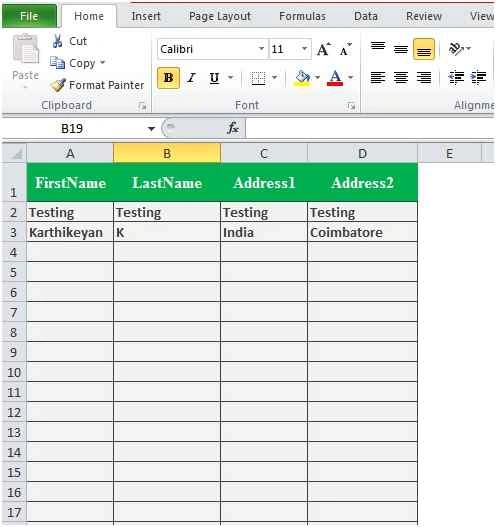
Figure 8: User data sheet
Conclusion
Thanks for reading! I hope you liked this article. Please provide your valuable suggestions.


anil giriPosted Jul 22, 2022, 6:33 AM EDT
All cheaters
Suresh ShrestPosted May 13, 2022, 7:52 AM EDT
HELLO I TRY BUT NOT WORKING .CAN YOU HELP THAT THINGS
Refund ShoppingPosted May 18, 2021, 11:50 AM EDT
Fake code bro
Senzokuhle DlomoPosted Oct 23, 2019, 3:26 AM EDT
It doesn't work, and i think you did that deliberately, bcs you never respond to anyone
kamagoni kranthiPosted Jul 17, 2019, 7:54 PM EDT
Its not working
Mit VermaPosted Jun 14, 2019, 9:24 AM EDT
I know at onClick is not properly defined...
Mit VermaPosted Jun 14, 2019, 9:22 AM EDT
Not working bro it says - Try.html:56 Uncaught ReferenceError: Sample is not defined at HTMLInputElement.onclick (Try.html:56) onclick @ Try.html:56
RAMESH CHAUDHARIPosted Mar 16, 2019, 2:34 AM EDT
Not Working Bro....
SonuPosted Jan 21, 2019, 1:27 AM EST
HI Karthik, This code is not working. Please help me
SonuPosted Jan 21, 2019, 1:27 AM EST
I am not able to save the data entered. have followed your steps ditto. however on clicking the save button nothing happens. please help.
Indira DasPosted Nov 16, 2018, 8:36 PM EST
I am not able to save the data entered. have followed your steps ditto. however on clicking the save button nothing happens. please help.
Stephen PodgórskiPosted Aug 17, 2018, 5:05 PM EDT
Hi mate, I noticed in your code that you forgot to add a closing '>' on the opening Body tag, that might cause some issues for some browsers
Hardeep SinghPosted Aug 1, 2018, 4:57 AM EDT
Hi karthikeyan, I am chartered accountant by profession having little learning attitude in programming. I need guidance on your above article. As I have taken all the steps given by you but still not successful. I hope you will help me I you get this message.
Simon SimsPosted Jun 28, 2018, 4:07 AM EDT
Hi karthikeyan, I have used your coding for the basis of a more in-depth form which includes radio buttons and checkboxes but the only thing i can get to work is the one text field. None of the check boxes or radio buttons are working. Just wondered if you could advise please??? King Regards
yaswanth saiPosted May 30, 2018, 12:07 AM EDT
This is not working is there any changes made to run this if any send to my gmail
Leo DsPosted Aug 24, 2017, 11:12 AM EDT
Security permissions must be altered to allow saving to a local folder. If you are running this file directly from your machine consider renaming it to .HTA and look at HTML Applications on msdn.com.
ABDUL AZIZPosted Jun 10, 2017, 1:06 AM EDT
Not workiNo, showing "error on page""
Kiran KumarPosted Feb 9, 2017, 12:46 AM EST
No working :( Please recheck and post!
Muhammed AsifPosted Jan 20, 2017, 8:34 PM EST
Not working.Please do recheck your code
Nimish GuptaPosted Dec 20, 2016, 2:54 AM EST
Not working for me, let me know how to make this work
Nagendra kovvadaPosted Dec 4, 2016, 9:00 AM EST
Hiii..Sir..This was not working..please help or please mail me the working code to [email protected]
Prem KumarPosted Jun 12, 2016, 11:24 PM EDT
I need a vb script code to read date from excel sheet and write it to html. Could you help me in this?
Prem KumarPosted Jun 12, 2016, 11:23 PM EDT
Hi Karthi,
SakthiIsaiBharathi SamundeeswariPosted May 26, 2016, 9:04 AM EDT
Nice One Sir. I really need your help on my project. can we discuss offline ?
Najihah NasimPosted May 4, 2016, 6:28 PM EDT
i do try this but it does not work in my chrome, firefox, ie. can someone help me? why it is happen? i really need to connect html form with excel. thanks in advance.
Baskar DPosted Feb 1, 2016, 5:29 AM EST
Hi Karthi. But its wont work in Chrome. Ant tips
Gopi ChandPosted Oct 13, 2015, 7:25 AM EDT
Very helpful
nitin sonkhlaPosted Oct 11, 2015, 1:53 PM EDT
Hey, thanks for the efforts. I tried to replicate but it dint work. i even downloaded the sample and tried but that dint work either. would you please check and let me know if it actully works.
Karthikeyan KPosted Aug 18, 2015, 7:26 PM EDT
Thank you Santhakumar sir
Santhakumar MunuswamyPosted Aug 18, 2015, 10:28 AM EDT
Good one
Karthikeyan KPosted Aug 18, 2015, 4:26 AM EDT
Thank you Sibeesh sir
Sibeesh VenuTOP 100Posted Aug 18, 2015, 4:15 AM EDT
Nice Share
Karthikeyan KPosted Aug 18, 2015, 3:33 AM EDT
Thank you Sandeep sir
Sandeep KumarPosted Aug 18, 2015, 3:31 AM EDT
NIce article sir :)
Karthikeyan KPosted Aug 18, 2015, 1:41 AM EDT
Thank you Gopi sir
Gopi ChandPosted Aug 18, 2015, 1:30 AM EDT
Nice work
Karthikeyan KPosted Aug 17, 2015, 11:28 PM EDT
Thank you Rakesh sir...
RakeshPosted Aug 17, 2015, 11:19 PM EDT
Good work
Karthikeyan KPosted Aug 17, 2015, 11:10 PM EDT
Thank you Gowtham sir
Gowtham KTOP 100Posted Aug 17, 2015, 11:06 PM EDT
Nice one
Karthikeyan KPosted Aug 17, 2015, 10:51 PM EDT
Thank you Nilesh Jadav sir...
Nilesh JadavPosted Aug 17, 2015, 10:38 PM EDT
Great Post sir
Karthikeyan KPosted Aug 17, 2015, 10:13 PM EDT
Thank you Keyur Patel sir
Karthikeyan KPosted Aug 17, 2015, 10:13 PM EDT
Thank you Vaikesh sir
Keyur PatelPosted Aug 17, 2015, 10:08 PM EDT
Good One
Vaikesh K PPosted Aug 17, 2015, 9:52 PM EDT
Good share
Karthikeyan KPosted Aug 17, 2015, 9:37 PM EDT
Thank you Mohammed sir...
Karthikeyan KPosted Aug 17, 2015, 9:37 PM EDT
Thank you Rajeesh sir...
Karthikeyan KPosted Aug 17, 2015, 9:37 PM EDT
Thank you Vinodh sir..
Vinodh NarayananPosted Aug 17, 2015, 9:08 PM EDT
nice one
Rajeesh MenothPosted Aug 17, 2015, 8:35 PM EDT
Nice Share
Mohammed IbrahimPosted Aug 17, 2015, 8:28 PM EDT
nice