
Step 1
- Start the Excel application.
- On the Home tab choose the Cells style to change the header background and sheet background style so it looks as in the following diagram.
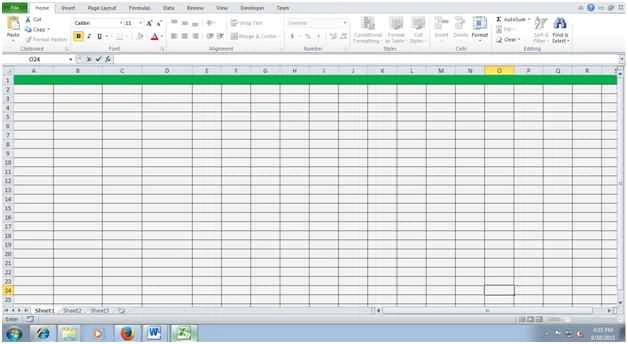
Figure 1: Excel Spreadsheet
- Save the Workbook with file extension “xlsx”.
- Open Notepad.
- Add the code shown below.
- <! DOCTYPE html>
- <html>
- <head>
- <style>
- table, td, th {
- border: 1px solid green;
- }
- th {
- background-color: green;
- color: white;
- }
- fieldset {
- border: #00cc00 2px solid;
- padding: 10px;
- Color: green;
- }
- </style>
- <script language="vbscript" type="text/vbscript">
- Sub Export()
- Dim mytable
- Dim mytable1
- Dim tab
- Dim n
- Dim j
- Set objExcel = CreateObject("Excel.Application")
- Set objWorkbook = objExcel.Workbooks.Open("C:\Users\Karthikeyan.K\Desktop\Book1.xlsx")
- objExcel.Application.Visible =True
- objWorkbook.Windows(1).Visible =True
- set XlSheet =objWorkbook.Sheets(1)
- XlSheet.Activate
- Set tab=document.getElementsByTagName("table")(0)
- mytable = document.getElementsByTagName("table")(0).rows.length
- mytable1= document.getElementsByTagName("table")(0).rows(0).cells.length
- For n = 0 to (mytable-1)
- For j = 0 To (mytable1-1)
- XlSheet.Cells (n + 1, j + 1).Value = tab.Rows(n).Cells(j).innertext
- Next
- Next
- MsgBox "Data Exported Successfully",vbInformation
- objWorkbook. Save
- objWorkbook. Close
- Set objWorkbook = Nothing
- Set objExcel = Nothing
- End Sub
- </script>
- </head>
- <body>
- <form>
- <fieldset>
- <Center>
- <img src="C:\Users\Karthikeyan.K\Desktop\excel_file-128.png" alt="face" height="128" width="128">
- <br>
- <br>
- <table>
- <tr>
- <th>Firstname</th>
- <th>Lastname</th>
- </tr>
- <tr>
- <td>Karthik</td>
- <td>K</td>
- </tr>
- <tr>
- <td>Mithu</td>
- <td>M</td>
- </tr>
- <tr>
- <td>Vinith</td>
- <td>R</td>
- </tr>
- <tr>
- <td>Menon</td>
- <td>A</td>
- </tr>
- </table>
- <br>
- <input type="button" onclick="Export ()" value="Export" /> <br>
- </Center>
- </fieldset>
- </form>
- </body>
- </html>
- Save the file with the extension “.htm”.
Step 2
Follow the procedure to turn on or turn off VBScript in your Internet Explorer:
- Choose Internet Options from the Tools menu.
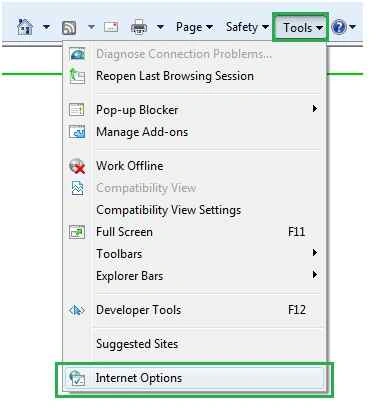
Figure 2
- Select security tab from the dialog box.
- Click the Custom Level button.
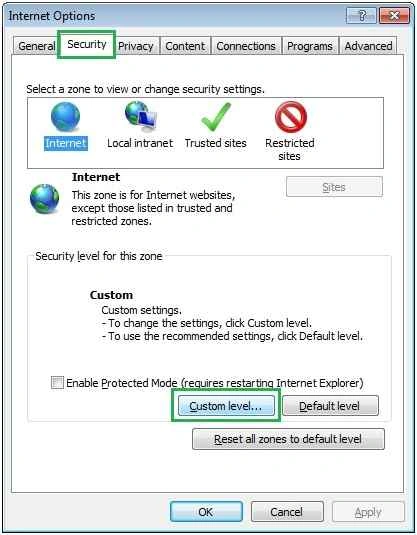
Figure 3
- Scroll down until you find the Scripting option.
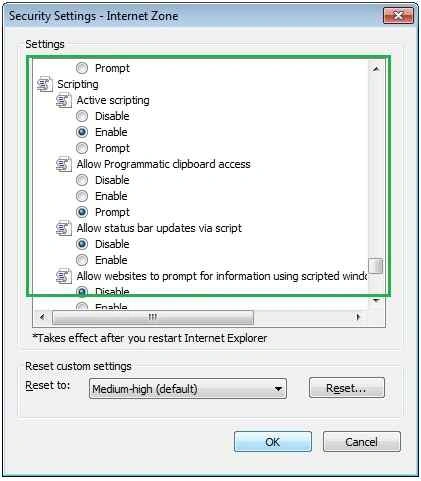
Figure 4
- Select the Enable radio button under Active scripting.
- Finally click OK and get out.
Output
- Open the HTML document.
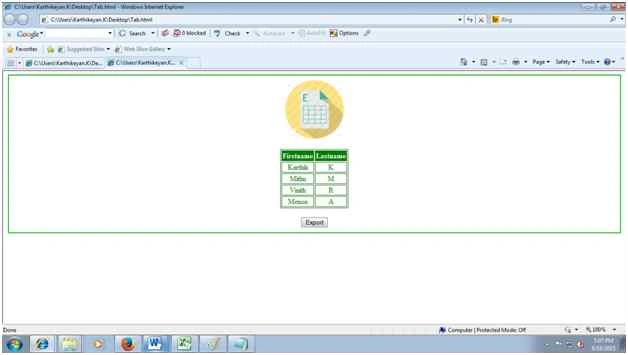
Figure 5: User data table
- Press the Export button.
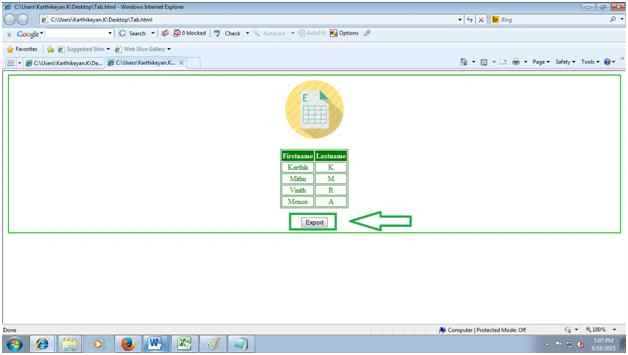
Figure 6: Export user data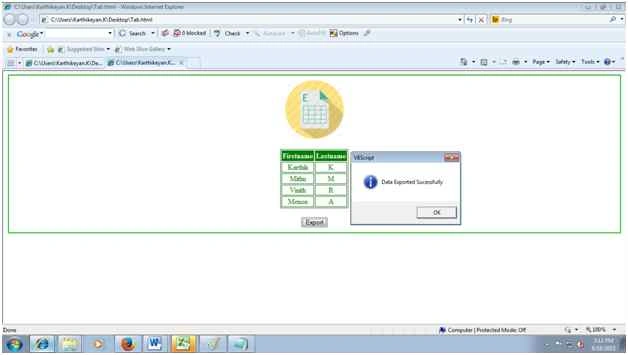
Figure 7: Data Exported Successfully
- Open the Workbook to check sheet1's data.
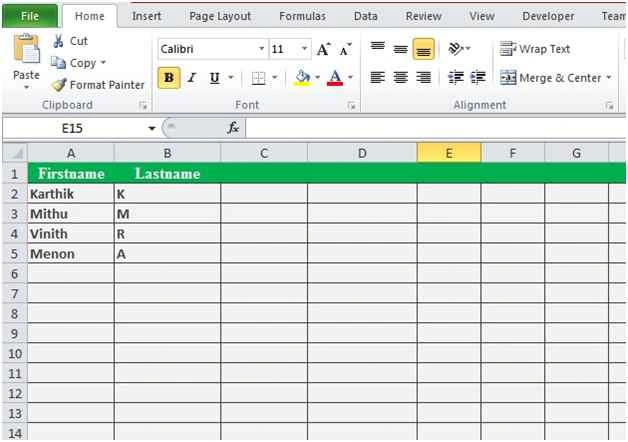
Figure 8: User data sheet
Conclusion
Thanks for reading! I hope you liked this article. Please provide your valuable suggestions.


Lars SchmidtPosted Feb 26, 2018, 11:28 PM EST
Hi Karthikeyan, thank you for this code. it works perfectly. I would like to ask how to extract only form entry into an existing excel sheet as an additional line underneath existing entries there. Thanks so much for your help!!! Best regards Lars
Karthikeyan KPosted Feb 1, 2016, 5:24 AM EST
Thanks for reading
Karthikeyan KPosted Feb 1, 2016, 5:24 AM EST
Hi Vijay VBScript only run in Internet Explorer..
Vijay BhaskarPosted Jan 31, 2016, 11:25 AM EST
Karthik.. thank you.. you have written wonderful article.. does it work on internet explorer only or on any browser also.. Please can you tell me..
Gowtham RajamanickamTOP 100Posted Jan 5, 2016, 2:27 AM EST
Good article
Karthikeyan KPosted Aug 19, 2015, 9:46 PM EDT
Thank you Vipul sir
Vipul MalhotraPosted Aug 19, 2015, 3:49 AM EDT
nice
Karthikeyan KPosted Aug 19, 2015, 3:23 AM EDT
Thank you Sandeep sir
Karthikeyan KPosted Aug 19, 2015, 3:22 AM EDT
Thank you Sibeesh sir
Sandeep KumarPosted Aug 19, 2015, 3:08 AM EDT
Nice Article sir :)
Sibeesh VenuTOP 100Posted Aug 19, 2015, 2:54 AM EDT
Nice Share
Karthikeyan KPosted Aug 18, 2015, 11:12 PM EDT
Thank you Gowtham sir
Gowtham KTOP 100Posted Aug 18, 2015, 10:54 PM EDT
Good One
Karthikeyan KPosted Aug 18, 2015, 10:12 PM EDT
Thank you Rajeesh sir
Karthikeyan KPosted Aug 18, 2015, 10:12 PM EDT
Thank you Vaikesh sir
Karthikeyan KPosted Aug 18, 2015, 10:11 PM EDT
Thank you Sumit sir
Sumit JoshiPosted Aug 18, 2015, 9:33 PM EDT
Nice Share.
Vaikesh K PPosted Aug 18, 2015, 9:21 PM EDT
Good one
Karthikeyan KPosted Aug 18, 2015, 8:23 PM EDT
Thank you Nilesh sir
Rajeesh MenothPosted Aug 18, 2015, 8:22 PM EDT
Good Karthikeyan K
Nilesh JadavPosted Aug 18, 2015, 8:16 PM EDT
Nice one Karthikeyan K.
Karthikeyan KPosted Aug 18, 2015, 7:16 PM EDT
Thank you Santhakumar sir...
Santhakumar MunuswamyPosted Aug 18, 2015, 10:28 AM EDT
Good one