
Introduction
The Local Storage is designed for storing the data at user side. In local storage data exist with no expiration date. The data will be available even when the browser / browsing tab is closed or reopened. Storage of data for temporary time at user side is a useful approach when we required to store data in database with a high frequent rate. Using local storage mechanism we can store a large amount data at user side storage and later we can insert all these data into database in a single interaction with database such that we can reduce the traffic and increase the performance of application.
Today I will tell you how to insert data into database using Ajax that is locally stored.
Firstly, create an Employee Table in database.
- CREATE TABLE [dbo].[Employee](
- [Emp_Name] [nvarchar](max)NULL,
- [Emp_Age] [int] NULL,
- [Emp_Salary] [int] NULL,
- [Emp_City] [nvarchar](max)NULL
- )

We will insert data into above Employee table.
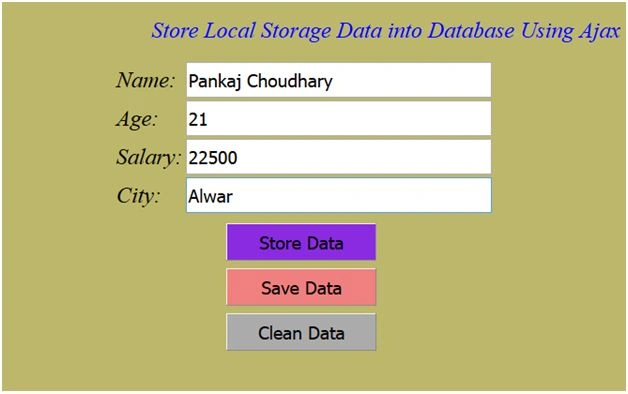
Now we create a web page as below.

HTML and CSS code for above page is:
Html Code
- <body>
- <formid="form1" runat="server">
- <divid="div1">
- <divid="head">Store Local Storage Data into Database Using Ajax</div>
- <table>
- <tr>
- <td><span>Name:</span></td>
- <td>
- <inputid="txtName" type="text" />
- </td>
- </tr>
- <tr>
- <td><span>Age:</span></td>
- <td>
- <inputid="txtAge" type="text" />
- </td>
- </tr>
- <tr>
- <td><span>Salary:</span></td>
- <td>
- <inputid="txtSalary" type="text" />
- </td>
- </tr>
- <tr>
- <td><span>City:</span></td>
- <td>
- <inputid="txtCity" type="text" />
- </td>
- </tr>
- </table>
- <div>
- <inputtype="button" id="btnStore" value="Store Data" />
- <br/>
- <inputtype="button" id="btnSave" value="Save Data" />
- <br/>
- <inputtype="button" id="btnClear" value="Clean Data" /> </div>
- </div>
- </form>
- </body>
- <style>
- #div1 {
- width: 100%;
- height: 500px;
- background-color: darkkhaki;
- font-size: 30px;
- font-style: oblique;
- padding-top: 20px;
- }
- span {
- margin-left: 30px;
- margin-left: 150px;
- }
- input {
- margin-right: 30px;
- width: 400px;
- height: 40px;
- font-size: 24px;
- }
- #btnStore {
- margin-left: 300px;
- margin-top: 10px;
- font-size: 24px;
- background-color: blueviolet;
- width: 200px;
- height: 50px;
- }
- #btnSave {
- margin-left: 300px;
- margin-top: 10px;
- font-size: 24px;
- background-color: lightcoral;
- width: 200px;
- height: 50px;
- }
- #btnClear {
- margin-left: 300px;
- margin-top: 10px;
- font-size: 24px;
- background-color: AppWorkspace;
- width: 200px;
- height: 50px;
- }
- #head {
- margin-left: 200px;
- margin-bottom: 20px;
- color: blue
- }
- </style>
Insert data into local storage:
- $("#btnStore").click(function()
- {
- if (localStorage)
- {
- var Employee_ = {};
- Employee_.Name = $("#txtName").val();
- Employee_.Age = $("#txtAge").val();
- Employee_.Salary = $("#txtSalary").val();
- Employee_.City = $("#txtCity").val();
- varItemId = "Emp" + Employee_.Name;
- localStorage.setItem(ItemId, JSON.stringify(Employee_));
- }
- else
- {
- alert("OOPS! Your Browser Not Supporting LocalStorage Please Update It!")
- }
- });
Let us try to insert some data.
After insertion of values now we check the local storage of browser and check the status of retrieved data.

Above image show that data is successfully stored in local storage. We can see that data is stored as key value pair. At last “length” is showing total numbers of records. Till now our first phase has been completed. Now we will retrieve data from local storage and insert into SQL Server database using Ajax.
Ajax code
When user click on the “Store Data” button first we retrieved data from local storage and after that we use Ajax to store this data into database.
Firstly, we will retrieve data from local storage.
- //Retrieve Data from Local Storage
- varEmployee_Detail = {}
- Employee_Detail.Emp_Name = "";
- Employee_Detail.Emp_Age = "";
- Employee_Detail.Emp_Salary = "";
- Employee_Detail.Emp_City = "";
- for (i = 0; i < localStorage.length; i++)
- {
- varobj = localStorage.getItem(localStorage.key(i));
- var Employee = JSON.parse(obj);
- Employee_Detail.Emp_Name += Employee["Name"] + ",";
- Employee_Detail.Emp_Age += Employee["Age"] + ",";
- Employee_Detail.Emp_Salary += Employee["Salary"] + ",";
- Employee_Detail.Emp_City += Employee["City"] + ",";
- }
Call Web Method using Ajax
- $.ajax({
- type: "POST",
- url: "default.aspx/Insert_Data",
- dataType: "json",
- contentType: "application/json; charset=utf-8",
- data: JSON.stringify(Employee_Detail),
- success: function () {
- alert("Data Has Inserted")
- }
- })
- });
- [WebMethod]
- publicstaticvoidInsert_Data(StringEmp_Name, StringEmp_Age, StringEmp_Salary, StringEmp_City)
- {
- try
- {
- SqlConnection con = newSqlConnection("Data Source=Temp; Initial Catalog=Catalog;Integrated Security=true;");
- con.Open();
- SqlCommandCmd = newSqlCommand("[usp_Employee_Insert]", con);
- Cmd.CommandType = CommandType.StoredProcedure;
- Cmd.Parameters.AddWithValue("@Emp_Name", Emp_Name);
- Cmd.Parameters.AddWithValue("@Emp_Age", Emp_Age);
- Cmd.Parameters.AddWithValue("@Emp_Salary", Emp_Salary);
- Cmd.Parameters.AddWithValue("@Emp_City", Emp_City);
- Cmd.ExecuteNonQuery();
- con.Close();
- }
- catch
- {}
- }
Here we retrieve the string that contain that are comma separated employee information.
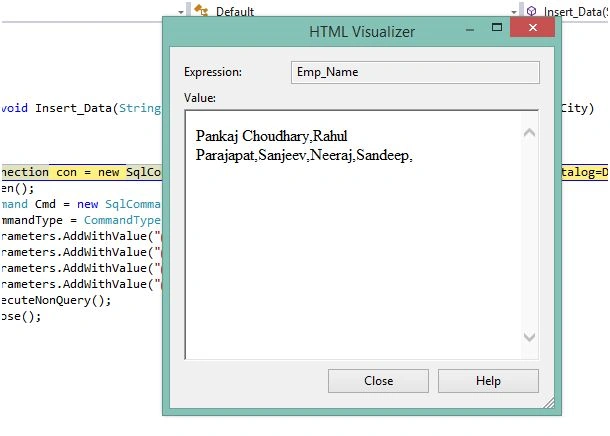
In above image we can see that name of all employees are stored in Emp_Name string and each name is separated by comma. Such that age of employees is stored in Emp_Age, Salary stored in Emp_Salary and city stored in Emp_City.
In above we used a stored procedure to insert the data into employee table. Code of this stored procedure is.
Stored Procedure
- ALTER PROCEDURE usp_Employee_Insert(@Emp_Namenvarchar(max) = NULL, @Emp_Agenvarchar(max) = NULL, @Emp_Salarynvarchar(max) = NULL, @Emp_Citynvarchar(max) = NULL)
- AS
- BEGIN
- DECLARE@ EmpName_[nvarchar](max);
- DECLARE@ EmpAge_[nvarchar](max);
- DECLARE@ EmpSalary_[nvarchar](max);
- DECLARE@ EmpCity_[nvarchar](max);
- DECLARE@ EmpName_Indexint;
- DECLARE@ EmpAge_Indexint;
- DECLARE@ EmpSalary_Indexint;
- DECLARE@ EmpCity_Indexint;
- WHILE(LEN(@Emp_Name) > 0) AND(LEN(@Emp_Age) > 0) AND(LEN(@Emp_Salary) > 0) AND(LEN(@Emp_City) > 0)
- BEGIN
- SET@ EmpName_Index = CHARINDEX(',', @Emp_Name);
- SET@ EmpAge_Index = CHARINDEX(',', @Emp_Age);
- SET@ EmpSalary_Index = CHARINDEX(',', @Emp_Salary);
- SET@ EmpCity_Index = CHARINDEX(',', @Emp_City);
- SET@ EmpName_ = SUBSTRING(@Emp_Name, 0, @EmpName_Index);
- SET@ EmpAge_ = SUBSTRING(@Emp_Age, 0, @EmpAge_Index);
- SET@ EmpSalary_ = SUBSTRING(@Emp_Salary, 0, @EmpSalary_Index);
- SET@ EmpCity_ = SUBSTRING(@Emp_City, 0, @EmpCity_Index);
- INSERT INTOdbo.Employee(
- Emp_Name,
- Emp_Age,
- Emp_Salary,
- Emp_City
- )
- VALUES
- (@EmpName_, --Emp_Name - nvarchar CONVERT(int, @EmpAge_), --Emp_Age - int CONVERT(int, @EmpSalary_), --Emp_Salary - int@ EmpCity_--Emp_City - nvarchar)
- SET@ Emp_Name = SUBSTRING(@Emp_Name, @EmpName_Index + 1, LEN(@Emp_Name));
- SET@ Emp_Age = SUBSTRING(@Emp_Age, @EmpAge_Index + 1, LEN(@Emp_Age));
- SET@ Emp_Salary = SUBSTRING(@Emp_Salary, @EmpSalary_Index + 1, LEN(@Emp_Salary));
- SET@ Emp_City = SUBSTRING(@Emp_City, @EmpCity_Index + 1, LEN(@Emp_City));
- PRINT@ Emp_Name
- END
- END
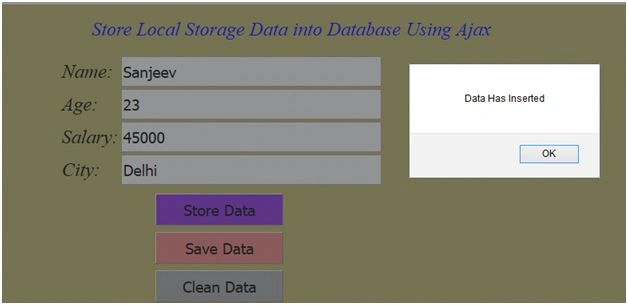
After successful execution of Meb Method we get an alert message that will show data has been inserted.
Now we check the Employee Table.
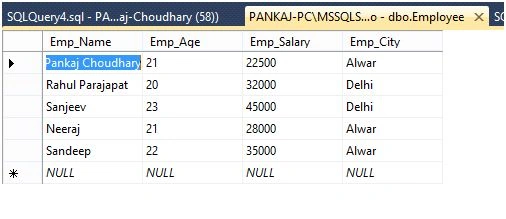
We can see the data has been inserted into Employee table.
Clear Data
- $("#btnClear").click(function () {
- localStorage.clear();
- })
Today we learned how to store data into local storage and insert this locally stored data into database using Ajax.
I hope you liked this article. Thanks for reading the article.


R HPosted Feb 5, 2018, 10:51 PM EST
DOES THE ABOVE CODE CAN BE USED TO IMPLEMENT SAME ,IN MVC???\
R HPosted Feb 5, 2018, 10:36 PM EST
Data type of all fields vary from table and in webmethod,Stored procedure.
Santhakumar MunuswamyPosted Jan 8, 2016, 9:23 PM EST
Thanks for nice article. Keep it up
Pankaj Kumar ChoudharyTOP 100Posted Jan 8, 2016, 2:32 PM EST
Thanks Sailesh Sir.........
Pankaj Kumar ChoudharyTOP 100Posted Jan 8, 2016, 2:32 PM EST
Thanks N Vinodh Sir........
Vinodh NarayananPosted Jan 8, 2016, 7:12 AM EST
Good one
Saillesh PawarPosted Jan 8, 2016, 4:47 AM EST
Nice
Pankaj Kumar ChoudharyTOP 100Posted Jan 8, 2016, 3:57 AM EST
Thanks Karthikeyan K Sir.......
Pankaj Kumar ChoudharyTOP 100Posted Jan 8, 2016, 3:57 AM EST
Thanks Debasis Saha Sir........
Pankaj Kumar ChoudharyTOP 100Posted Jan 8, 2016, 3:57 AM EST
Thanks Shubham Kumar Sir.......
Pankaj Kumar ChoudharyTOP 100Posted Jan 8, 2016, 3:56 AM EST
Thanks P K Yadav Sir.........
Pankaj Kumar ChoudharyTOP 100Posted Jan 8, 2016, 3:56 AM EST
Thanks Kumaresh Rajalingam Sir.........
Karthikeyan KPosted Jan 8, 2016, 2:21 AM EST
Good one bro...
Debasis SahaTOP 100Posted Jan 7, 2016, 7:08 PM EST
Good One..
Shubham KumarPosted Jan 7, 2016, 6:28 PM EST
good !!!
Praveen KumarPosted Jan 7, 2016, 5:13 PM EST
Very Nice
Kumaresh RajalingamPosted Jan 7, 2016, 2:24 PM EST
Good one sir