
In this article we will be seeing the following:
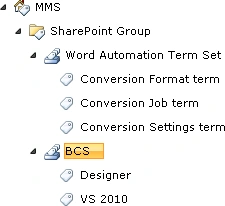
- Create a new Term for a TermSet
- Get all the Terms for a particular TermSet
Steps Involved:
- Open visual studio 2010.
- Create a new console application.
- Add the following references.
- Microsoft.SharePoint.dll
- Microsoft.SharePoint.Taxonomy.dll
- Add the following namespaces.
- Using Microsoft.SharePoint;
- Using Microsoft.Sharepoint.Taxonomy;
Create new Term for a Termset:
using System;
using System.Collections.Generic;
using System.Linq;
using System.Text;
using Microsoft.SharePoint;
using Microsoft.SharePoint.Taxonomy;
namespace EMM
{
class Program
{
static void Main(string[] args)
{
using (SPSite site = new SPSite("http://serverName:10/"))
{
TaxonomySession taxonomySession = new TaxonomySession(site);
TermStore termStore = taxonomySession.TermStores["MMS"];
Group group = termStore.Groups["SharePoint Group"];
TermSet termSet = group.TermSets["Word Automation Term Set"];
Term term1 = termSet.CreateTerm("Conversion Settings term", 1033);
Term term2 = termSet.CreateTerm("Conversion Job term", 1033);
Term term3 = termSet.CreateTerm("Conversion Format term", 1033);
termStore.CommitAll();
}
}
}
}
Get all the terms for a particular termset:
using System;
using System.Collections.Generic;
using System.Linq;
using System.Text;
using Microsoft.SharePoint;
using Microsoft.SharePoint.Taxonomy;
namespace EMM
{
class Program
{
static void Main(string[] args)
{
using (SPSite site = new SPSite("http://servcerName:10/"))
{
TaxonomySession taxonomySession = new TaxonomySession(site);
TermStore termStore = taxonomySession.TermStores["MMS"];
Group group = termStore.Groups["SharePoint Group"];
TermSet termSet = group.TermSets["BCS"];
TermCollection termCol = termSet.Terms;
foreach (Term term in termCol)
{
Console.WriteLine(term.Name);
}
Console.ReadLine();
}
}
}
}

Join the conversation! Your thoughts help the community grow.