
C# Timer is used to implement a timer in C#. The Timer class in C# represents a Timer control that executes a code block repeatedly at a specified interval. For example, backing up a folder every 10 minutes or writing to a log file every second. The method that needs to be executed is placed inside the timer event.
Windows Forms has a Timer control that can be dropped to a Form and set its properties. Learn how to use a Timer in C# to write to a text file repeatedly at a certain time interval.
C# Timer Code Example
Let’s create a Windows application that will use a timer to write some text to a text file every 5 seconds. Our Windows Forms application has two buttons, Start and Stop. Once the Start button is clicked, the application will write a line to a text file every 1 second. The application stops writing to the text file after clicking the Stop button.
Step 1
Open Visual Studio and create a Windows Forms application.
Step 2
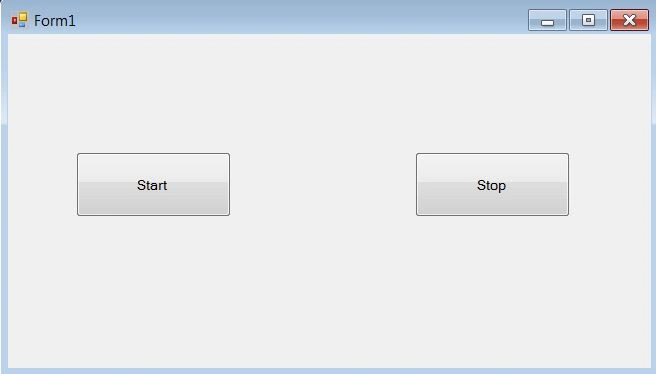
Add two Button controls to the Form and name them Start and Stop. You may also want to change their names. In my case, I have changed their names to StartButton and StopButton, respectively. The final Form looks like the following image.
Note
We will create a text file, C:\temp\mcb.txt. Please change this folder and file name to the name you like. If you want to use the same name, please ensure you have a folder C:\temp on your computer.
Step 3
Now let’s add a Timer control to the Form. Drag and drop a Timer control from Visual Studio Toolbox to the Form. This will add a Timer control, timer1, to the Form.
Step 4
Now, we’re going to set Timer’s property.
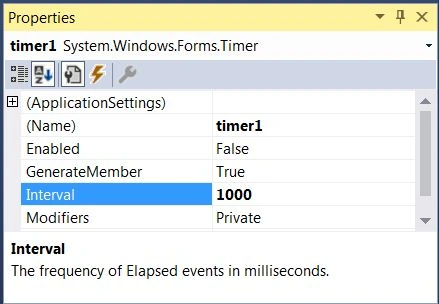
Right-click on the Timer control and open the Properties window. Set the Interval property to 1000. The value of the Interval property is in milliseconds.
1 sec = 1000 milliseconds.
See below.
Step 5
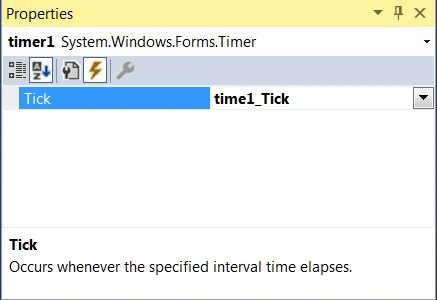
Now click the Events button and add a Timer event handler by double-clicking on the Tick property. The Timer event is timer1_Tick. See below.
Step 6
Now I add a FileStream and a StreamWriter object at the beginning of the class. These classes are used to create a new text file and write to the text file.
The classes are defined in the System.IO namespace. Make sure to import the System.IO namespace at the top of the class.
using System.IO;As you can see from the following code, the FileStream class creates an mcb.txt file, and StreamWriter will be used to write to the file.
private static FileStream fs = new FileStream(@"c:\temp\mcb.txt", FileMode.OpenOrCreate, FileAccess.Write);
private static StreamWriter m_streamWriter = new StreamWriter(fs);
Now write the following code in the Form Load event,
private void Form1_Load(object sender, System.EventArgs e)
{
    // Write to the file using StreamWriter class
    m_streamWriter.BaseStream.Seek(0, SeekOrigin.End);
    m_streamWriter.Write(" File Write Operation Starts : ");
    m_streamWriter.WriteLine("{0} {1}",
    DateTime.Now.ToLongTimeString(), DateTime.Now.ToLongDateString());
    m_streamWriter.WriteLine("===================================== \n");
    m_streamWriter.Flush();
}
As you can see from the above code, this code writes some lines to the file.
Now write code on the Start and Stop button click handlers. As you can see from the following code, the Start button click sets the timer's Enabled property to true. Setting the timer's Enabled property starts the timer to execute the timer event. I set the Enabled property to false on the Stop button click event handler, which stops executing the timer tick event.
private void button1_Click(object sender, System.EventArgs e)
{
    timer1. Enabled =true;
}
private void button2_Click(object sender, System.EventArgs e)
{
    timer1. Enabled =false;
}
Now the last step is to write the timer's tick event to write the current time to the text file. Write the following code in your timer event,
private void timer1_Tick(object sender, System.EventArgs e)
{
    m_streamWriter.WriteLine("{0} {1}",
    DateTime.Now.ToLongTimeString(),DateTime.Now.ToLongDateString());
    m_streamWriter.Flush();
}
Step 7
Build and Run the application.
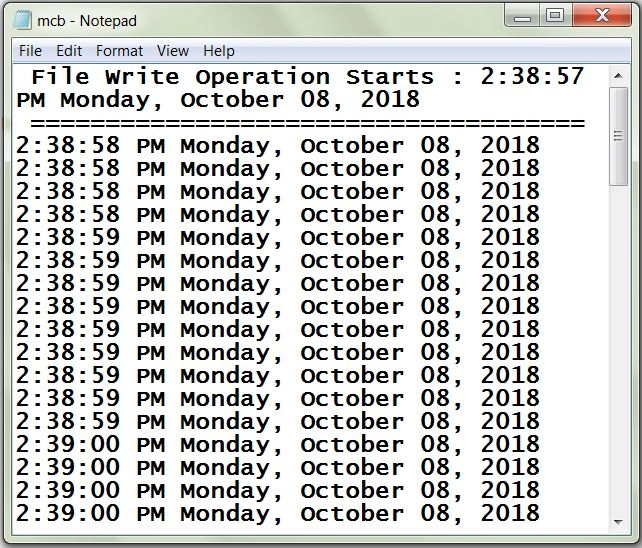
Click on the Start button to start writing to the text file. Run it for a minute or so, and click on the Stop button to stop it.
The output mcb.txt file looks like the following image.
Using Timer at runtime in C #
We just saw how to use a Timer using Visual Studio designer at design time. But you may need to use a timer at run time.
The Timer class in C# represents a timer at runtime. Here are some useful members of the Timer class.
| Tick | This event occurs when the Interval has elapsed. |
| Start | Starts raising the Tick event by setting Enabled to true. |
| Stop | Stops raising the Tick event by setting Enabled to false. |
| Close | Releases the resources used by the Timer. |
| AutoReset | Indicates whether the Timer raises the Tick event each time the specified Interval has elapsed or whether the Tick event is raised only once after the first interval has elapsed. |
| Interval | Indicates the interval on which to raise the Tick event. |
| Enabled | Indicates whether the Timer raises the Tick event. |
The following code snippet creates a Timer at runtime, sets its property, and adds an event handler. In this code, we set Timer’s Interval to 2 seconds.
Timer timer1 = new Timer
{
    Interval = 2000
};
timer1. Enabled = true;
timer1. Tick += new System.EventHandler(OnTimerEvent);
Let’s say we want to display some text in a ListBox control. The following code adds text and updates the ListBox every 2 seconds.
private void OnTimerEvent(object sender, EventArgs e)
{
   listBox1.Items.Add(DateTime.Now.ToLongTimeString() + "," +DateTime.Now.ToLongDateString());
}
How to use the Timer class to raise an event after a certain interval?
The following code will use the Timer class to raise an event every 5 seconds,
Timer timer1 = new Timer
{
    Interval = 5000
};
timer1. Enabled = true;
timer1. Tick += new System.EventHandler(OnTimerEvent);
Write the event handler.
This event will be executed every 5 seconds,
public static void OnTimerEvent(object source, EventArgs e)
{
    m_streamWriter.WriteLine("{0} {1}", DateTime.Now.ToLongTimeString(),DateTime.Now.ToLongDateString());
    m_streamWriter.Flush();
}
Summary
This article discussed how to use a timer in C#. We also saw how to create a Windows application with a Timer control and use it to execute code at a certain interval of time.


Sujit PrabhakaranPosted Apr 1, 2024, 9:54 AM EDT
What will happen if the timer is not able to complete its task in the Tick event? Lets say If the next Tick event arrives and the Timer is still continuing on the previous Tick event, what will happen?
MahadevanPosted Dec 9, 2022, 7:19 AM EST
I have a doubt How timer running even in the single threaded environment.
Sean FranklinPosted Apr 13, 2020, 7:02 PM EDT
This is great. It reminds me of setInterval from JavaScript. Thanks for the article
Sourav MukherjeePosted Mar 3, 2019, 7:10 AM EST
Nice post.
Dharmendra Kumar PanditPosted Feb 20, 2019, 9:42 PM EST
Nice One Article sir.
Salman MushtaqPosted Oct 9, 2018, 9:02 PM EDT
Informative
Ramesh PalaniappanPosted Aug 18, 2016, 4:21 AM EDT
Nice
kalu singh raoPosted Jul 7, 2016, 4:40 AM EDT
Nice...
GokulPosted May 25, 2016, 10:04 PM EDT
it's nice
Vignesh ManiTOP 100Posted May 1, 2016, 11:40 AM EDT
Good one
Bhuvanesh MohankumarPosted Apr 19, 2016, 10:33 AM EDT
Good one
Ashish SrivastavaPosted Apr 4, 2016, 6:43 AM EDT
Nice
Vivek KumarPosted Mar 31, 2016, 10:12 AM EDT
Nice Share
Amatya AgyeyPosted Mar 24, 2016, 1:50 AM EDT
Nice 1
Sonu ChaudharyPosted Feb 25, 2016, 1:30 AM EST
good one!
Jithil JohnPosted Feb 15, 2016, 2:17 AM EST
Good one
Irfan AcPosted Jan 24, 2016, 8:31 PM EST
usefull
Umarul FarookPosted Jan 22, 2016, 5:45 AM EST
usefull
Abdalmajeed AlshariPosted Jan 2, 2016, 10:35 PM EST
the timer tool is not found in WPF project why , tlank you .
Mohamed Gani MnPosted Nov 6, 2015, 6:15 AM EST
Fine to us about understand
Ravi KumharPosted Jun 1, 2015, 2:36 AM EDT
very useful
mahesh jayadevPosted May 19, 2015, 1:43 AM EDT
private static System.Timers.Timer aTimer;// Obj declaration globally Timer SCtimer = new Timer(); SCtimer.Interval = (10 * 3000); // 10 Seconds SCtimer.tick += new EventHandler(SCtimer_Tick); --Here in class lib, tick is not working SCtimer.Start(); // Create a timer with a ten wo second interval. aTimer = new System.Timers.Timer(10000); aTimer.Elapsed += OnTimedEvent; aTimer.Enabled = true; private void OnTimedEvent(Object source, ElapsedEventArgs e) { log.Debug("The Elapsed event was raised at {0}" + e.SignalTime ); Count += 1; log.Debug("Counter=" + Count); if (Count == 3) { timerExpired = true; cardPresented = false; return; } timerExpired = true; } I want to come out from the loop after 30 sec .... could you please help me regarding this
mahesh jayadevPosted May 19, 2015, 1:39 AM EDT
How to work on timers on class library, I want to come out from the infinite while loop
mahesh jayadevPosted May 19, 2015, 1:38 AM EDT
Hi Mahesh,
Vithal WadjeTOP 100Posted Sep 24, 2014, 7:02 AM EDT
very useful
edmund durangoPosted Jul 23, 2014, 8:41 PM EDT
sir Mahesh, can you help me on how to make a alert message or anything that will warning before the time is up ? hope you can help me !
ShyuanPosted Jan 27, 2014, 10:04 PM EST
Didn't know is that easy for Visual Studio! Thank you! :D
Vithal WadjeTOP 100Posted Jan 24, 2013, 2:13 AM EST
good article mahesh sir, can we call the specific methods automatically with specific time of interval ?
hassan wasefPosted Jul 12, 2012, 1:04 PM EDT
its very useful>> thanks very much
Mahesh ChandTOP 10Posted May 18, 2012, 5:27 AM EDT
Atul, there is an article on splash screen on this site. Did you search that?
nagendra reddy panyamPosted May 1, 2012, 11:07 PM EDT
Sir Iam developing Desktop capturing application. Iam Aware That Taking Screen shot by pressing capture buton on my windows form. But My Requirement is I dont want press repeatadly i have to define some time span during this span button click event occurs repeatadly and save those on my desktop upto i press stop
NobodyPosted Nov 11, 2011, 6:55 AM EST
Hi, really need your help. I am doing a game project and i want to add a countdown game timer in my game to tell the player to complete the game within one minute. I have been finding the code, it is either cannot work or the code is not suitable. I am using visual studio 2010 WPF. I am using C#. Hope that you could provide me with the coding if you know how to do and do reply me asap.
jhneditedPosted Apr 12, 2011, 2:45 AM EDTEdited Apr 12, 2011, 2:47 AM EDT
nice
Robert SchultzPosted Feb 1, 2011, 6:00 PM EST
Very helpful and appreciate that you included the source code.
abed ElkassiheditedPosted Jan 24, 2011, 10:16 AM ESTEdited Jan 24, 2011, 10:17 AM EST
timer1.Tick += new System.EventHandler (OnTimerEvent); and not timer1.Tick = new System.EventHandler (OnTimerEvent); the difference is the plus sign
yunusPosted Dec 8, 2010, 10:52 PM EST
Hi; i m not good at c# programming. when i imported this source codeand after compilation, it gives an error which is The name 'Application' does not exist in the current context. Can u help me for this problem. Thanks a lot.
Shubham SharmaPosted Nov 27, 2010, 12:18 AM EST
how to set a timer for fixed time interval,and in that time interval i can perform some task. and after the timer time end timer should stop. plz help me
Rajan dubeyPosted Nov 3, 2010, 10:23 PM EDT
Hi I want create a AJAX program help of timer in .net GUI. can you help me how to create this program. thanks rajan Dubey
Vicky KanojiyaPosted Oct 10, 2010, 10:48 PM EDT
THANKS
chang cruzPosted Sep 6, 2010, 1:50 AM EDT
i was confused on how to make a time limitation for my game
raj kumarPosted Aug 23, 2010, 3:42 AM EDT
if any have the solution, pls sent to [email protected] thanks in advances.
raj kumarPosted Aug 23, 2010, 3:40 AM EDT
any one can solve the problem for job scheduling automatically for every 1 hrs.
Muhamamd Ali ShahzadPosted Aug 5, 2010, 11:01 PM EDT
hi. I have a project to keep track of mails that are received and sent from an organization. we have a issue date,received date and a due date. i want if the timer gets 1 day close to the due date an alarm should buzz and a popup form should appear. how can i set the timer for that? i just need a sample code to get through... Best Regards
Yossi FibertPosted Jul 9, 2010, 5:50 AM EDT
I need to play 4 cards and i need to have 1-2 secondes between each threw. When I use Threading the cards picture stuck. What shoud i do?
isha sharmaPosted Jun 14, 2010, 3:27 AM EDT
do reply
ali amanzadeheditedPosted Apr 3, 2010, 3:17 AM EDTEdited Apr 3, 2010, 3:18 AM EDT
Hello. I have an event for recieve data from port. I want to start a timer when data recieved, but timer don't start and timer event don't run. Please help me. thankyou
usman manzoorPosted Mar 21, 2010, 7:51 AM EDT
nice helpfull
boy badzPosted Mar 18, 2010, 10:36 PM EDT
how to use sytem timer in storing in database which also gives feedback to the user how days it was running or which only run until 30 days
boy badzPosted Mar 18, 2010, 10:35 PM EDT
how to use sytem timer in storing in database which also gives feedback to the user how days it was running or which only run until 30 days
Xavier McLallenPosted Aug 19, 2009, 10:45 AM EDT
How could i get two timers to do this at the same time on the same form?
binu kumareditedPosted Apr 22, 2009, 1:33 AM EDTEdited Apr 22, 2009, 2:54 AM EDT
using timer i want to check my database continuously for any new data comes, then capture that data pls send me on [email protected] it's very urgent plsss
chintan desaiPosted Feb 1, 2009, 11:26 PM EST
it's a very nice article.thank you very much for sharing.
sachin agarwalPosted Jan 28, 2009, 7:14 PM EST
very help full [email protected]
Maranna NPosted Nov 30, 2008, 9:15 PM EST
this is good article
Abirami RameshPosted Sep 26, 2008, 10:43 PM EDT
im doing a project for a browsing center in windows form using the C#.net. After the customer login he has to enter his browsing time in a textBox. After getting the time, using the timer i should display the time left out by reducing his browsing time in the same window. how can i do this? please help me. please send me some sample codings.
vijay gunasekaranPosted Sep 18, 2008, 9:06 PM EDT
How to update the listbox content from database for period of time?
vijay gunasekaranPosted Sep 18, 2008, 9:05 PM EDT
How to update the listbox content from database for period of time?
maruti kutrePosted Feb 20, 2008, 7:59 PM EST
How can i call thread in the eventhandler methd of timer as soon as the timer reaches the specified value the thread needs to be run and perform the action Can you suggest me in this regard
MADPosted Oct 2, 2007, 4:52 PM EDT
What minimal value of an Timer.Interval ?
Zac FeuerbornPosted Sep 24, 2007, 10:48 AM EDT
Which timer are you using? System.Windows.Forms.Timer - or - System.Threading.Timer
raju aPosted Feb 16, 2007, 4:42 AM EST
give information urgently pl's