
In this article we shall see how to display a TopBar Message Panel using jQuery Plugin.
jQuery:

JQuery is a JavaScript library that handles many commonly used features and also handles the differences between, e.g., Internet Explorer and standards-compliant browsers. It's something you can use to reduce the amount of work when creating web-based applications.
jQuery TopBar plugin:
The TopBar message box plug-in can be used to show a message box or notification on a web page. This is very simple to use and easy to configure.
Example:
Head section:
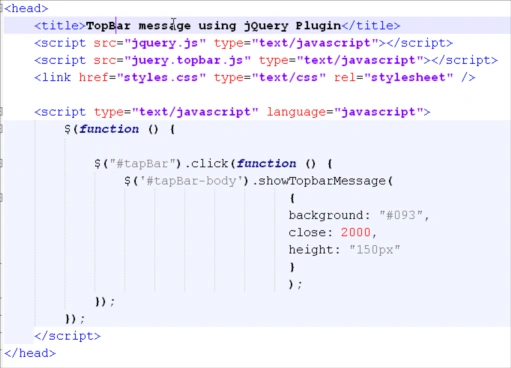
In the head section we are defining the function which will display the TopBar panel upon click of the link provided.
Body section:
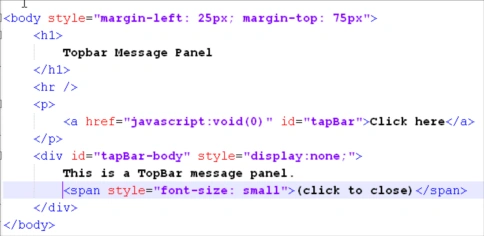
The body section contains the link which will call the function showTopbarMessage() when the link is clicked.
Summary:
In this article, we have seen the basics of how to display a TopBar message panel using jQuery plugin.
Thanks for spending your precious time here. Please provide your valuable feedbacks and comments, which enable me to give a better article the next time.
Please rate this Article.
Thanks.


Fabio PaivaPosted Aug 1, 2011, 9:48 AM EDT
Thanks for sharing jagan, but how can i set the height according to the text?
Jaganathan BantheswaranPosted May 24, 2011, 10:34 AM EDT
You are welcome Majid.
Majid KamaliPosted May 24, 2011, 4:32 AM EDT
Thanks for sharing it. Really nice article