
The TreeView control is an object model in ASP.Net that allows the creation of nodes dynamically. It will have a Root, Parent, and Leaf.
The TreeView control has properties and events. It has some characteristics.
- TreeView node can navigate to some other pages.
- The images and properties can be set to the nodes.
- It can have lines, checkboxes,es, and images.
- It can set dynamically expand/collapse.
- The nodes can be created on demand.
The sample treeview code.
<asp:TreeView ID="TreeView1" runat="server">
    <Nodes>
        <asp:TreeNode Value="Child1" PopulateOnDemand="true" ShowCheckBox="true" Expanded="True" Text="1">
            <asp:TreeNode Value="Grandchild1" Text="A" />
            <asp:TreeNode Value="Grandchild2" Text="B" />
        </asp:TreeNode>
        <asp:TreeNode Value="Child2" Text="2" />
        <asp:TreeNode Value="Child3" Expanded="True" Text="3">
            <asp:TreeNode Value="Grandchild1" Text="A" />
        </asp:TreeNode>
    </Nodes>
</asp:TreeView>
There are some properties that are useful for defining the behavior of the TreeView. These properties are Boolean value-based.
- PopulateOnDemand: It will populate the node under another node on demand. It will help to increase the performance; it would not create and render at the time of initial loading.
- ShowCheckBox: This property is used to set whether the checkbox is required or not.
- Expand: It accepts Boolean property to set the node has to be expanded or collapsed at the time of rendering.
- ShowLines: This is used to show the flow of the nodes in the lines.
Let's see an example of the SQL Server TreeView. It will show all the databases in the given SQL Server.
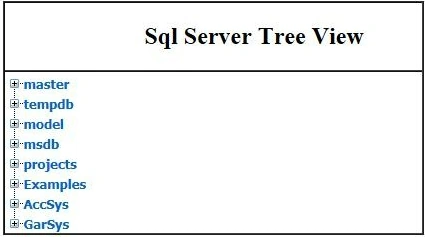
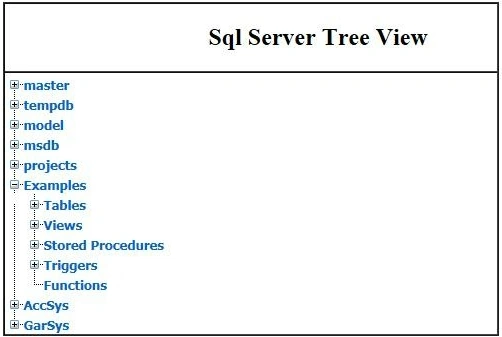
The databases are the parent nodes. All the databases have child nodes like Tables, Views, Stored procedures, Triggers, and Functions.
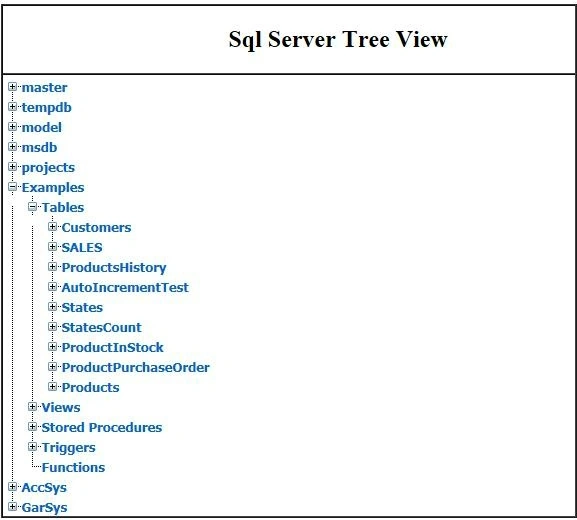
Every table in the database will have a list of tables underlying the database.
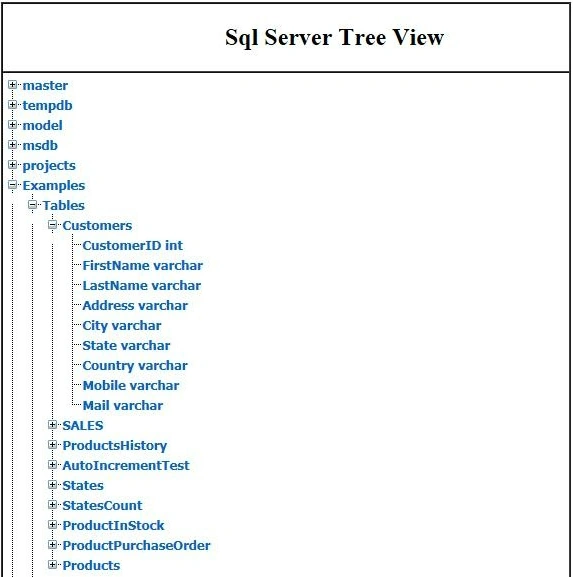
Click on every table will show the schema of the table.
Please download the code attachment, change your SQL Server connection string, and check out the code.


Vivek Kumar VishwasPosted Nov 9, 2017, 9:38 PM EST
Suppose , i have a table in database. I want to bind The unique id and name in nodes and when i click on node , it must show the all data according to that id by expanding the nodes. How to do this. ASpx Code --------------------------------<asp:TreeView ID="TreeView2" runat="server" ImageSet="XPFileExplorer" NodeIndent="15" Expanded="True" > <HoverNodeStyle Font-Underline="True" ForeColor="#6666AA" /> <NodeStyle Font-Names="Tahoma" Font-Size="8pt" ForeColor="Black" HorizontalPadding="2px" NodeSpacing="0px" VerticalPadding="2px"></NodeStyle> <ParentNodeStyle Font-Bold="False" /> <SelectedNodeStyle BackColor="#B5B5B5" Font-Underline="False" HorizontalPadding="0px" VerticalPadding="0px" /> </asp:TreeView> CS code--------------------------------SqlConnection con = new SqlConnection(ConfigurationManager.ConnectionStrings["constr"].ConnectionString.ToString()); protected void Page_Load(object sender, EventArgs e) { if (!this.IsPostBack) { DataTable dt = this.GetData("SELECT * FROM TopParent"); this.PopulateTreeView(dt, 0, null); BindRepeaterRight(); } } private void PopulateTreeView(DataTable dtParent, int parentId, TreeNode treeNode) { foreach (DataRow row in dtParent.Rows) { TreeNode child = new TreeNode { Text = row["cName"].ToString(), Value = row["cId"].ToString() }; if (parentId == 0) { TreeView2.Nodes.Add(child); DataTable dtChild = this.GetData("SELECT * FROM TopParent WHERE Id = " + child.Value); PopulateTreeView(dtChild, int.Parse(child.Value), child); } else { treeNode.ChildNodes.Add(child); } } } private DataTable GetData(string query) { DataTable dt = new DataTable(); string constr = ConfigurationManager.ConnectionStrings["constr"].ConnectionString; using (SqlConnection con = new SqlConnection(constr)) { using (SqlCommand cmd = new SqlCommand(query)) { using (SqlDataAdapter sda = new SqlDataAdapter()) { cmd.CommandType = CommandType.Text; cmd.Connection = con; sda.SelectCommand = cmd; sda.Fill(dt); } } return dt; } }
cai huPosted Mar 11, 2014, 7:25 PM EDT
thanks a lot for sharing. but i cann't to download the TreeViewExample.zip, Who can help me?
MayilrajanPosted Feb 12, 2014, 11:38 PM EST
good work...
Rajnish AzadPosted Feb 9, 2014, 8:51 PM EST
very nice article for tree view and sql server structure display. thanks .
ronel gonzalesPosted Oct 10, 2013, 7:05 PM EDT
thanks a lot is very helpful
saagar soniPosted Sep 10, 2013, 10:16 PM EDT
thanx a lot for sharing...very easy explanation
baskarPosted May 18, 2013, 5:54 AM EDT
Where is Database file?
bassam mossaPosted Oct 21, 2012, 7:17 AM EDT
can you make the same exp using vb.net and i need to use checkbox node in treeview
seenivasan PPosted Oct 3, 2012, 10:46 PM EDT
Give same set of process using XML Database...
SenthilkumarPosted Mar 12, 2012, 7:53 PM EDT
Thanks amit for your appreciation...
Amit MaheshwariPosted Mar 12, 2012, 9:02 AM EDT
Good work senthilkumar keep it up and thanks for sharing........