
Customization Options for Dark Theme
SQL Server Management Studio (SSMS) has been the favorite tool of SQL Server users as it comes as an integrated tool for managing SQL Infrastructure as well as day-to-day tasks like deployment, monitoring, designing, managing, etc. SSMS 2017 has arrived with so many exciting features but is still lacking the DARK theme which is growing popular among developers and DBAs. Well, it’s in the development stage and there is a trick to enable it which we’ll see in this small post.
If you haven’t installed SSMS yet, try it. It’s FREE.
Download SSMS 2017 from here.
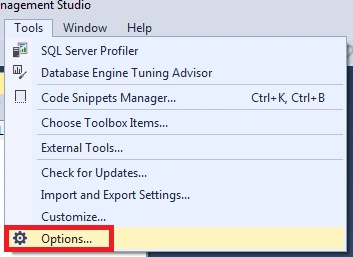
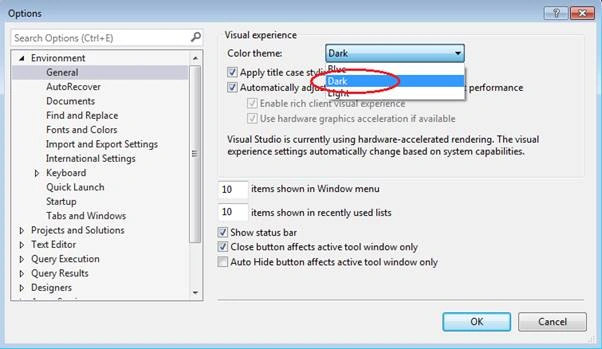
To change the current theme, there are two ways to open the Configuration window.
- Go to, Tools, Options
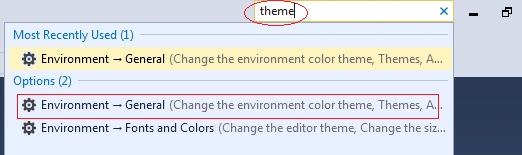
- Type the theme in the Quick Launch (CTRL+Q) textbox.
The Options window will pop up and if you click on the Color theme dropdown, you’ll be presented with just 2 themes – Blue & Light.
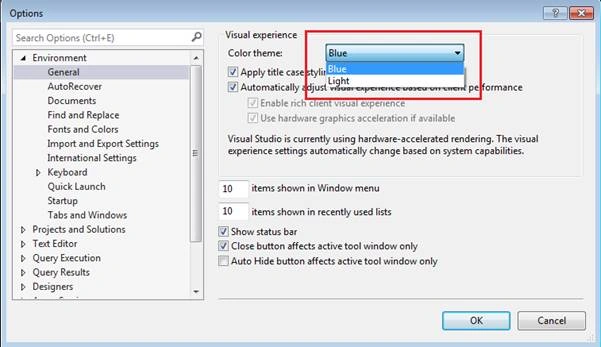
The dark theme is hidden from users as it is still in the development stage.
You can enable the dark theme using the following steps.
Step 1. Open Notepad as administrator.
Step 2. Click on File >> Open and navigate to the following path.
C:\Program Files (x86)\Microsoft SQL Server\140\Tools\Binn\ManagementStudioStep 3. Open ssms.pkgundef file.
Step 4. Find the section “//Remove Dark theme”
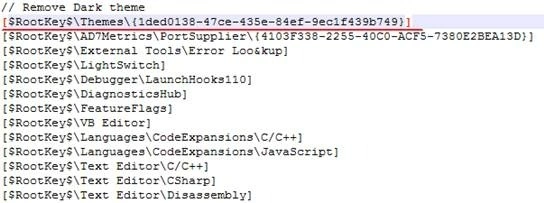
Step 5. Comment out the highlighted line and save changes to the file.
Restart the SSMS and you should now be able to see the Dark theme option.
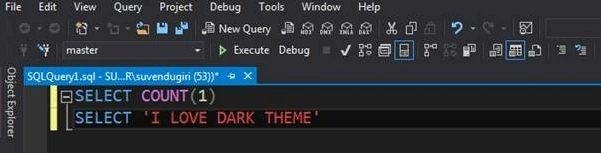
Apply it and enjoy
Note. As this feature is still in the development stage, there is a possibility of some unexpected behavior for you to experience.
Hope you liked this small tip.


Daniel GuzmánPosted Jul 2, 2019, 2:19 PM EDT
ManagementStudio is not avaible in My folder, why?:(
Space NolePosted Dec 18, 2018, 5:17 AM EST
Is there any way to get the sub menus in the context menu to not display as dark gray on black?
Mustafa TonkusPosted Oct 24, 2018, 10:15 PM EDT
Thanks, for sharing.
marco vitranoPosted Sep 18, 2018, 12:45 AM EDT
Thank you for sharing. We hope in new "dark side" of SSMS
Farhan AhmedTOP 100Posted Jul 23, 2018, 8:56 PM EDT
Nice like it
Nick DonnellyPosted Jul 16, 2018, 12:23 AM EDT
This is still the 50% fake dark mode right? When will SSMS support proper dark mode??? It's 2018 - this 50% thing looks broken.
Hadshana KamalanathanTOP 100Posted Jul 15, 2018, 8:53 AM EDT
Thank you for sharing
Viknaraj ManogararajahTOP 100Posted Jul 14, 2018, 7:12 PM EDT
Nice Article, Thank you for sharing.........
Mohammed IbrahimPosted Jul 4, 2018, 11:31 PM EDT
Nice to know about the feature..... Thanks
Satyaprakash SamantarayPosted Jul 4, 2018, 4:57 AM EDT
Nice article Suvendu Shekhar Giri....