
Introduction
JQuery is one of the most popular JavaScript libraries which exposes a lot of usable APIs for JavaScript developers. It’s an integration with Typescript that may do wonders for you.
I am taking my previous code sample for the demonstration.
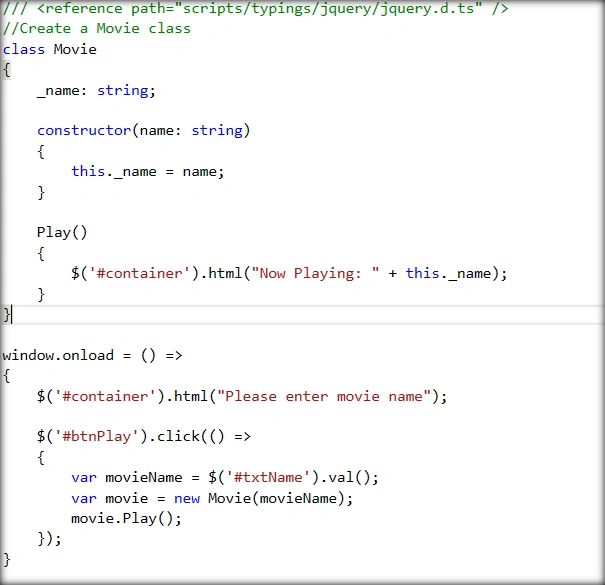
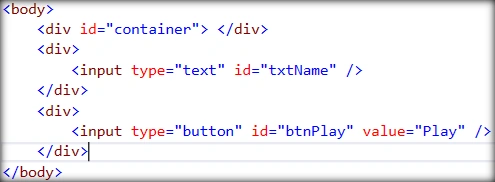
In my previous sample, I displayed a message in the alert box, but in this sample, I will display a message in the UI with the help of JQuery functions.
How to integrate with Typescript
- Open project in Visual Studio.
- Right click “TypescriptDemo” project and go to Nuget package manager.
- Type “definitely” in a search box.
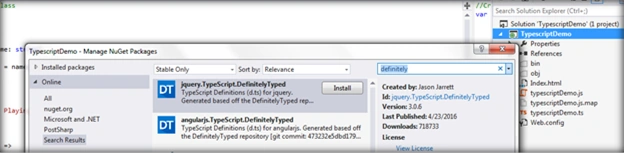
You will see the list of libraries; which have an extension as “*.d.ts” and is called ‘DefinitelyTyped”, which are specific to Typescript projects.
For our sample, we will select “jquery.TypeScript.DefinitelyTyped” and install.
This will add a jQuery version of Typescript with an extension same as of Typescript files.
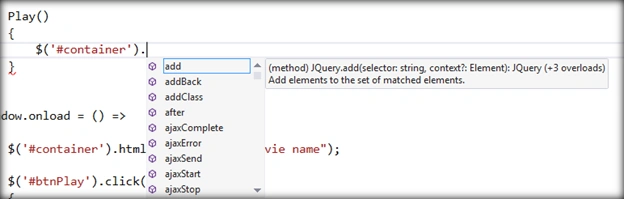
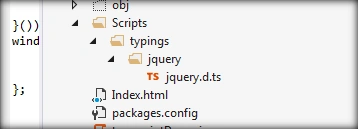 Drag and drop this “jquery.d.ts” file on the “demo.ts” file. This will add a reference to the JQuery library. Now, you are ready to use all the API’s of jQuery in your Typescript files.
 Open “demo.ts” and make changes in “Play” function, as shown below:



shital patelPosted Apr 25, 2018, 12:15 AM EDT
Thanks for give solution.Its working
Michael PalmerPosted Jan 26, 2018, 7:24 AM EST
Thanks for sharing. I really wish C# Corner would switch from putting screenshots of code to putting actual code that can be copied.
devendra soniPosted Jun 9, 2016, 9:24 PM EDT
Awesome
farooq smdPosted Jun 9, 2016, 7:47 AM EDT
nice one
Vignesh ManiTOP 100Posted Jun 9, 2016, 12:56 AM EDT
Nice one
Ashish BajpaiPosted Jun 8, 2016, 9:03 PM EDT
Thank you, Friends..
Santhakumar MunuswamyPosted Jun 8, 2016, 7:53 PM EDT
Thank you for nice share
Sonu ChaudharyPosted Jun 8, 2016, 10:48 AM EDT
good one ..
Kuppurasu NagarajTOP 100Posted Jun 8, 2016, 8:20 AM EDT
Nice Sharing..