
HTML
- <!DOCTYPE html>
- <html>
- <head></head>
- <body>
- <div>
- <div class="objects">
- <div class="obj obj-01"><img src='https://pbs.twimg.com/profile_images/601645996360138752/JXX6TiZa_400x400.png'></div>
- <div class="obj obj-02"><img src='https://pbs.twimg.com/profile_images/601645996360138752/JXX6TiZa_400x400.png'></div>
- <div class="obj obj-03"><img src='https://pbs.twimg.com/profile_images/601645996360138752/JXX6TiZa_400x400.png'></div>
- <div class="obj obj-04"><img src='https://pbs.twimg.com/profile_images/601645996360138752/JXX6TiZa_400x400.png'></div>
- <div class="obj obj-05"><img src='https://pbs.twimg.com/profile_images/601645996360138752/JXX6TiZa_400x400.png'></div>
- </div>
- </div>
- </body>
- </html>
The preceding HTML code defines the div element groups and inserts an image inside a child div element using an IMG tag.
CSS
Use CSS code to make the look and feel for all the HTML elements as we used before in the HTML part. The following is the CSS code I have used in this tutorial.
- body {
- background - color: #00FFCC;
- }
- div img {
- border-radius:15px;
- max-width: 100px;
- max-height: 100px;
- }
- .obj { width:100px; height:100px; margin:10px; padding: 5px;
- }
- .objects div { float: left; }
Before adding the CSS code be sure it covers the entire browser display area. The preceding CSS code defines the entire HTML element design process.
jQuery
The first step in the jQuery scripting part is to include the required jQuery library reference in the head element of your page.
- <script src="https://ajax.googleapis.com/ajax/libs/jquery/1.11.3/jquery.min.js"></script>
The following is the complete jQuery and JavaScript code I used in this tutorial.
- $(document).ready(function(){
- $('.obj').one('click', function() {
- $(this).unbind('click');
- $(this).fadeOut('slow');
- return false;
- })
- });
The preceding jQuery scripting code improves the performance of the application and it defines the entire HTML element UI functionality and effects.
Complete code
The following is the complete HTML, CSS and jQuery scripting codes I used in this tutorial.
- <!DOCTYPE html>
- <html>
- <head>
- <style>
- body {
- margin: 50px 50px;
- padding: 0px;
- text-align: center;
- background-color: #00FFCC;
- }
- div img {
- border-radius: 15px;
- max-width: 100px;
- max-height: 100px;
- }
- .obj {
- width: 100px;
- height: 100px;
- margin: 10px;
- padding: 5px;
- }
- .objects div {
- float: left;
- }
- </style>
- <script src="https://ajax.googleapis.com/ajax/libs/jquery/1.11.3/jquery.min.js"></script>
- <script>
- $(document).ready(function() {
- $('.obj').one('click', function() {
- $(this).unbind('click');
- $(this).fadeOut('slow');
- return false;
- })
- });
- </script>
- <body>
- <div>
- <div class="objects">
- <div class="obj obj-01"><img src='https://pbs.twimg.com/profile_images/601645996360138752/JXX6TiZa_400x400.png'></div>
- <div class="obj obj-02"><img src='https://pbs.twimg.com/profile_images/601645996360138752/JXX6TiZa_400x400.png'></div>
- <div class="obj obj-03"><img src='https://pbs.twimg.com/profile_images/601645996360138752/JXX6TiZa_400x400.png'></div>
- <div class="obj obj-04"><img src='https://pbs.twimg.com/profile_images/601645996360138752/JXX6TiZa_400x400.png'></div>
- <div class="obj obj-05"><img src='https://pbs.twimg.com/profile_images/601645996360138752/JXX6TiZa_400x400.png'></div>
- </div>
- </div>
- </body>
- </html>
Output
1. Open the main Index html file in the web browser.
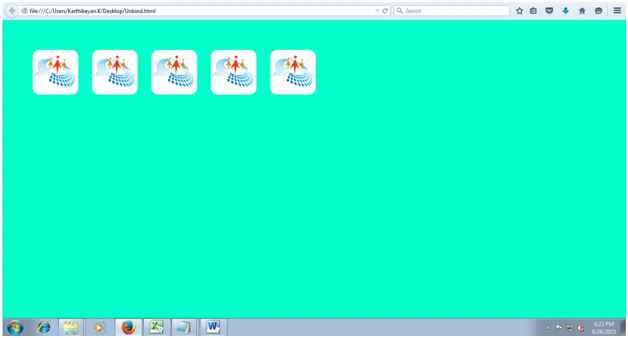
Figure 1: Main index page
2. Press the div image element.

Figure 2: Unbind event

Figure 3: Unbind event
Conclusion
I hope you liked this useful article. It will be useful for jQuery beginners. Please provide your valuable feedback and suggestions.
Live demo link: Jsfiddle
References


Gowtham RajamanickamTOP 100Posted Jan 5, 2016, 2:27 AM EST
Good article
Karthikeyan KPosted Sep 1, 2015, 8:04 PM EDT
Thank you Gunavadhi A S
Gunavadhi A SPosted Sep 1, 2015, 8:03 PM EDT
It's Really useful. Thank you Mr.Karthikeyan...
Karthikeyan KPosted Aug 29, 2015, 2:25 AM EDT
Thank you Santhakumar munuswamy sir...
Karthikeyan KPosted Aug 29, 2015, 2:24 AM EDT
Thank you Yashwanth Muthineni sir
Yashwanth MuthineniPosted Aug 29, 2015, 1:42 AM EDT
Nice Share
Santhakumar MunuswamyPosted Aug 29, 2015, 1:18 AM EDT
Good article. Thanks for sharing
Karthikeyan KPosted Aug 28, 2015, 7:59 PM EDT
Thank you Rakesh Chavda sir
RakeshPosted Aug 28, 2015, 12:42 AM EDT
nice work
Karthikeyan KPosted Aug 27, 2015, 7:15 PM EDT
Thank you Sandeep sir
Sandeep KumarPosted Aug 27, 2015, 8:51 AM EDT
Nice article sir :)
Karthikeyan KPosted Aug 27, 2015, 5:48 AM EDT
Thank you Gowtham Rajamanickam sir
Gowtham RajamanickamTOP 100Posted Aug 27, 2015, 5:44 AM EDT
good
Karthikeyan KPosted Aug 26, 2015, 10:55 PM EDT
Thank you Upendra Pratap Shahi sir
Upendra Pratap ShahiPosted Aug 26, 2015, 10:45 PM EDT
nice one dear..
Karthikeyan KPosted Aug 26, 2015, 10:22 PM EDT
Thank you Ankit Bansal sir
Ankit BansalPosted Aug 26, 2015, 10:21 PM EDT
Good one..Thanks for sharing..
Karthikeyan KPosted Aug 26, 2015, 10:02 PM EDT
Thank you Amol Jadhao sir
Karthikeyan KPosted Aug 26, 2015, 10:02 PM EDT
Thank you Rajeesh Menoth sir
Amol JadhaoPosted Aug 26, 2015, 9:57 PM EDT
Nice share
Rajeesh MenothPosted Aug 26, 2015, 9:48 PM EDT
Nice One
Karthikeyan KPosted Aug 26, 2015, 8:05 PM EDT
Thank you Mohammed Ibrahim sir
Mohammed IbrahimPosted Aug 26, 2015, 8:01 PM EDT
nice
Karthikeyan KPosted Aug 26, 2015, 7:28 PM EDT
Thank you Santhakumar Munuswamy sir
Karthikeyan KPosted Aug 26, 2015, 7:28 PM EDT
Thank you Gowtham K sir
Santhakumar MunuswamyPosted Aug 26, 2015, 7:04 PM EDT
Good article. Thanks for sharing
Gowtham KTOP 100Posted Aug 26, 2015, 6:34 PM EDT
Good one