
What is Tenant Object Quota?
The Tenant Object Quota (also called Directory Object Quota or directorySizeQuota) is a Microsoft-imposed limit on the total number of directory objects that can exist in a single Entra ID tenant (formerly Azure Active Directory).
Default limits
50,000 objects: For tenants without a verified custom domain.
300,000 objects: For tenants with at least one verified domain (most common scenario, including EDU tenants like the one in the image).
Newly created tenants start with a temporary low limit (~600 objects for the first 2 days), then automatically adjust.
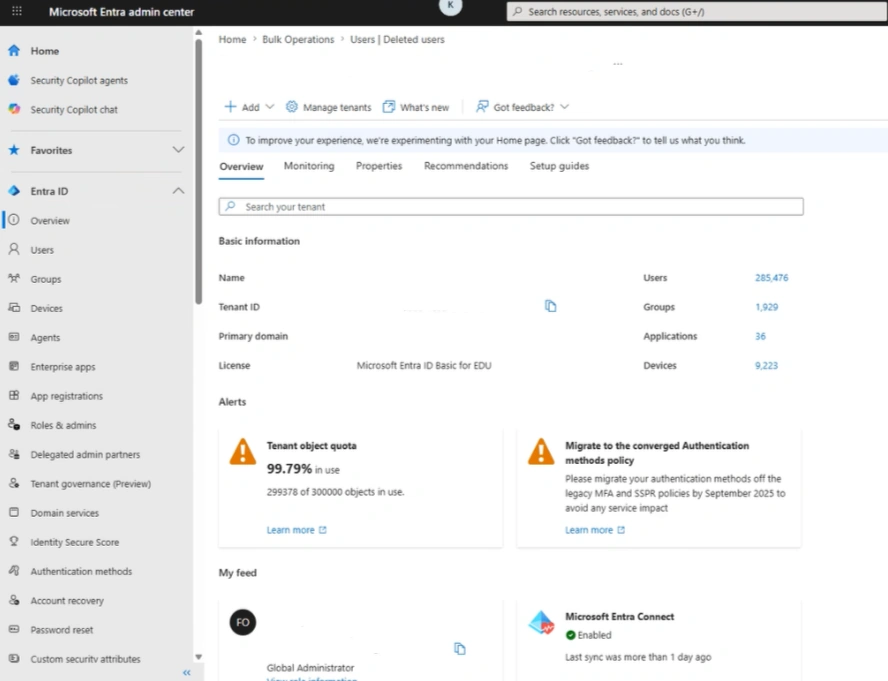
What Counts Toward the Quota?
Virtually every object in the directory contributes to this count, including both active and recently deleted (soft-deleted) items. Microsoft counts a broad range of items:
Users (member users, guest/B2B users)
Groups (security groups, Microsoft 365 groups, dynamic groups)
Devices (especially Intune-managed or hybrid joined devices)
Applications and Service Principals (app registrations, enterprise apps)
Contacts
Administrative roles and assignments
Schema/extensions
Deleted objects (soft-deleted users, groups, apps — they count fully or partially for 30 days)
Hidden/system-managed objects created by services like Intune, Teams, Exchange, SharePoint, etc.
B2B guest users and many more internal objects
Issues When the Quota is Reached or Exceeded
When usage approaches or hits 100%, the tenant becomes severely restricted:
Cannot create new users — Including regular members or B2B guests.
Cannot create new groups or applications.
Synchronization failures — Entra Connect (on-prem sync) fails with errors like "directory object quota limit exceeded."
B2B/Partner Portal Issues — Accepting partner invitations or B2B collaboration links often fails because it requires creating a guest user object in the tenant.
App registrations and service principals blocked.
Broader operational halts — Provisioning, automation, Intune device enrollment, and many admin tasks stop working.
Why Does This Happen?
Organic growth: Large universities, enterprises, or organizations with heavy device usage (e.g., thousands of student/faculty devices).
B2B collaboration: Inviting many external partners or guests.
Hybrid environments: Syncing large on-premises AD with many groups/devices.
Stale objects: Accumulated soft-deleted items, old app registrations, or unused service principals.
EDU scenarios: Student enrollments, temporary accounts, and device management can quickly inflate counts.
How to Check Your Tenant Quota
You can check from Entra Portal overview or by PowerShell.
Connect-MgGraph -Scopes "Organization.Read.All"
Get-MgOrganization | Select-Object -ExpandProperty AdditionalProperties | Select-Object directorySizeQuota
Solutions and Best Practices
1. Immediate Cleanup (Recommended First Step)
Permanently delete old users, groups, and devices from the "Deleted users" or "Deleted groups" sections.
Review and remove unused:
App registrations and service principals.
Stale devices in Intune/Entra.
Unnecessary groups and contacts.
Tools/scripts: Community scripts exist to analyze quota-consuming objects.
2. Request Quota Increase
Contact Microsoft Support through the Azure portal or Microsoft 365 admin center.
Provide justification (e.g., user count, sync needs, EDU usage).
Microsoft can raise it beyond 300,000 on a case-by-case basis (especially with P1/P2 or E5 licenses and verified domains).
3. Preventive Measures
Regularly monitor quota usage.
Implement lifecycle policies (e.g., group expiration, device cleanup).
Use dynamic groups judiciously.
Archive or offboard old users/devices promptly.
For very large organizations, consider multiple tenants or consult Microsoft on architecture.
Remove unnecessary guest accounts after reviewing
Tighten guest user invite settings

Join the conversation! Your thoughts help the community grow.