
This article explains how to populate (bind) CheckBox in GridView from the database in ASP.NET using jQuery and Ajax. Also this article explains how to save the CheckBox checked (selected) value to the database.
Background
- VS2013
- C#
- SQL Server
Database
I have used the following table with schema as follows.
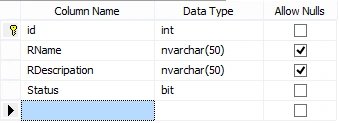
- CREATE TABLE [dbo].[ReportData]
- (
- [id] [int] IDENTITY(1,1) NOT NULL,
- [RName] [nvarchar](50) NULL,
- [RDescripation] [nvarchar](50) NULL,
- [Status] [bit] NULL,
- CONSTRAINT [PK_ReportData] PRIMARY KEY CLUSTERED
- (
- [id] ASC
- )
- WITH (PAD_INDEX = OFF, STATISTICS_NORECOMPUTE = OFF, IGNORE_DUP_KEY = OFF, ALLOW_ROW_LOCKS = ON, ALLOW_PAGE_LOCKS = ON) ON [PRIMARY]
- ) ON [PRIMARY]
HTML Markup
Here I have used jQuery DataTable plugin for displaying data instead of ASP.NET server control GridView as it provides a broad range of facilities (sorting, searching, pagination) and it is very optimized. You can know more about jQuery DataTable from the following link.
TableData is the public DataTable with namespace System.Data.DataTable from code behind in .cs page.
Binding Data
The following query fills data in DataTable from which we are binding data in our jQuery DataTable.
- public DataTable TableData = new DataTable();
- public static string Constr = ConfigurationManager.ConnectionStrings["ConStr"].ConnectionString;
- protected void Page_Load(object sender, EventArgs e)
- {
- if (!IsPostBack)
- {
- GetAllData();
- }
- }
- private void GetAllData() //Get all the data and bind it in HTLM Table
- {
- using (var con = new SqlConnection(Constr))
- {
- const string query = "select * from ReportData order by id desc";
- using (var cmd = new SqlCommand(query, con))
- {
- using (var sda = new SqlDataAdapter())
- {
- cmd.Connection = con;
- sda.SelectCommand = cmd;
- using (TableData)
- {
- TableData.Clear();
- sda.Fill(TableData);
- }
- }
- }
- }
- }
Scripts
The following is the jQuery code and reference to bind data in jQuery DataTable.
- <script src="http://ajax.googleapis.com/ajax/libs/jquery/1.7.1/jquery.min.js"></script>
- <script src="js/jquery.dataTables.min.js"></script>
- <script type="text/javascript">
- $(document).ready(function () {
- $('#example').DataTable({
- });
- });
- </script>
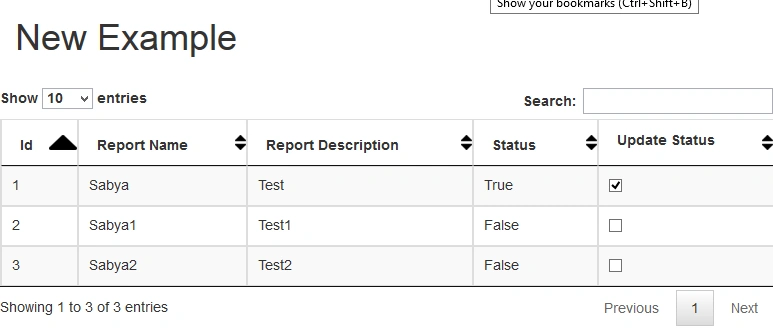
After this point the page will look as per the following image:
Updating CheckBox value to the Database
The following is my jQuery which makes Ajax call for updating checkbox event.
- <script type="text/javascript">
- $(".chcktbl1").click(function () {
- var rdata = $(this).attr("data-id"); // reading the id of the checkbox through data-id
- console.log(rdata);
- //alert(rdata);
- $.ajax({
- type: "Post",
- contentType: "application/json; charset=utf-8",
- url: "GridUpdate.aspx/UpdateIsData",
- data: '{eid: ' + rdata + '}',
- dataType: "json",
- success: function (response) {
- if (response != 0) {
- alert("Data Update Successfully!!!!");
- location.reload();
- }
- },
- error: function (response) {
- if (response != 1) {
- alert("Error!!!!");
- }
- }
- });
- });
- </script>
On success I am using location.reload(); to reload the page to show the reflected changes in Grid, instead of this you can use Append if you don't want to load your page.
The following is the code used to update checkbox event in database. As I have done this using Ajax call so it has to be a WebMethod.
- [WebMethod]
- public static void UpdateIsData(int eid)
- {
- if (eid != null)
- {
- try
- {
- string data = string.Empty;
- var con = new SqlConnection(Constr);
- // Chenge Staus For check
- var q = "Select status from ReportData Where id='" + eid + "'";
- var command = new SqlCommand(q, con);
- con.Open();
- SqlDataReader readData = command.ExecuteReader();
- while (readData.Read())
- {
- data = readData["status"].ToString();
- con.Close();
- if (data == "False")
- {
- using (var con2 = new SqlConnection(Constr))
- {
- var query = "update ReportData set Status='True' where id='" + eid + "'";
- con2.Open();
- var cmd = new SqlCommand(query, con2);
- cmd.ExecuteNonQuery();
- con2.Close();
- }
- }
- else
- {
- using (var con1 = new SqlConnection(Constr))
- {
- var query = "update ReportData set Status='False' where id='" + eid + "'";
- con1.Open();
- var cmd = new SqlCommand(query, con1);
- cmd.ExecuteNonQuery();
- con1.Close();
- }
- }
- }
- }
- catch (Exception)
- {
- }
- }
- }
You can download the attached sample project and use as per your requirement.
Hope that helps and thanks for reading.


Shahbaz ShaikhPosted Oct 10, 2019, 5:14 AM EDT
Really good code love
Shahbaz ShaikhPosted Oct 10, 2019, 5:12 AM EDT
Invalid attempt to call Read when reader is closed. This is the error i get can solve ?
Naqi ZaidiPosted Jul 22, 2017, 8:11 PM EDT
I'm trying to get the value of whichever checkbox is selected using ajax and jquery. MVC 4
SubashPosted Aug 1, 2016, 1:52 AM EDT
Nice
Lucas NgobeniPosted Mar 18, 2016, 12:04 AM EDT
Thanks a lot this really helped
mohammad kianiPosted Dec 30, 2015, 11:14 PM EST
Thank you for your professional article
Banketeshvar NarayanPosted Nov 15, 2015, 12:45 AM EST
Nice share
Humayun Kabir MamunPosted Nov 9, 2015, 8:27 PM EST
Nice...
pragnesh limbasiyaPosted Oct 28, 2015, 4:59 AM EDT
Best Article For Learning
Ekrem TapanPosted Oct 21, 2015, 8:19 AM EDT
this article really best one
Vidhyadhar GalandePosted Oct 18, 2015, 8:50 PM EDT
Nice Article...
Sabyasachi MishraPosted Oct 18, 2015, 8:41 PM EDT
Thanks every one
Santhakumar MunuswamyPosted Oct 17, 2015, 10:27 PM EDT
Good one
Sujeet SumanPosted Oct 17, 2015, 10:25 AM EDT
Nice article..........
Priyaranjan K STOP 100Posted Oct 17, 2015, 9:19 AM EDT
Nice one ..
Gowtham KTOP 100Posted Oct 17, 2015, 8:57 AM EDT
Good one
Kamlesh BhorPosted Oct 17, 2015, 6:22 AM EDT
Thanks for sharing...
Nilesh JadavPosted Oct 16, 2015, 8:14 PM EDT
Nice one sir !!
Harshad PansuriyaPosted Oct 16, 2015, 8:14 PM EDT
Nice one
RakeshPosted Oct 16, 2015, 10:50 AM EDT
Good share