
The scenario is that if I have one internal domain server and one DMZ machine hosted in the cloud and for some reason we upload the file then we need to save the file on the internal server.
Now let us see how ot use WCF to save the file on the internal server.
Step 1
Create a WCF project in Visual Studio.
Now open the IServices class and add the following operation contract.
- [OperationContract]
- bool UploadToTempFolder(byte[] pFileBytes, string pFileName);
- [OperationContract]
- byte[] GetFileFromFolder(string pFileName);
Open the Services.svc class and the following code.
This method is used to save the file on the server.
- public bool UploadToTempFolder(byte[] pFileBytes, string pFileName)
- {
- bool isSuccess = false;
- FileStream fileStream = null;
- //Get the file upload path store in web services web.config file.
- string strTempFolderPath = System.Configuration.ConfigurationManager.AppSettings.Get("FileUploadPath");
- try {
- if (!string.IsNullOrEmpty(strTempFolderPath))
- {
- if (!string.IsNullOrEmpty(pFileName))
- {
- string strFileFullPath = strTempFolderPath + pFileName;
- fileStream = new FileStream(strFileFullPath, FileMode.OpenOrCreate, FileAccess.ReadWrite);
- // write file stream into the specified file
- using(System.IO.FileStream fs = fileStream)
- {
- fs.Write(pFileBytes, 0, pFileBytes.Length);
- isSuccess = true;
- }
- }
- }
- } catch (Exception ex)
- {
- throw ex;
- }
- return isSuccess;
- }
- This method will give you the file content as a byte.
- public byte[] GetFileFromFolder(string filename)
- {
- byte[] filedetails = new byte[0];
- string strTempFolderPath = System.Configuration.ConfigurationManager.AppSettings.Get("FileUploadPath");
- if (File.Exists(strTempFolderPath + filename)) {
- return File.ReadAllBytes(strTempFolderPath + filename);
- } else return filedetails;
- }
Step 3
Create an empty website from Visual Studio.
Add one file upload control and one button to upload the file.
- <table>
- <tr>
- <td>
- <span>Select File : </span>
- </td>
- <td>
- <asp:FileUpload ID="FileUpload1" runat="server" />
- </td>
- </tr>
- <tr>
- <td colspan="2">
- <asp:Button runat="server" ID="btnUpload" Text="Upload File" OnClick="btnUpload_Click" />
- </td>
- </tr>
- <tr>
- <td>
- <span>File Upload Starts on :</span>
- </td>
- <td>
- <asp:Label runat="server" ID="lblTimeStarts"></asp:Label>
- </td>
- </tr>
- <tr>
- <td colspan="2">
- <asp:Button runat="server" ID="btnGetUploadedFile" OnClick="btnGetUploadedFile_Click" Text="Get Uploaded File" />
- <br />
- <asp:DataList ID="DataList1" runat="server" OnItemCommand="DataList1_ItemCommand">
- <ItemTemplate>
- <asp:LinkButton ID="LinkButton1" runat="server" CommandName="GetFile" Text="
- <%# (string)Container.DataItem %>" />
- </ItemTemplate>
- </asp:DataList>
- </td>
- </tr>
- </table>
After adding the web reference add the following code to the button event.
- protected void btnUpload_Click(object sender, EventArgs e)
- {
- //Check file is selected or not
- if(FileUpload1.HasFile)
- {
- System.Diagnostics.Stopwatch timer = new System.Diagnostics.Stopwatch();
- timer.Start();
- //To Service
- #region Upload Files
- string filename = FileUpload1.FileName;
- byte[] filebyte = FileUpload1.FileBytes;
- //Service refrence
- FileUploadWCF.ServiceClient objAttachment = new FileUploadWCF.ServiceClient();
- //pass the file byte to service
- objAttachment.UploadToTempFolder(filebyte, filename);
- #endregion
- timer.Stop();
- lblTimeStarts.Text = "File upload takes >>>" + Convert.ToString((TimeSpan.FromMilliseconds(timer.ElapsedMilliseconds).Milliseconds)) + " milliseconds. <br>";
- writetheFileNameInText(filename,"output");
- bindUploadFile(DataList1, "output");
- }
- }
- private void writetheFileNameInText(string fileName,string outputFileName)
- {
- using (StreamWriter w = File.AppendText(Server.MapPath(@"~\App_Data\" + outputFileName + ".txt")))
- {
- w.WriteLine(fileName);
- }
- }
- private void bindUploadFile(DataList dl,string outputFileName)
- {
- List<string> lstfileName = new List<string>();
- lstfileName = gettheFileNamefromText(outputFileName);
- dl.DataSource = lstfileName;
- dl.DataBind();
- }
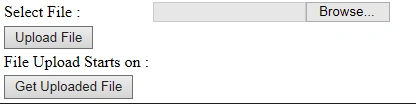
After uploading the file it will show the files just below the Get Uploaded File.
Now this is in the development mode. If we host the service on IIS then we need to change the WCF binding depending on the requirements.
Please find the attached source code for WCF services and Temp web site.


jayesh baviskarPosted Nov 28, 2019, 9:00 PM EST
Where is btnGetUploadedFile_Click Event?
Humayun Kabir MamunPosted Aug 14, 2015, 12:39 AM EDT
Nice...
Sumit JoshiPosted Aug 12, 2015, 9:28 PM EDT
nice article abrar
Manas MohapatraPosted Aug 12, 2015, 8:42 PM EDT
Good One..
Shridhar SharmaPosted Aug 12, 2015, 3:09 PM EDT
nice
Santhakumar MunuswamyPosted Aug 12, 2015, 10:55 AM EDT
Good Article. Thanks for sharing
Chervine BhiwooPosted Aug 12, 2015, 6:53 AM EDT
Nice!
Gopi ChandPosted Aug 12, 2015, 3:30 AM EDT
Nice work
RakeshPosted Aug 12, 2015, 1:15 AM EDT
Good one
Sibeesh VenuTOP 100Posted Aug 11, 2015, 11:08 PM EDT
Nice Share...
Jaipal ReddyPosted Aug 11, 2015, 9:25 PM EDT
good one sir
Rajeesh MenothPosted Aug 11, 2015, 8:02 PM EDT
Good One
Karthikeyan KPosted Aug 11, 2015, 7:21 PM EDT
Good one..Thanks for sharing...