
In this article I am going to show how we can upload file with progress bar. I posted articles about uploading file, but in this article I am showing uploading of file with progress bar. Here in this article I am upload two type files namely video and image. First user have to select what type of file he/she want to upload and after uploading he can see uploaded file below in a datalist.
The aspx code for this is
<%@ Page Language="C#" AutoEventWireup="true" CodeFile="Default.aspx.cs" Inherits="_Default" %>
<!DOCTYPE html PUBLIC "-//W3C//DTD XHTML 1.0 Transitional//EN" "http://www.w3.org/TR/xhtml1/DTD/xhtml1-transitional.dtd">
<html xmlns="http://www.w3.org/1999/xhtml">
<head id="Head1" runat="server">
<title>File Upload</title>
<link href="StyleSheet.css" rel="Stylesheet" type="text/css" />
<script language="javascript" type="text/javascript">
var size = 2;
var id = 0;
function ProgressBar() {
if (document.getElementById('<%=ImageFile.ClientID %>').value != "") {
document.getElementById("divProgress").style.display = "block";
document.getElementById("divUpload").style.display = "block";
id = setInterval("progress()", 20);
return true;
}
else {
alert("Select a file to upload");
return false;
}
}
function progress() {
size = size + 1;
if (size > 299) {
clearTimeout(id);
}
document.getElementById("divProgress").style.width = size + "pt";
document.getElementById("<%=lblPercentage.ClientID %>").firstChild.data = parseInt(size / 3) + "%";
}
</script>
</head>
<body>
<form id="form1" runat="server">
<div>
<table cellpadding="0" cellspacing="0" width="80%" align="center" style="background: White;
padding: 10px;" border="4">
<tr>
<td align="left" style="border: none;">
<div>
<h1>
Select File To Upload</h1>
<asp:Label ID="lblImageFile" Text="Your File" AssociatedControlID="ImageFile" runat="server"
CssClass="lbl" />
<asp:DropDownList ID="DListFileType" runat="server">
<asp:ListItem Text="Image" Value="Image"></asp:ListItem>
<asp:ListItem Text="Video" Value="Video"></asp:ListItem>
</asp:DropDownList>
<input id="ImageFile" contenteditable="false" runat="server" name="ImageFile" type="file"
style="width: 300px" />
<asp:Button ID="btnAddImage" runat="server" Text="Upload File" OnClientClick="return ProgressBar()"
OnClick="btnAddImage_Click" />
<br />
<br />
<asp:Label ID="lblError" runat="server" ForeColor="Red" Font-Bold="true" Visible="false"></asp:Label>
<br />
<br />
<asp:Button ID="btnShowImage" Text="Show Image" runat="server" OnClick="btnShowImage_Click" />
<asp:Button ID="btnShowVideo" Text="Show Video" runat="server" OnClick="btnShowVideo_Click" />
<div id="divUpload" style="display: none">
<div style="width: 300pt; text-align: center;">
Uploading...</div>
<div style="width: 300pt; height: 20px; border: solid 1pt gray">
<div id="divProgress" runat="server" style="width: 1pt; height: 20px; background-color: Blue;
display: none">
</div>
</div>
<div style="width: 300pt; text-align: center;">
<asp:Label ID="lblPercentage" runat="server" Text="Label"></asp:Label></div>
<br />
<asp:Label ID="Label1" runat="server" ForeColor="Red"></asp:Label>
</div>
</div>
<br class="clear" />
<div class="bottomColumn">
<asp:DataList ID="dlImageList" RepeatColumns="3" runat="server">
<ItemTemplate>
<asp:Image ID="imgShow" ImageUrl='<%# Eval("Name","~/Images/{0}")%>' Style="width: 200px"
runat="server" AlternateText='<%# Eval("Name") %>' />
<br />
</ItemTemplate>
</asp:DataList>
</div>
</td>
</tr>
<tr>
<td>
<div class="bottomColumn">
<asp:DataList ID="DataListVideo" RepeatColumns="3" runat="server" Width="100%">
<ItemTemplate>
<object id="mediaPlayer" classid='clsid:22D6F312-B0F6-11D0-94AB-0080C74C7E95' standby='Loading....'
type='application/x-oleobject' width="160px">
<param name="movie" value="<%# Eval("Name","http://localhost/UploadFileWithProgressBar/Video/{0}")%>">
<param name='animationatStart' value='false'> <%-- Here your URL --%>
<param name='transparentatStart' value='false'>
<param name='autoStart' value='false'>
<param name='showControls' value='true'>
<param name='clickToPlay' value='true'>
<param name="ShowStatusBar" value='true'>
<param name="windowlessVideo" value='false'>
<embed type="application/x-mplayer2" pluginspage="http://microsoft.com/windows/mediaplayer/en/download/"
id="" name="mediaPlayer" class="MediaPlayerWidth" src="<%# Eval("Name","http://localhost/UploadFileWithProgressBar/Video/{0}")%>"> </embed>
<%-- Here your URL --%>
</object>
</ItemTemplate>
</asp:DataList>
</div>
</td>
</tr>
</table>
</div>
</form>
</body>
</html>
This is the aspx.cs code
using System;
using System.Data;
using System.Configuration;
using System.Collections;
using System.Web;
using System.Web.Security;
using System.Web.UI;
using System.Web.UI.WebControls;
using System.Web.UI.WebControls.WebParts;
using System.Web.UI.HtmlControls;
using System.IO;
using System.Data.SqlClient;
using System.Text;
using System.Collections.Generic;
using System.Linq;
using System.Diagnostics;
public partial class _Default : System.Web.UI.Page
{
string DownloadFileType;
protected void Page_Load(object sender, EventArgs e)
{
}
protected void btnAddImage_Click(object sender, EventArgs e)
{
DownloadFileType = DListFileType.SelectedValue.ToString();
string strFileName;
HtmlInputFile htmlFile = (HtmlInputFile)ImageFile;
if (htmlFile.PostedFile.ContentLength > 0)
{
string sFormat = String.Format("{0:#.##}", (float)htmlFile.PostedFile.ContentLength / 2048);
ViewState["ImageName"] = htmlFile.PostedFile.FileName.Substring(htmlFile.PostedFile.FileName.LastIndexOf("\\") + 1);
strFileName = ViewState["ImageName"].ToString();
string sExtension = strFileName.Substring(strFileName.LastIndexOf(".") + 1);
if (checkFileType(sExtension)) //Check for file types
{
if (DownloadFileType == "Image")
{
htmlFile.PostedFile.SaveAs(Server.MapPath("~/Images/" + strFileName));
}
else if (DownloadFileType == "Video")
{
htmlFile.PostedFile.SaveAs(Server.MapPath("~/Video/" + strFileName));
}
lblError.Visible = false;
System.Threading.Thread.Sleep(8000);
Label1.Visible = true;
Label1.Text = "Upload successfull!";
ShowImage();
ShowVideo();
}
else
{
lblError.Visible = true;
lblError.Text = "Please Check your file";
}
}
else
{
lblError.Visible = true;
lblError.Text = "Please Select any file to upload";
}
}
private bool checkFileType(string FileExtension)
{
if (DownloadFileType == "Video")
{
switch (FileExtension.ToLower())
{
case "wmv":
return true;
case "avi":
return true;
case "mpg":
return true;
case "wav":
return true;
case "mid":
return true;
case "asf":
return true;
case "mpeg":
return true;
case "dat":
return true;
default:
return false;
}
}
else if (DownloadFileType == "Image")
{
switch (FileExtension.ToLower())
{
case "gif":
return true;
case "png":
return true;
case "jpg":
return true;
case "jpeg":
return true;
default:
return false;
}
}
return false;
}
protected void btnShowImage_Click(object sender, EventArgs e)
{
ShowImage();
}
public void ShowImage()
{
DirectoryInfo myImageDir = new DirectoryInfo(MapPath("~/Images/"));
try
{
dlImageList.DataSource = myImageDir.GetFiles();
dlImageList.DataBind();
}
catch (System.IO.DirectoryNotFoundException)
{
Response.Write("<script language =Javascript> alert('Upload File(s) First!');</script>");
}
}
protected void btnShowVideo_Click(object sender, EventArgs e)
{
ShowVideo();
}
public void ShowVideo()
{
DirectoryInfo myVideoDir = new DirectoryInfo(MapPath("~/Video/"));
try
{
DataListVideo.DataSource = myVideoDir.GetFiles();
DataListVideo.DataBind();
}
catch (System.IO.DirectoryNotFoundException)
{
Response.Write("<script language =Javascript> alert('Upload File(s) First!');</script>");
}
}
}
When we run the application then the output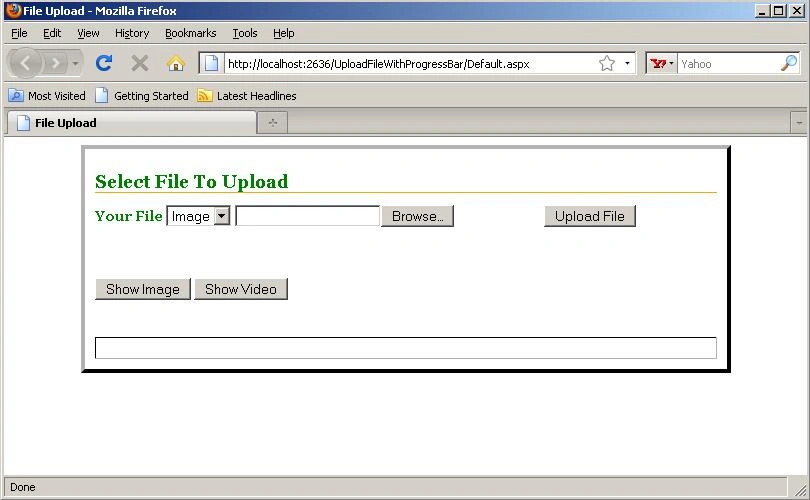
Figure 1.
From DropDownlist user can select the type of file to be uploaded.
When uploading an image file.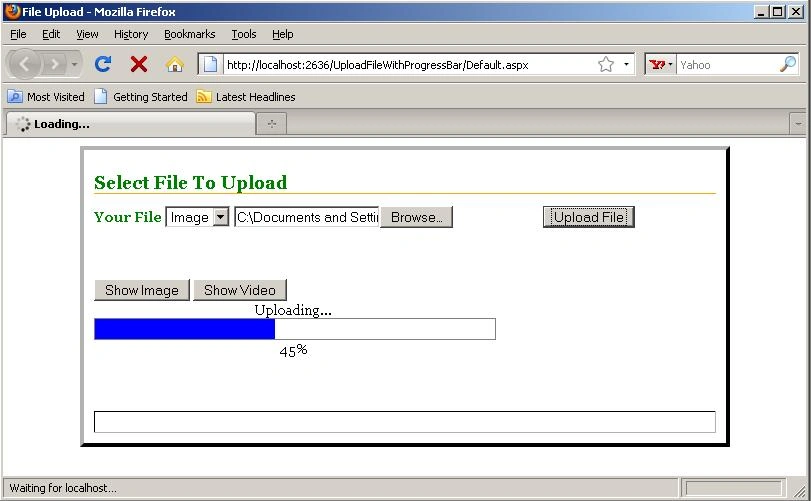
Figure 2.
After uploading an image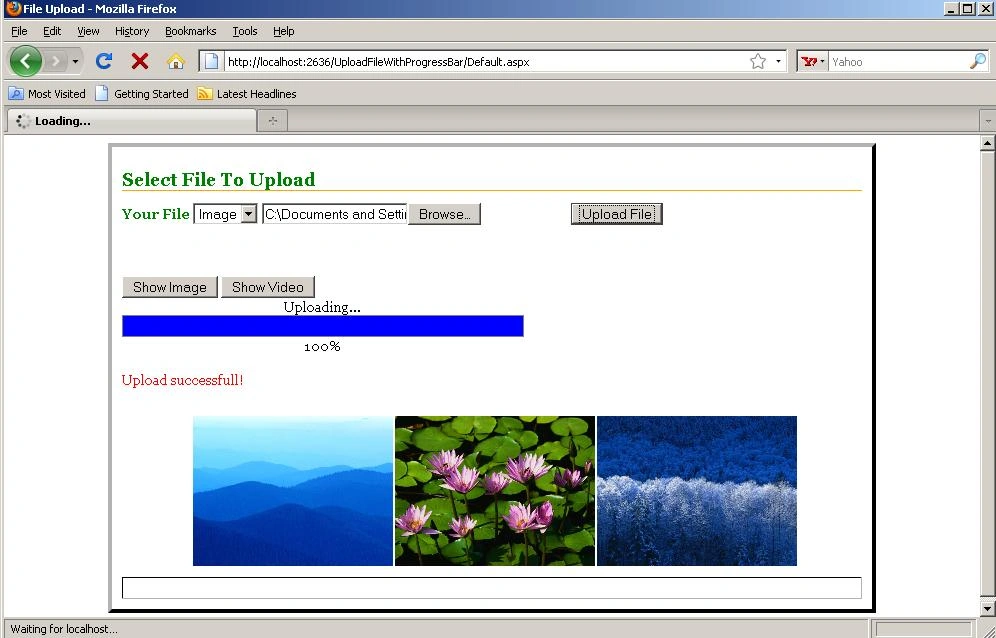
Figure 3.
If user has selected video as the file type to be uploaded. 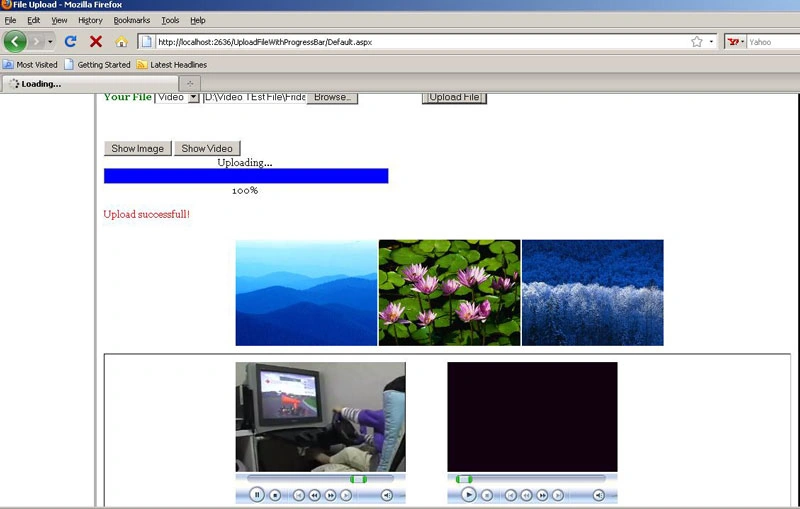
Figure 4.


Saber ShaikhPosted Jan 12, 2016, 7:46 PM EST
Nice Article
Arsal KhanPosted Dec 24, 2015, 8:50 PM EST
hello, when i click in show video button , videos is not shown in video box
Rahevar Raghuvirsinh JPosted Mar 4, 2015, 9:53 PM EST
but my case different .. i have use static 3 input file .. nd 3 time progress not working plz suggest me..
Rahevar Raghuvirsinh JPosted Mar 4, 2015, 9:52 PM EST
hello this is article perfect ..
Khargesh RajputPosted Feb 13, 2015, 12:35 AM EST
sir uploading and progress bar is working but progress with percent is faster then uploading file
Manvendra PatelPosted Dec 14, 2014, 4:20 AM EST
thanks very nice code.I have no issues when doing using java script in a aspx page without a masterpage, but when I try to use it in pages that have a masterpage, it doesn't work, finally i solved it using ClientID in java script code like-("<%=divProgress.ClientID%>")
Mudee ZabPosted Jul 16, 2014, 1:09 AM EDT
hello i download zip file and insert directly in empty website but when i upload file the progress bar shows working but when i check in my website image folder it is not there can you tell me why
jay palPosted Apr 11, 2014, 8:51 AM EDT
That is a good question: the progress bar steps going faster than uploading the file specially large file how to set the interval of progress steps according the file size.Can anyone suggest a solution for this issue?
wahb alaamriPosted Feb 17, 2014, 7:27 PM EST
the progress bar steps going faster than uploading the file specially large file how to set the interval of progress steps according the file size
Long Dao ngocPosted Dec 20, 2013, 8:02 AM EST
Thank you very much! :)
Santosh YadavPosted Mar 30, 2013, 5:17 AM EDT
very fine...
narendra reddyPosted Mar 6, 2012, 8:01 PM EST
nice work it will be usefull
krishna patelPosted Oct 12, 2011, 1:14 AM EDT
Very nice... code for upload file with progressbar
mark bsleyPosted Mar 17, 2011, 6:44 AM EDT
has anyone tried this in .vb? Or think that a c# to vb converter may work
hem kumarPosted Mar 16, 2011, 1:51 AM EDT
htmlFile.PostedFile.SaveAs(Server.MapPath("~/Images/" + strFileName)); on that preceeding line Could not find a part of the path 'C:\Documents and Settings\Administrator\Desktop\hem\pms\progressbar\Images\Surya_Anand.jpg'.
Rashid ChakiPosted Dec 2, 2010, 9:29 PM EST
Hi Rahul, your all Ajax work is really appreciated.... Thanks.. Rashid Chaki
Johnny Quispe FloresPosted Nov 29, 2009, 9:28 AM EST
Hello, I read your article and I feel great, but I have a query, when the ProgressBar is working, I can not move the window, and when I do this is blocked, as could implement threads in this demo? I hope you can help, Thanks! : D Enjoy!! Johnny B.