
Background
I have often seen the question asking how to upload images to a database in ASP.Net C# but the question ends without a solution. So by considering the preceding requirement I decided to write this article especially focusing on beginners and those who want to learn how to upload Images to a database.
Now before creating the application, let us create a table named ImageTotable or whatever name you wish in a database to store the Uploaded image files in a database table having the following fields (shown in the following image):

In the preceding table, the myphoto column name is used to store the image file and the name is used to store the comment or name which is given to the image.
I hope you have created the same type of table.
Now let us start to create an application to upload image files step-by-step.
- "Start" - "All Programs" - "Microsoft Visual Studio 2010".
- "File" - "New Project" - "C#" - "Empty Project" (to avoid adding a master page).
- Give the project a name, such as ImageUpload or another as you wish and specify the location.
- Then right-click on Solution Explorer - "Add New Item" - Default.aspx page.
- One File upload control, one Button, one textbox, one label
<form id="form1" runat="server">
<div>
<table>
<tr>
<td>
Select Image
</td>
<td>
<asp:FileUpload ID="FileUpload1" runat="server" />
</td>
<tr>
<td>
Select Image
</td>
<td>
<asp:FileUpload ID="FileUpload1" runat="server" />
</td>
Album Name
<td>
<asp:TextBox ID="TextBox1" runat="server" />
</td>
<td>
</td>
</tr>
</table>
<table><tr><td><p><asp:Label ID="Label2" runat="server" Text="label"></asp:Label> </p></td></tr></table>
</div>
</form>

From the preceding view I am using one button to do the upload; one textbox to provide an album name.
Now run the application and click on the save button without selecting an Image file which shows the following error as shown in the following:
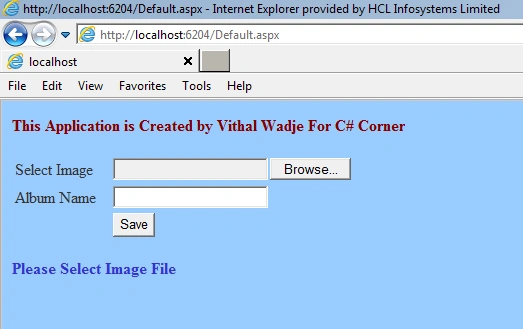
Now select the Image file, which shows the following message after being successfully uploaded:
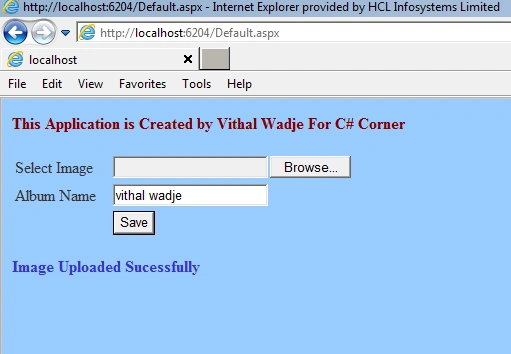
- For detailed code please download the zip file attached above.
- Don't forget to update the Web.config file according to your Server location.


Akagami ShanksPosted Mar 24, 2017, 11:25 PM EDT
What is the purpose of this line: FileUpload1.PostedFile.InputStream.Read(pic, 0, length);
Vithal WadjeTOP 100Posted Apr 12, 2016, 12:28 PM EDT
refer my other articles
Nagesh BadigerPosted Apr 12, 2016, 10:53 AM EDT
k thnks but how to show images form database table ... send me how for this gmail id = [email protected]
Vithal WadjeTOP 100Posted Feb 22, 2016, 4:42 AM EST
Bibhor kumar ,refer my other articles
Vithal WadjeTOP 100Posted Feb 22, 2016, 4:41 AM EST
Thanks
Amit Kumar SinghPosted Feb 20, 2016, 2:45 AM EST
Nice one
tanuj omarPosted May 24, 2015, 10:31 PM EDT
hie frds use this link it will help u https://www.youtube.com/watch?v=1w9BHooz1Yw
Bibhor kumarPosted May 14, 2015, 2:26 AM EDT
how to save image in (sql)database in binary fromate asp.net c#
Vithal WadjeTOP 100Posted Aug 29, 2014, 9:01 PM EDT
thanks sir.its my pleasure
Santhosh KumarPosted Aug 29, 2014, 3:01 AM EDT
thank u
Vithal WadjeTOP 100Posted Aug 28, 2013, 10:41 AM EDT
thanks Rini Sir
RiniPosted Aug 27, 2013, 7:43 PM EDT
Thanx for the soln. it is indeed helpful..
Vithal WadjeTOP 100Posted Mar 24, 2013, 9:17 PM EDT
thanks sir ,for reading my article,this is not a above article error,its you solution file error so create application step by step as i have given
Siddhartha DeyPosted Mar 22, 2013, 11:04 PM EDT
ERROR ...... http://postimg.org/image/4xx3mre2x/
Siddhartha DeyPosted Mar 22, 2013, 10:59 PM EDT
ERROR :-........... Operand type clash: varbinary(max) is incompatible with text ....... Please Help !!
Vithal WadjeTOP 100Posted Mar 14, 2013, 8:08 PM EDT
thanks sir reading my article,soon i will be write article on on it when i got time
Sanket ChougulePosted Mar 14, 2013, 2:30 AM EDT
Thanx for the soln. it is indeed helpful.. now need your help to retrieve the images periodically from the database to show in the web form using timer control
Vithal WadjeTOP 100Posted Mar 11, 2013, 8:18 PM EDT
then you have not any sufficient permission to perform insert ,update,delete operation on database ,check it
Arun kumarPosted Mar 5, 2013, 8:37 PM EST
I'm nt inserted any primary key on it
Vithal WadjeTOP 100Posted Mar 5, 2013, 12:49 AM EST
what is your table structure ? if you applied any primary key on above article table structure then remove it
Arun kumarPosted Mar 4, 2013, 5:10 AM EST
hi sorry sir this occur now"The INSERT permission was denied on the object 'ImageTotable', database 'master', schema 'dbo'."
Vithal WadjeTOP 100Posted Mar 4, 2013, 12:36 AM EST
thanks arun sir
Arun kumarPosted Mar 3, 2013, 8:41 PM EST
Working Sir....,Thank you :)
Vithal WadjeTOP 100Posted Feb 28, 2013, 6:22 PM EST
thanks Talha ,sir for reading my article and can not be understand your question please repeat it
Vithal WadjeTOP 100Posted Feb 28, 2013, 6:21 PM EST
arun sir ,you have creating many subfolder to store the application thats why you got error just keep solution as F:\Projects\UploadImages and then open
Talha Abdul MuqsitPosted Feb 28, 2013, 5:50 AM EST
how to fetch it and bind with image
Arun kumarPosted Feb 28, 2013, 12:18 AM EST
rectify that error sir"Error 1 Could not load type 'UploadImages.Default'. F:\Projects\UploadImages\UploadImages\UploadImages\Default.aspx 1 "
Vithal WadjeTOP 100Posted Feb 10, 2013, 5:05 PM EST
Rahul check your database table column filed datatype in whhich you have stored image or create a table as i have created above
Rahul SoniPosted Feb 6, 2013, 11:44 PM EST
Operand type clash: nvarchar is incompatible with image this error is generard
Rahul SoniPosted Feb 6, 2013, 11:44 PM EST
Operand type clash: nvarchar is incompatible with image this error is generard
Vithal WadjeTOP 100Posted Jan 28, 2013, 7:33 PM EST
for this you can refer my other articles
Ripon NathPosted Jan 28, 2013, 11:22 AM EST
can you plz tell how to retrive image form a database in an ASP.NET Application......am trying very hard but not getting any result.....RIPON...
Ripon NathPosted Jan 28, 2013, 11:22 AM EST
can you plz tell how to retrive image form a database in an ASP.NET Application......am trying very hard but not getting any result.....RIPON...
Vithal WadjeTOP 100Posted Jan 3, 2013, 11:53 PM EST
its depends upon your requirement,but is beeter way to store the uploaded images in database instaed of application folder ,according to my experience if we store the images into application folder ,it may result to slow an application.. whats about your opinion ?
Rohatash KumarTOP 100editedPosted Jan 3, 2013, 10:41 PM ESTEdited Jan 3, 2013, 10:44 PM EST
Nice article Vithal. How we can upload image to application folder. uploading a image to application folder or database Which is better way to do it. vithal