
In my previous article JavaScript Calendar in ASP.NET 2.0 here, I discussed how to use a calendar control using java script. I got many emails from readers asking how to use this control with a master page. So here I am going to discuss about this.
In this article I am using a JavaScript file (Calendar.js) and a CSS file (Calendar.css). The JavaScript file has all functions and methods, which are used in calendar and CSS file has all calendar style sheets.
You can call JavaScript file on page like this:
<script language="javascript" src=Calendar.js type="text/javascript"></script>
And style sheet file like this:
<link href=Calendar.css rel="stylesheet" type="text/css">
Only diffrence is you have to change the ID of your control with the master page like this.
This is without the master page.
<form id="form1" runat="server">
<asp:Label ID="lblDateSent" runat="server" Text="Posted on:" CssClass="graytextbold"></asp:Label>
<input ID="PostedOn" runat="server" class="NormalTextBox" readonly="readOnly" type="text" />
<a onclick="showCalendarControl(PostedOn)" href="#">
<img src=calendar.gif style="width: 20px; height: 20px" border=0 /></a>
</form>
This is with the master page.
<asp:Label ID="lblDateSent" runat="server" Text="Posted on:" CssClass="graytextbold"></asp:Label>
<input ID="PostedOn" runat="server" class="NormalTextBox" readonly="readOnly" type="text" />
<a onclick="showCalendarControl(ctl00_ContentPlaceHolder1_PostedOn)" href="#">
<img src="calendar.gif" style="width: 20px; height: 20px" border=0 />
</a>
Only the changed line is onclick event(showCalendarControl(ctl00_ContentPlaceHolder1_PostedOn)). You can see id of your control in ViewSource.
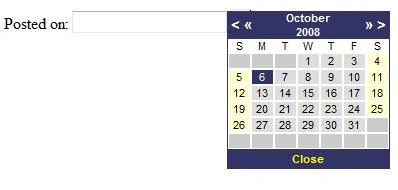
Result will be same. For more details I am attaching my test application with both examples. Download it.


sumit gargPosted Feb 24, 2012, 12:32 AM EST
plz tell me how can i chagne year by using dropdownlist box
Sunil DhimanPosted May 30, 2011, 4:06 AM EDT
its a nice article Raj. keep posting...
shilpa saharePosted Feb 20, 2011, 9:56 PM EST
I want to selected date in Textbox control..
ss ssPosted Nov 23, 2010, 9:11 PM EST
Its working fine without giving codes in IE...and wont work with mozilla ..... As you said i used single codes for the control while calling showcalendarcontrol function... now calendar control is visible in both the browsers but not working.....ie..selected date is not iserted in textbox plsssssssss help meeeee very very urgent
Mani KandanPosted Sep 3, 2010, 11:01 PM EDT
Thanks Raj Kumar
Ramesh KumarPosted Aug 26, 2010, 6:31 AM EDT
object Expected error
Donovan CarterPosted Mar 25, 2010, 6:25 AM EDT
<!--Session data-->
charu gayPosted Mar 22, 2010, 11:58 PM EDT
its working good...
raji sundarPosted Feb 24, 2010, 7:32 PM EST
How to get the selected date into textbox? Can anybody know.. please help me in this.... Thanks In Advance... Awaiting your reply dotnet buddies...
vijaya bharathiPosted Aug 25, 2009, 11:19 PM EDT
Thank u very much to give a such nice code sir,it works fine.it helps me a lot
satya narayanaPosted Jun 28, 2009, 9:49 AM EDT
Hi sir, Nice post , it is working in IE but not working in Mozilla , So kindly update it . satya
kinfePosted May 21, 2009, 2:38 PM EDT
good job
Asheej TKPosted Mar 28, 2009, 7:10 AM EDT
Thanks a lot boss....keep posting...
Manoj LalPosted Mar 25, 2009, 2:55 AM EDT
Hello Sir, when i m using this nd clicking on the img(calendar.gif) i m getting Error on the Page. Please help me how can i over come this problem while using calandar with master page.
suma shanPosted Feb 19, 2009, 2:37 PM EST
I's very useful for me. Thx for your post in Master page.
Prateek RegmiPosted Dec 18, 2008, 6:34 PM EST
I tried with Explorer and works well. But it is not working at all in firefox. please Reply me at [email protected]
Prateek RegmiPosted Dec 18, 2008, 6:01 PM EST
nice job raj