
In this article you will learn how to use Stored Procedure in Entity Framework MVC. Here are the steps:
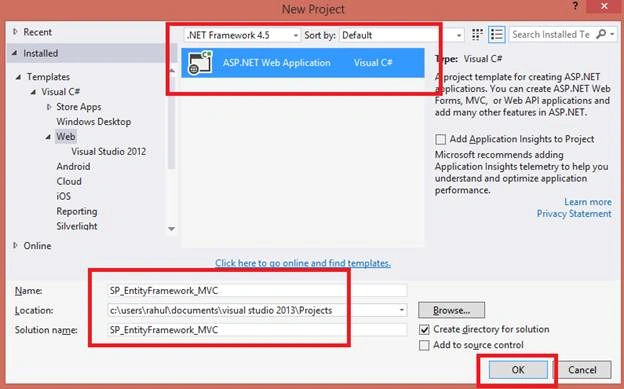
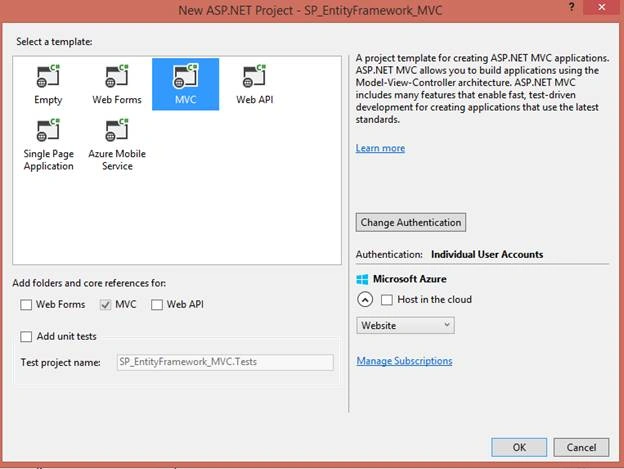
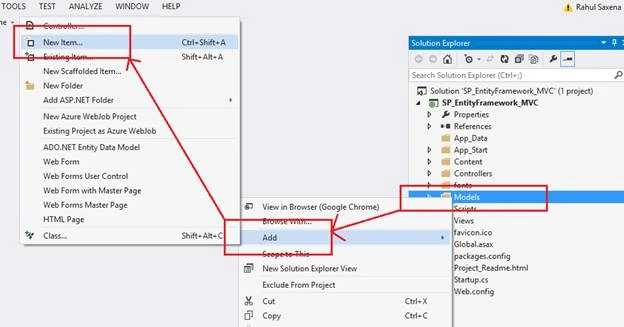
Open Visual Studio, Add, then New Project,
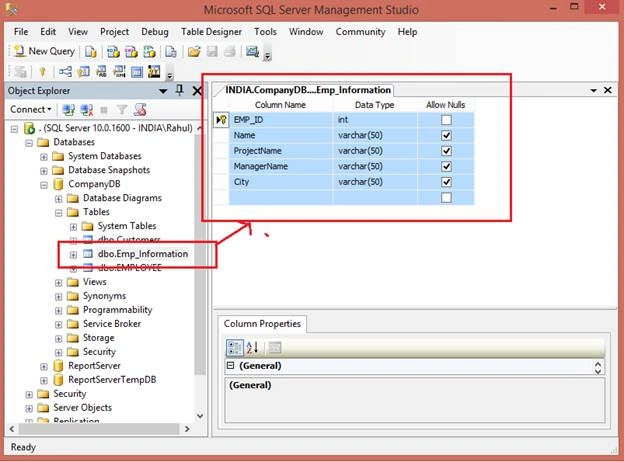
Here is my Data Table from which I will show data using Stored Procedure.
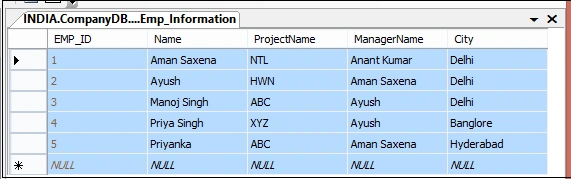
Data in my Table.
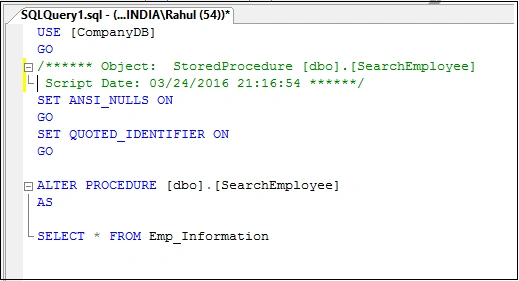
The following is my Stored Procedure:
Here is my Data Table from which I will show data using Stored Procedure.
Data in my Table.
The following is my Stored Procedure:
- USE [CompanyDB]
- GO
- /****** Object: StoredProcedure
- [dbo].[SearchEmployee]
- Script Date: 03/25/2016 18:48:48 ******/
- SETANSI_NULLSON
- GO
- SETQUOTED_IDENTIFIERON
- GO
- ALTERPROCEDURE [dbo].[SearchEmployee]
- AS
- SELECT*FROM Emp_Information
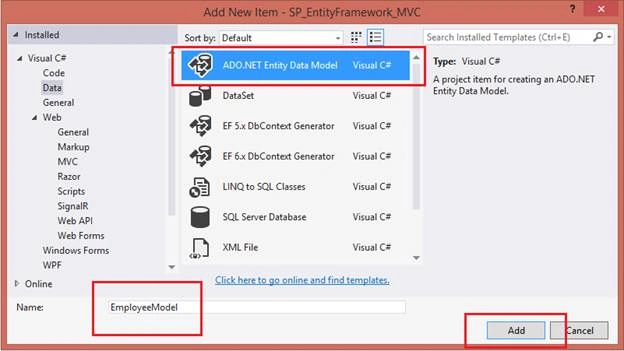
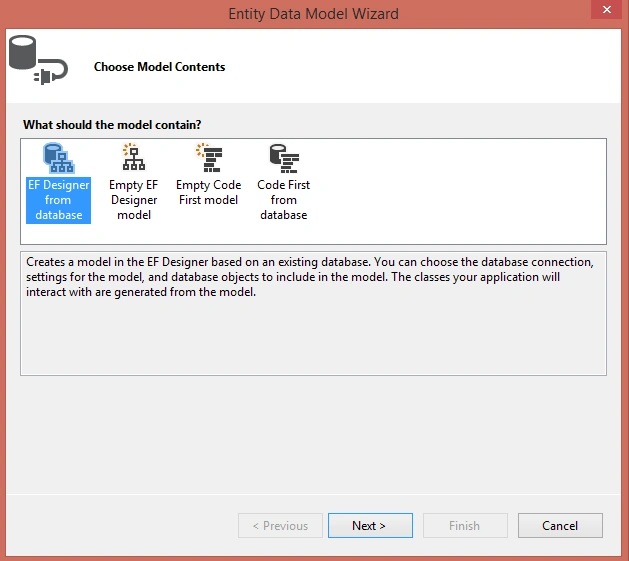
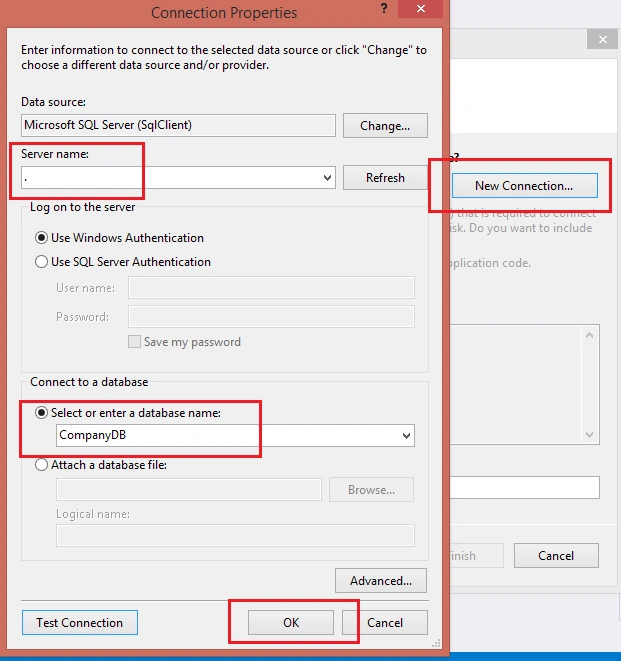
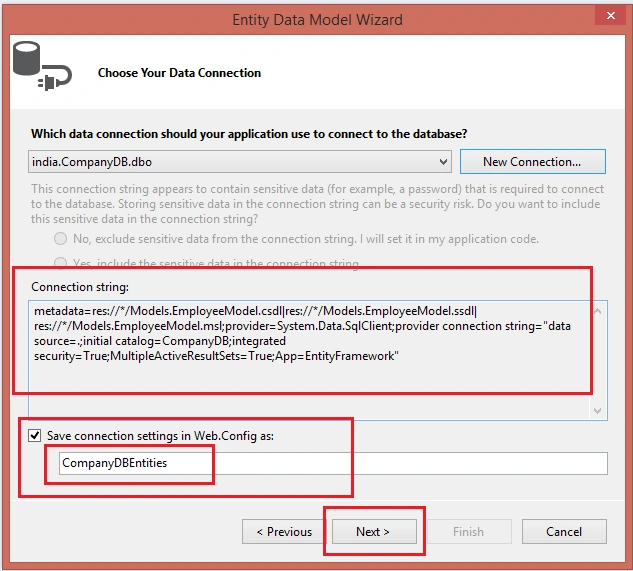
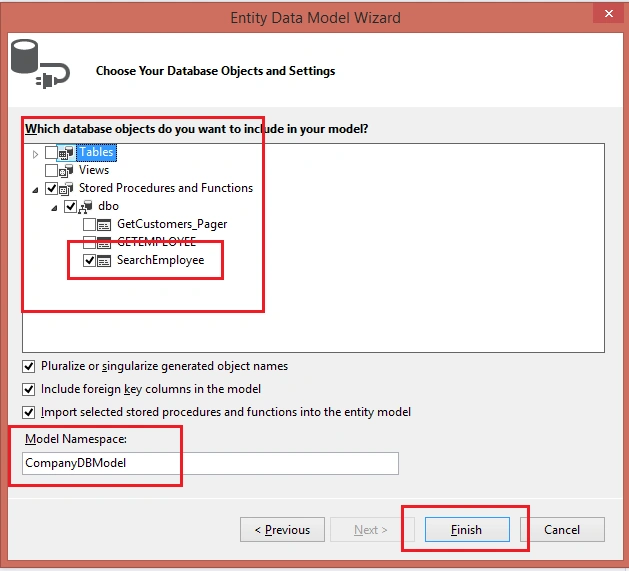
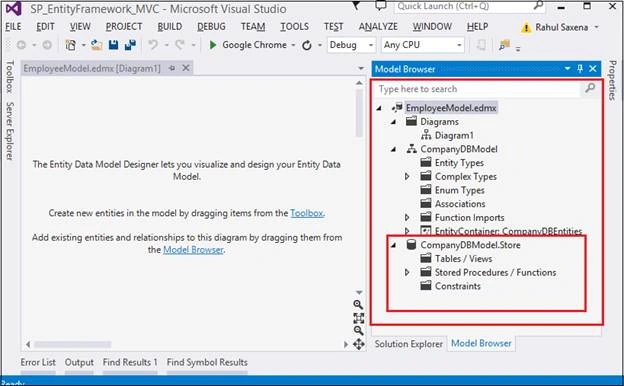
Select your table and Stored Procedure here.
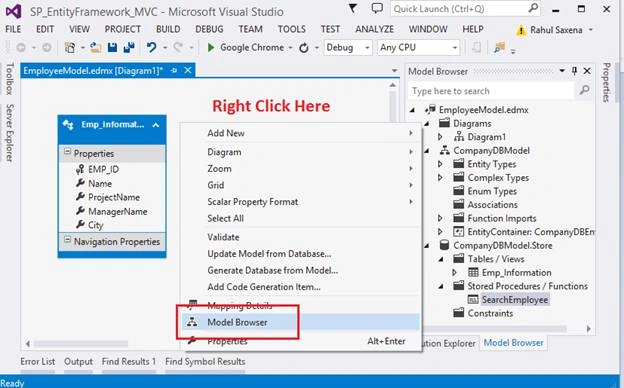
Right Click and then click on Model Browser:
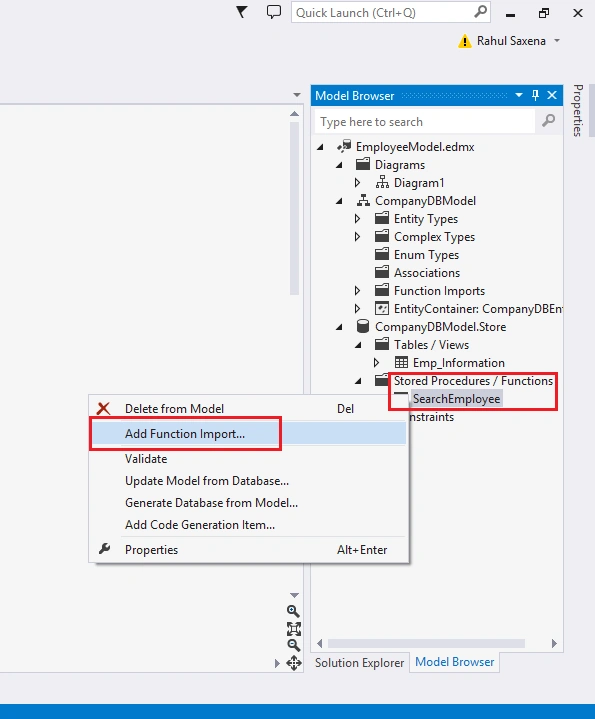
Right Click on your Stored Procedure, then click on Add Function Import,
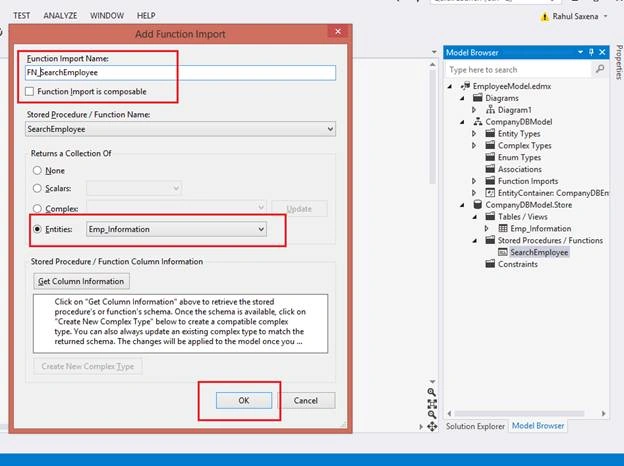
Here give name to your function and select your entities.
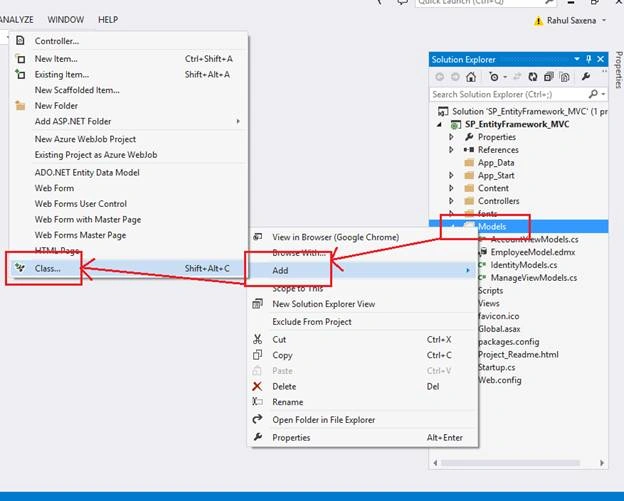
Now Add a Class.
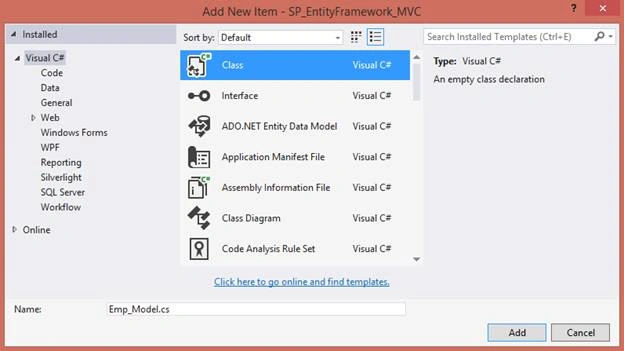
And write below code here in this class:
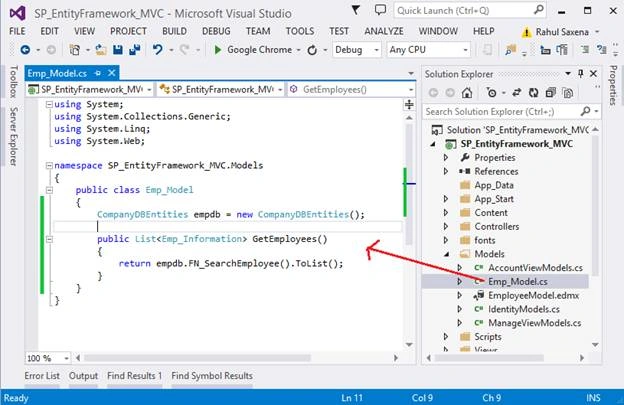
- using System;
- using System.Collections.Generic;
- using System.Linq;
- using System.Web;
- namespace SP_EntityFramework_MVC.Models
- {
- public class Emp_Model
- {
- CompanyDBEntitiesempdb = newCompanyDBEntities();
- public List < Emp_Information > GetEmployees()
- {
- return empdb.FN_SearchEmployee().ToList();
- }
- }
- }
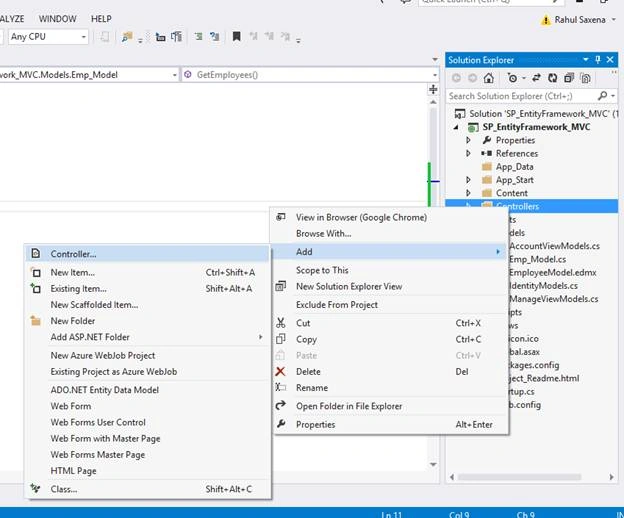
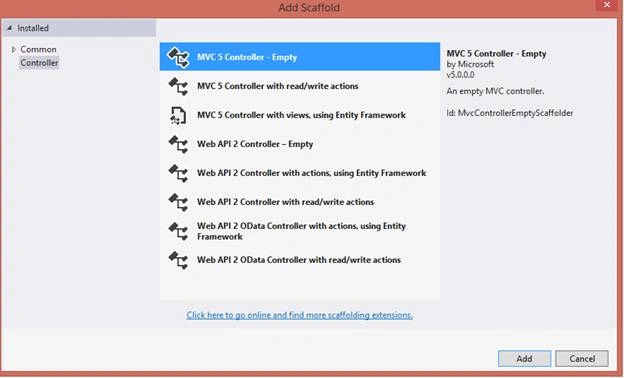
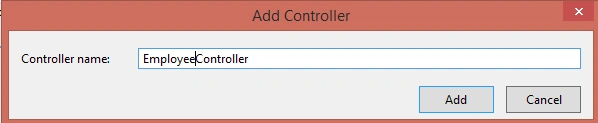
And write the following code in your controller:
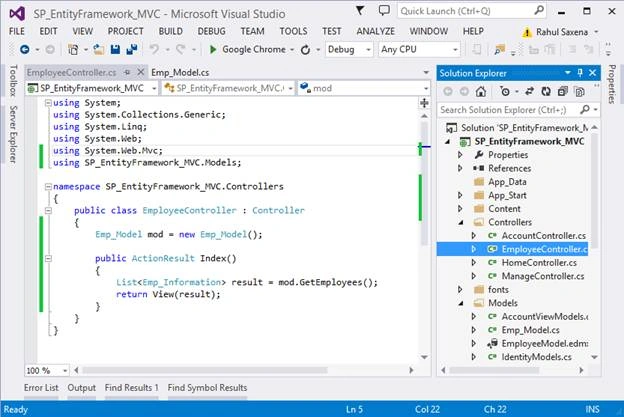
- using System;
- using System.Collections.Generic;
- using System.Linq;
- using System.Web;
- using System.Web.Mvc;
- using SP_EntityFramework_MVC.Models;
- namespace SP_EntityFramework_MVC.Controllers
- {
- public class EmployeeController: Controller
- {
- Emp_Model mod = newEmp_Model();
- public ActionResult Index()
- {
- List < Emp_Information > result = mod.GetEmployees();
- return View(result);
- }
- }
- }
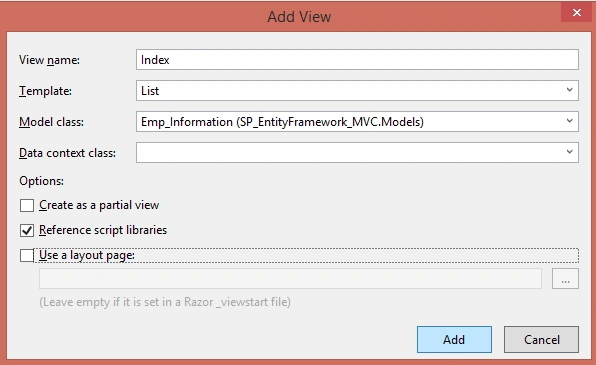
View.cshtml:
- @model IEnumerable<SP_EntityFramework_MVC.Models.Emp_Information>
- @{
- Layout = null;
- }
- <!DOCTYPE html>
- <html>
- <head>
- <meta name="viewport"content="width=device-width"/>
- <title>Employee List</title>
- </head>
- <body>
- <table class="table"style="border:solid4pxred; padding:20px; color:white; width:100%;">
- <tr><td align="center"colspan="5"style="border:solid4pxred; background-color:orange; padding:10px; font-family:Verdana; font-size:20pt; color:white; width:100%;"> Using Stored Procedure In Entity Framework MVC</td></tr>
- <tr style="background-color:green;">
- <th>
- @Html.DisplayNameFor(model =>model.EMP_ID)
- </th>
- <th>
- @Html.DisplayNameFor(model =>model.Name)
- </th>
- <th>
- @Html.DisplayNameFor(model =>model.ProjectName)
- </th>
- <th>
- @Html.DisplayNameFor(model =>model.ManagerName)
- </th>
- <th>
- @Html.DisplayNameFor(model =>model.City)
- </th>
- </tr>
- @foreach (var item in Model)
- {
- <tr style="background-color:skyblue; color:red; padding:10px;">
- <td>
- @Html.DisplayFor(modelItem =>item.EMP_ID)
- </td>
- <td>
- @Html.DisplayFor(modelItem =>item.Name)
- </td>
- <td>
- @Html.DisplayFor(modelItem =>item.ProjectName)
- </td>
- <td>
- @Html.DisplayFor(modelItem =>item.ManagerName)
- </td>
- <td>
- @Html.DisplayFor(modelItem =>item.City)
- </td>
- </tr>
- }
- </table>
- </body>
- </html>
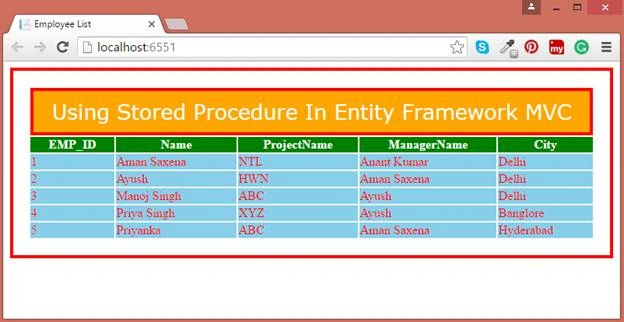
Read more articles on MVC:


DavePosted Jun 28, 2020, 9:34 AM EDT
What if you wish to output extra fields NOT in the table? Why does EF always need the stored procedure's output columns to match a table?
shanthan rubanPosted Jul 24, 2019, 7:27 PM EDT
Thank you.. really useful
vaibhav wadekarPosted Dec 6, 2018, 6:33 AM EST
How to play songs within mvc
Md RaquibPosted Nov 26, 2018, 8:37 AM EST
This is not working code, There is error in this. db.FN_SearchEmployee().ToList(); code generating error.
Jhon HernándezPosted Jun 12, 2018, 12:54 PM EDT
Ah... of course... I don?t have a Data base
Jhon HernándezPosted Jun 12, 2018, 12:53 PM EDT
On public partial class CompanyDBEntities : DbContext
Jhon HernándezPosted Jun 12, 2018, 12:53 PM EDT
Hi, I?m using VS 2013 and this error comes from your code: An exception of type 'System.Data.Entity.Core.EntityException' occurred in EntityFramework.SqlServer.dll but was not handled in user code
Delpin Susai RajTOP 100Posted Aug 28, 2016, 2:35 AM EDT
Good one
Rahul Kumar SaxenaTOP 100Posted Apr 8, 2016, 4:00 AM EDT
Thanks Suraj Sahoo bro
Suraj SahooPosted Apr 7, 2016, 10:21 AM EDT
Nice one Sir. :)
Rahul Kumar SaxenaTOP 100Posted Apr 7, 2016, 9:37 AM EDT
Thanks
Rahul Kumar SaxenaTOP 100Posted Apr 7, 2016, 9:35 AM EDT
Thanks Mohammed Ibrahim
Mohammed IbrahimPosted Apr 7, 2016, 8:47 AM EDT
nice
Rahul Kumar SaxenaTOP 100Posted Apr 7, 2016, 8:37 AM EDT
Thanks Debasis Saha
Rahul Kumar SaxenaTOP 100Posted Apr 7, 2016, 8:37 AM EDT
Thanks Vignesh Mani
Rahul Kumar SaxenaTOP 100Posted Apr 7, 2016, 8:36 AM EDT
Thanks Shridhar Sharma
Debasis SahaTOP 100Posted Apr 7, 2016, 6:25 AM EDT
Nice One..
Vignesh ManiTOP 100Posted Apr 7, 2016, 2:11 AM EDT
Nice one
Shridhar SharmaPosted Apr 7, 2016, 1:46 AM EDT
very well explained sir.
Rahul Kumar SaxenaTOP 100Posted Apr 7, 2016, 12:33 AM EDT
Thanks 2 All
Rahul Kumar SaxenaTOP 100Posted Apr 7, 2016, 12:33 AM EDT
Thanks Imtiyaz Ansari
Rahul Kumar SaxenaTOP 100Posted Apr 7, 2016, 12:33 AM EDT
Thanks Karthikeyan K
Rahul Kumar SaxenaTOP 100Posted Apr 7, 2016, 12:33 AM EDT
Thanks Mohammad Khalid
Rahul Kumar SaxenaTOP 100Posted Apr 7, 2016, 12:32 AM EDT
Thanks Gowtham Rajamanickam
Rahul Kumar SaxenaTOP 100Posted Apr 7, 2016, 12:32 AM EDT
Thanks Jaipal Reddy
Rahul Kumar SaxenaTOP 100Posted Apr 7, 2016, 12:32 AM EDT
Thanks Debendra Dash
Imtiyaz AnsariPosted Apr 7, 2016, 12:30 AM EDT
Nice...
Karthikeyan KPosted Apr 6, 2016, 11:59 PM EDT
Good one sir..Thanks for sharing
Mohammad KhalidPosted Apr 6, 2016, 11:19 PM EDT
Clear steps followed. Very nice
Gowtham RajamanickamTOP 100Posted Apr 6, 2016, 10:58 PM EDT
good one..
Jaipal ReddyPosted Apr 6, 2016, 10:12 PM EDT
Nice one sir. .
Debendra DashPosted Apr 6, 2016, 9:54 PM EDT
Nice one sir.....