
Introduction
Google has updated the policy in Google Developer Blog about user privacy and security. As per the policy, we must remove SMS and Call Log permissions from manifest or else our app will be removed from the Google play store. But our app needs SMS permission for automatically authenticating app users. What is the solution?
Google offers an API named SMS Retriever API to allow our app to read SMS without SMS permission and we need to follow a set of rules while formatting the verification message. In this article, we will learn how to use SMS Retriever API in Kotlin to read SMS and rules need to be followed. If you are new to Kotlin, read my previous articles to read Kotlin from scratch.
Verification Message Format
We should follow the below rules while formatting verification message.
- A message should have a maximum of 140 bytes length.
- Should start with “<#>”.
- Followed by OTP - One Time Pass (code/word).
- 11 character length hash for the app (it is generated by our app).
Example
- <#> Your Example App code is: 123ABC78
- FA+9qCX9VSu
Coding Part
I have detailed the article as in the following steps.
- Step 1: Creating a New Project with Empty Activity.
- Step 2: Setting up the Google Auth Libraries.
- Step 3: Implementation of SMS Retriever API using Kotlin.
Step 1 - Creating a new project with Kotlin
- Open Android Studio and select "Create new project".
- Name the project as your wish and tick the Kotlin Support checkbox.
- Then Select your Activity type (For example, Navigation Drawer Activity, Empty Activity, etc.).
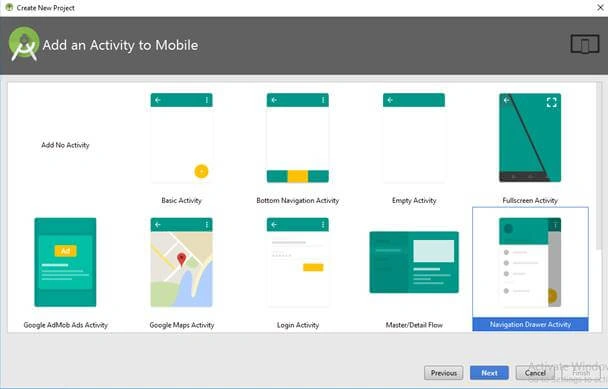
- Then, click the “Finish” button to create a new project in Android Studio.
Step 2 - Setting up the Google Auth Libraries
In this part, we will see how to set up the library for the project.
- Then add the following lines in app level build.gradle file to apply Google services to your project.
- dependencies {
- …
- implementation 'com.google.android.gms:play-services-base:11.6.0'
- implementation 'com.google.android.gms:play-services-auth-api-phone:11.6.0'
- …
- }
- Then click “Sync Now” to setup your project.
- Now the project is ready and no need to add any permissions in Manifest.
Step 3 - Implementation of SMS Retriever API using Kotlin
- Create a user interface to display your OTP read through the API. Open or create “activity_main.xml” and paste the following code snippet.
- <?xml version="1.0" encoding="utf-8"?>
- <android.support.constraint.ConstraintLayout xmlns:android="http://schemas.android.com/apk/res/android"
- xmlns:app="http://schemas.android.com/apk/res-auto"
- xmlns:tools="http://schemas.android.com/tools"
- android:layout_width="match_parent"
- android:layout_height="match_parent"
- tools:context="com.androidmad.smsretrieverapisample.MainActivity">
- <EditText
- android:id="@+id/editText"
- android:layout_width="match_parent"
- android:layout_height="wrap_content"
- android:layout_marginLeft="20dp"
- android:layout_marginRight="20dp"
- app:layout_constraintBottom_toBottomOf="parent"
- app:layout_constraintLeft_toLeftOf="parent"
- app:layout_constraintRight_toRightOf="parent"
- app:layout_constraintTop_toTopOf="parent" />
- <Button
- android:onClick="onBtnResendClick"
- android:id="@+id/btn_restart"
- android:text="Resend"
- android:layout_width="0dp"
- android:layout_height="wrap_content"
- android:layout_marginLeft="20dp"
- android:layout_marginRight="20dp"
- app:layout_constraintBottom_toBottomOf="parent"
- app:layout_constraintEnd_toEndOf="parent"
- app:layout_constraintHorizontal_bias="0.0"
- app:layout_constraintLeft_toLeftOf="parent"
- app:layout_constraintRight_toRightOf="parent"
- app:layout_constraintStart_toStartOf="parent"
- app:layout_constraintTop_toTopOf="@id/editText"
- app:layout_constraintVertical_bias="0.247" />
- </android.support.constraint.ConstraintLayout>
- We need to create a helper class to provide the hash value for our app to construct the verification message. Create a Kotlin class file named as “AppSignatureHelper.kt” and paste the following code snippet which is helpful to create an 11 character length hash for our application.
- package com.androidmad.smsretrieverapisample
- import android.annotation.SuppressLint
- import android.content.Context
- import android.content.ContextWrapper
- import android.content.pm.PackageManager
- import android.os.Build
- import android.support.annotation.RequiresApi
- import android.util.Base64
- import android.util.Log
- import java.nio.charset.StandardCharsets
- import java.security.MessageDigest
- import java.security.NoSuchAlgorithmException
- import java.util.*
- class AppSignatureHelper(context: Context) : ContextWrapper(context) {
- /**
- * Get all the app signatures for the current package
- *
- * @return
- */
- // Get all package signatures for the current package
- // For each signature create a compatible hash
- val appSignatures: ArrayList<String>
- @SuppressLint("PackageManagerGetSignatures")
- @RequiresApi(api = Build.VERSION_CODES.KITKAT)
- get() {
- val appCodes = ArrayList<String>()
- try {
- val packageName = packageName
- val packageManager = packageManager
- val signatures = packageManager.getPackageInfo(packageName,
- PackageManager.GET_SIGNATURES).signatures
- signatures
- .mapNotNull { hash(packageName, it.toCharsString()) }
- .mapTo(appCodes) { String.format("%s", it) }
- } catch (e: PackageManager.NameNotFoundException) {
- Log.v(TAG, "Unable to find package to obtain hash.", e)
- }
- return appCodes
- }
- companion object {
- val TAG = AppSignatureHelper::class.java.simpleName!!
- private val HASH_TYPE = "SHA-256"
- private val NUM_HASHED_BYTES = 9
- private val NUM_BASE64_CHAR = 11
- @RequiresApi(api = Build.VERSION_CODES.KITKAT)
- private fun hash(packageName: String, signature: String): String? {
- val appInfo = packageName + " " + signature
- try {
- val messageDigest = MessageDigest.getInstance(HASH_TYPE)
- messageDigest.update(appInfo.toByteArray(StandardCharsets.UTF_8))
- var hashSignature = messageDigest.digest()
- // truncated into NUM_HASHED_BYTES
- hashSignature = Arrays.copyOfRange(hashSignature, 0, NUM_HASHED_BYTES)
- // encode into Base64
- var base64Hash = Base64.encodeToString(hashSignature, Base64.NO_PADDING or Base64.NO_WRAP)
- base64Hash = base64Hash.substring(0, NUM_BASE64_CHAR)
- Log.v(TAG + "sms_sample_test", String.format("pkg: %s -- hash: %s", packageName, base64Hash))
- return base64Hash
- } catch (e: NoSuchAlgorithmException) {
- Log.v(TAG + "sms_sample_test", "hash:NoSuchAlgorithm", e)
- }
- return null
- }
- }
- }
- Then, we need to get the hash from the class by creating an object for the helper class and calling the hash creation method which returns the value.
- // This code requires one time to get Hash keys do comment and share key
- val appSignature = AppSignatureHelper(this)
- Log.v("AppSignature", appSignature.appSignatures.toString())
- Create a Custom BroadCastReceiver class named as “MySMSBroadcastReceiver.kt” and add the following code snippets.
- class MySMSBroadcastReceiver : BroadcastReceiver() {
- private var otpReceiver: OTPReceiveListener? = null
- fun initOTPListener(receiver: OTPReceiveListener) {
- this.otpReceiver = receiver
- }
- override fun onReceive(context: Context, intent: Intent) {
- if (SmsRetriever.SMS_RETRIEVED_ACTION == intent.action) {
- val extras = intent.extras
- val status = extras!!.get(SmsRetriever.EXTRA_STATUS) as Status
- when (status.statusCode) {
- CommonStatusCodes.SUCCESS -> {
- // Get SMS message contents
- var otp: String = extras.get(SmsRetriever.EXTRA_SMS_MESSAGE) as String
- Log.d("OTP_Message", otp)
- // Extract one-time code from the message and complete verification
- // by sending the code back to your server for SMS authenticity.
- // But here we are just passing it to MainActivity
- if (otpReceiver != null) {
- otp = otp.replace("<#> ", "").split("\n".toRegex()).dropLastWhile { it.isEmpty() }.toTypedArray()[0]
- otpReceiver!!.onOTPReceived(otp)
- }
- }
- CommonStatusCodes.TIMEOUT ->
- // Waiting for SMS timed out (5 minutes)
- // Handle the error ...
- if (otpReceiver != null)
- otpReceiver!!.onOTPTimeOut()
- }
- }
- }
- interface OTPReceiveListener {
- fun onOTPReceived(otp: String)
- fun onOTPTimeOut()
- }
- }
- Here, OTPReceiveListener is an interface used to call back the events from broad cast receiver. Then open your Activity and implement OTPReceiverListener.
- Register the receiver in AndroidManifest.xml with SMS_RETRIEVED action.
- <receiver android:name=".MySMSBroadcastReceiver" android:exported="true">
- <intent-filter>
- <action android:name="com.google.android.gms.auth.api.phone.SMS_RETRIEVED" />
- </intent-filter>
- </receiver>
- Then, start the SmsRetriever API as shown in below. Also, register your broadcast receiver with SmsRetriever.SMS_RETRIEVED_ACTION using intent filter.
- private fun startSMSListener() {
- try {
- smsReceiver = MySMSBroadcastReceiver()
- smsReceiver!!.initOTPListener(this)
- val intentFilter = IntentFilter()
- intentFilter.addAction(SmsRetriever.SMS_RETRIEVED_ACTION)
- this.registerReceiver(smsReceiver, intentFilter)
- val client = SmsRetriever.getClient(this)
- val task = client.startSmsRetriever()
- task.addOnSuccessListener {
- // API successfully started
- }
- task.addOnFailureListener {
- // Fail to start API
- }
- } catch (e: Exception) {
- e.printStackTrace()
- }
- }
You will receive the OTP in call back methods implemented in your Activity.
- override fun onOTPReceived(otp: String) {
- //showToast("OTP Received: " + otp)
- editText.setText(otp)
- if (smsReceiver != null) {
- LocalBroadcastManager.getInstance(this).unregisterReceiver(smsReceiver)
- }
- }
- override fun onOTPTimeOut() {
- showToast("OTP Time out")
- }
Full Code
You can find the full code implementation of the Activity here.
- class MainActivity : AppCompatActivity(), OTPReceiveListener {
- private var smsReceiver: MySMSBroadcastReceiver? = null
- override fun onCreate(savedInstanceState: Bundle?) {
- super.onCreate(savedInstanceState)
- setContentView(R.layout.activity_main)
- startSMSListener()
- }
- /**
- * Starts SmsRetriever, which waits for ONE matching SMS message until timeout
- * (5 minutes). The matching SMS message will be sent via a Broadcast Intent with
- * action SmsRetriever#SMS_RETRIEVED_ACTION.
- */
- private fun startSMSListener() {
- try {
- smsReceiver = MySMSBroadcastReceiver()
- smsReceiver!!.initOTPListener(this)
- val intentFilter = IntentFilter()
- intentFilter.addAction(SmsRetriever.SMS_RETRIEVED_ACTION)
- this.registerReceiver(smsReceiver, intentFilter)
- val client = SmsRetriever.getClient(this)
- val task = client.startSmsRetriever()
- task.addOnSuccessListener {
- // API successfully started
- }
- task.addOnFailureListener {
- // Fail to start API
- }
- } catch (e: Exception) {
- e.printStackTrace()
- }
- }
- fun onBtnResendClick(view: View){
- startSMSListener()
- }
- override fun onOTPReceived(otp: String) {
- //showToast("OTP Received: " + otp)
- editText.setText(otp)
- if (smsReceiver != null) {
- LocalBroadcastManager.getInstance(this).unregisterReceiver(smsReceiver)
- }
- }
- override fun onOTPTimeOut() {
- showToast("OTP Time out")
- }
- override fun onDestroy() {
- super.onDestroy()
- if (smsReceiver != null) {
- LocalBroadcastManager.getInstance(this).unregisterReceiver(smsReceiver)
- }
- }
- private fun showToast(msg: String) {
- Toast.makeText(this, msg, Toast.LENGTH_SHORT).show()
- }
- }
Reference
|
SMS Retriever API for Android
|
https://developers.google.com/identity/sms-retriever/overview
|
|
Google Announcement on Security Policy
|
https://android-developers.googleblog.com/2019/01/reminder-smscall-log-policy-changes.html
|
If you have any doubts or need any help, contact me.
Download Code


Narayana LekkalaPosted Sep 5, 2020, 12:39 AM EDT
I have followed your code but OnRecieve method is caaling after time out . Please help me here.
Martin MatomoPosted Sep 17, 2019, 12:50 PM EDT
Thank you for this post and your site well done. I am a beginner in Kotlin, I would like to develop an application for my Wordpress site with the REST API. Can you help me if he wants more?
Chu DuPosted Jul 23, 2019, 3:20 AM EDT
Otp for xamarin android Please!