
Have you ever opened Amazon or Flipkart during a big electronics sale, added a phone to your wishlist, and waited for the sale to begin? But the moment the clock hits zero, you see the dreaded message: Out of Stock.
It makes you wonder how thousands of people managed to buy the product before you even got a chance to click the button.
Well, not everyone is sitting in front of a screen, refreshing the page and waiting for the right moment. Some are using automated bots that can send requests much faster than any human.
And this is where an interesting backend concept comes into play: Rate Limiting.
What happens when there are no limits?
Imagine an online shopping website during a major sale. Thousands of customers are trying to purchase the same phone at the same time.
A normal user might click the Buy Now button once or twice. But an automated script can send hundreds or even thousands of requests within seconds.
Now imagine the server receiving all those requests without any restrictions.
Two major problems can occur:
1.The server struggles to handle the traffic
Every request needs server resources. When too many requests arrive within a very short period, the server can become overloaded.
Pages may take longer to load, checkout might stop working, and in extreme cases, the entire application could become unavailable.
2. Automated bots get an unfair advantage
Bots can send purchase attempts much faster than humans. If the application doesn't have proper protections, automated traffic can consume resources and potentially gain an advantage over genuine customers.
So, how do websites control this?
The solution: Rate Limiting
This is where Rate Limiting comes in.
Think about your bank's ATM. Your bank might allow only a certain number of withdrawals within a day. Even if you have enough money in your account, you cannot keep making unlimited withdrawals.
Rate Limiting follows a similar idea, but instead of controlling ATM withdrawals, it controls how frequently a client can send requests to a server.
For example, a website might set a rule:
A user can make a maximum of 5 requests per second to a particular API.
If the user exceeds that limit, the server temporarily rejects additional requests.
The goal isn't to stop people from using the application. It's to prevent excessive traffic from affecting everyone else.
How does Rate Limiting actually work?
Let's understand what happens when a request reaches a server.
1. First, the server identifies the user
When you interact with a website, the backend can use different identifiers to understand where a request is coming from.
Some common examples include:
IP address
Logged-in user ID
Session ID or authentication token
For example, when you click the Buy Now button, the backend can associate that request with your user account or session.
This helps the application track request activity.
2. The server keeps track of requests
Once the user is identified, the rate limiter checks how many requests they have already made within a particular time window.
Let's say the API allows 5 requests per second.
Here's a simple example:
Request 1: Allowed
Request 2: Allowed
Request 3: Allowed
Request 4: Allowed
Request 5: Allowed
Request 6: Rejected
The server maintains this count using a tracking mechanism. Depending on the application, this could be implemented using an in-memory store, Redis, or another suitable storage system.
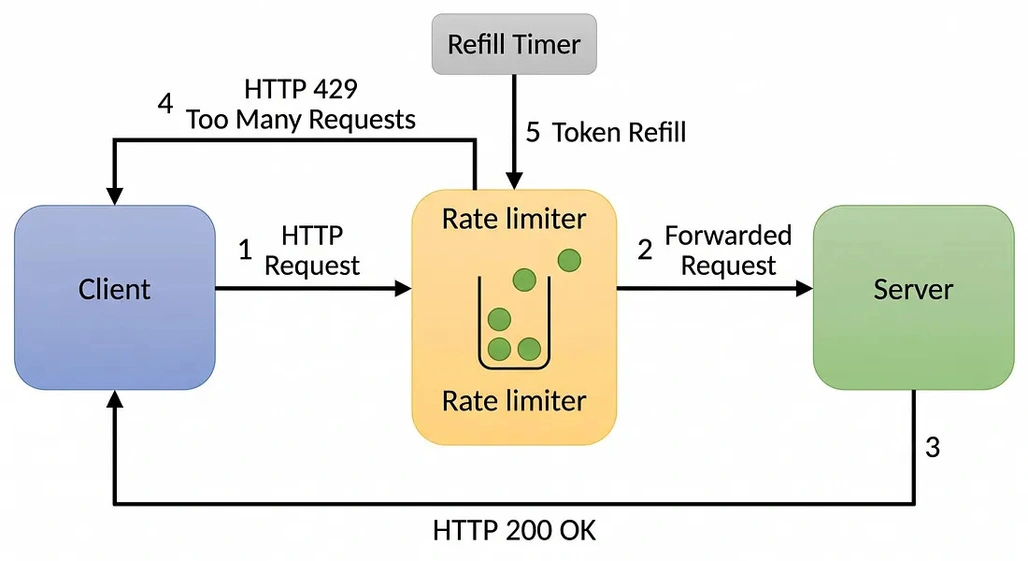
3. The server decides whether to accept or reject the request
Now comes the important part.
If the incoming request is within the configured limit, the application allows it to continue.
But if the limit has already been reached, the rate limiter rejects the request.
In most HTTP APIs, the server responds with:
HTTP 429 – Too Many Requests
This tells the client that it has sent too many requests within a given period.
The server can also include a Retry-After header to indicate when the client can try again.
One important detail: rate limiting doesn't necessarily mean the server never receives or reads the request. The request must reach the component enforcing the limit, such as an API gateway or middleware, before it can be rejected.
Does Rate Limiting completely stop bots?
Not really.
Rate Limiting is an important layer of protection, but it isn't a magic solution that blocks every bot.
For example, a bot might distribute its requests across multiple IP addresses or use different accounts to avoid a simple per-IP limit.
That's why real-world applications often combine rate limiting with other security measures, such as bot detection, CAPTCHA, authentication checks, and purchase restrictions.
The exact implementation depends on the application and the type of traffic it needs to handle.
Final Thoughts
The next time you see an API return a 429 error, remember that it isn't necessarily a server failure. It might simply be the application's way of saying, "You've made too many requests. Give me a moment."
Rate Limiting may sound like a small backend feature, but it plays an important role in keeping applications stable, protecting APIs from excessive traffic, and ensuring that resources are available to genuine users.
Behind a simple Buy Now button, there are several backend mechanisms working together. Rate Limiting is one of them.

Join the conversation! Your thoughts help the community grow.