
Introduction
The key combination of "CTRL+R" is used to show or hide the query results pane. Sometimes we do not require a query results pane and therefore it can be hidden using the keyboard shortcut keys "CTRL+R". However, there is no direct option to hide this pane.
Problem statement
Recently, I had installed a fresh copy of SQL Server 2012 Express Edition with advanced services in my machine. Then, I loaded SQL Server Management Studio and executed a sample query. Let us say that after analyzing the query results, I wanted changes in my query and did not require the query result. Generally, in this case we will use the keyboard combination CTRL+R to hide the results pane. But, here the result pane was visible even after pressing the key CTRL+R.
Solutions
Solution: 1
The following is the procedure to get the shortcuts working again.
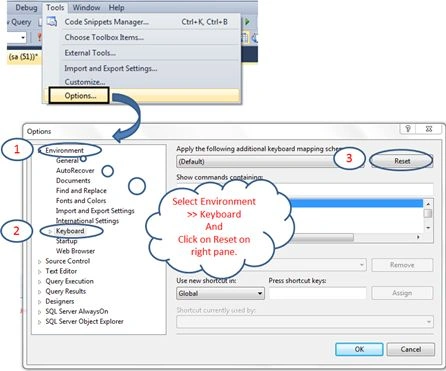
- Go to the Tools Menu in SSMS and Select Options.
- Select Keyboard section under the Environment tab.
- Select "Default" from the drop down under "Apply the following additional keyboard mapping scheme".
- Click Reset.
Solution: 2
We can also assign our custom shortcut keys. Here's another way to get the shortcut working again.
- Go to the Tools Menu in SSMS and Select Options.
- Select the Keyboard section under the Environments tab.
- Search for the text “Window.ShowResultsPane” using the “Show commands containing” TextBox.
- Select the “SQL Query Editor” option from the dropdown under “Use new shortcut in” and type CTRL+R in “Press shortcut keys” TextBox. Now, click assign.

I hope this helps!


Deva RajanPosted Aug 12, 2019, 9:29 PM EDT
Thanks. It helps to solve the problem.
Srinivas PPosted Jun 20, 2019, 9:14 PM EDT
Small trick but more helpful
SubashPosted Oct 26, 2016, 12:05 AM EDT
Thanks for sharing sir
Santhakumar MunuswamyPosted May 12, 2015, 11:18 AM EDT
Thanks for good one
Gowtham RajamanickamTOP 100Posted May 12, 2015, 9:16 AM EDT
good
NitinPosted May 12, 2015, 8:50 AM EDT
informative
Former memberPosted May 12, 2015, 4:41 AM EDT
Good One
Pankaj Kumar ChoudharyTOP 100Posted May 12, 2015, 3:47 AM EDT
Thanks Sir I m really facing this problem in sqlserver 2012.... thanks for sharing
Sibeesh VenuTOP 100Posted May 12, 2015, 2:26 AM EDT
Good one