
A React Fragment lets you group multiple elements without adding an extra DOM node (like a <div>).
Normally in React, every component must return one root element.
For example
return (
  <h1>Hello</h1>
);
But it's hardly the case that you only return single, you'd have multiple elements.
return (
  <h1>Hello</h1>
  <p>World</p>
);
However, React will through compile time error:

To fix it, you might wrap both elements in a <div>
return (
  <div>
    <h1>Hello</h1>
    <p>World</p>
  </div>
);
But this adds an unnecessary <div> to the HTML structure, which can cause layout or styling issues.
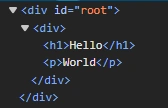
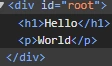
A React Fragment solves this by acting as an invisible wrapper.
return (
  <React.Fragment>
    <h1>Hello</h1>
    <p>World</p>
  </React.Fragment>
);
Short Syntax
return (
  <>
    <h1>Hello</h1>
    <p>World</p>
  </>
);
Other use cases
While the primary use case of React Fragments is to return multiple elements without adding extra DOM nodes, there are actually a few additional, use cases beyond that. Let’s explore them.
1. Rendering Lists Without Extra Nodes
When you render lists, you might want to group multiple sibling elements for each item without creating a wrapper element (like a <div> or <li>).
For example
function ItemList() {
  const items = [
    { id: 1, name: 'Apple', price: '$2' },
    { id: 2, name: 'Banana', price: '$1' }
  ];

  return (
    <table>
      <tbody>
        {items.map(item => (
          <React.Fragment key={item.id}>
            <tr>
              <td>{item.name}</td>
              <td>{item.price}</td>
            </tr>
          </React.Fragment>
        ))}
      </tbody>
    </table>
  );
}
Note: <React.Fragment key={item.id}> lets you use a key (unlike the shorthand <> syntax), which is essential when rendering lists.
If you used plain <>, you couldn’t add the key prop.
2. Component Composition and Conditional Rendering
You can use fragments to conditionally return multiple elements from a component or within JSX expressions:\
function Greeting({ user }) {
  return (
    <>
      {user ? (
        <>
          <h1>Welcome back, {user.name}!</h1>
          <p>You have {user.notifications} new messages.</p>
        </>
      ) : (
        <>
          <h1>Welcome!</h1>
          <p>Please log in.</p>
        </>
      )}
    </>
  );
}
Join the conversation! Your thoughts help the community grow.