
The Windows aggregate functions are normal aggregate functions, the normal aggregate functions have some limitations.
In the normal aggregate functions we need to use a Group by clause or hide some of the columns.
The normal aggregate functions like Sum, Max, Min, Avg and Count can return the grouped data, but in the Windows aggregate functions they can return the row by row aggregated data.
Demo
- CREATE TABLE DBO.SALES (
- PROD_ID INT, SALES_YEAR INT, SALES_AMOUNT INT
- ) INSERT INTO DBO.SALES(
- PROD_ID, SALES_YEAR, SALES_AMOUNT
- )
- VALUES
- (1, 2009, 10000) INSERT INTO DBO.SALES(
- PROD_ID, SALES_YEAR, SALES_AMOUNT
- )
- VALUES
- (1, 2010, 9000) INSERT INTO DBO.SALES(
- PROD_ID, SALES_YEAR, SALES_AMOUNT
- )
- VALUES
- (1, 2011, 8000) INSERT INTO DBO.SALES(
- PROD_ID, SALES_YEAR, SALES_AMOUNT
- )
- VALUES
- (1, 2012, 7000) INSERT INTO DBO.SALES(
- PROD_ID, SALES_YEAR, SALES_AMOUNT
- )
- VALUES
- (1, 2013, 14000) INSERT INTO DBO.SALES(
- PROD_ID, SALES_YEAR, SALES_AMOUNT
- )
- VALUES
- (1, 2014, 18000) INSERT INTO DBO.SALES(
- PROD_ID, SALES_YEAR, SALES_AMOUNT
- )
- VALUES
- (1, 2015, 15000) INSERT INTO DBO.SALES(
- PROD_ID, SALES_YEAR, SALES_AMOUNT
- )
- VALUES
- (2, 2013, 12000) INSERT INTO DBO.SALES(
- PROD_ID, SALES_YEAR, SALES_AMOUNT
- )
- VALUES
- (2, 2014, 8000) INSERT INTO DBO.SALES(
- PROD_ID, SALES_YEAR, SALES_AMOUNT
- )
- VALUES
- (2, 2015, 16000) INSERT INTO DBO.SALES(
- PROD_ID, SALES_YEAR, SALES_AMOUNT
- )
- VALUES
- (3, 2012, 7000) INSERT INTO DBO.SALES(
- PROD_ID, SALES_YEAR, SALES_AMOUNT
- )
- VALUES
- (3, 2013, 8000) INSERT INTO DBO.SALES(
- PROD_ID, SALES_YEAR, SALES_AMOUNT
- )
- VALUES
- (3, 2014, 9700) INSERT INTO DBO.SALES(
- PROD_ID, SALES_YEAR, SALES_AMOUNT
- )
- VALUES
- (3, 2015, 12500)
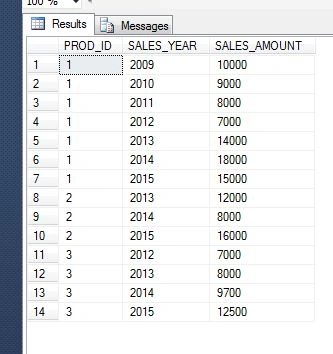
- SELECT
- *
- FROM
- DBO.SALES
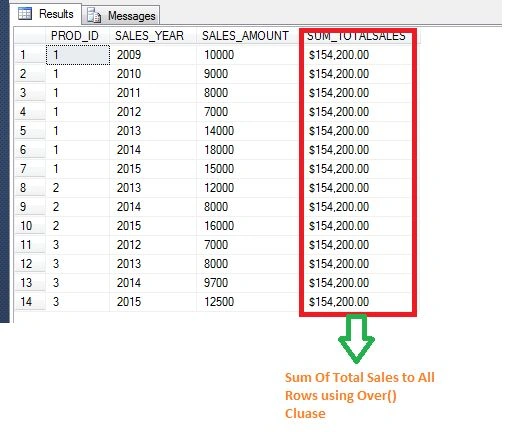
- --SUM OF SALES TOTAL TO ALL ROWS USING WINDOW AGGREGATE FUNCTION
- SELECT *, FORMAT(SUM(SALES_AMOUNT) OVER(),'C') [SUM_TOTALSALES] FROM DBO.SALES
- SELECT *, (SELECT FORMAT(SUM(SALES_AMOUNT) ,'C') FROM DBO.SALES) AS [SUM_TOTALSALES] FROM DBO.SALES
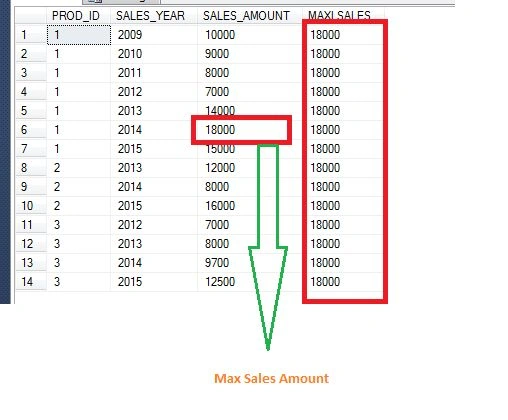
- --MAX OF SALES TOTAL FROM ROWS TO ALL ROWS USING WINDOW AGGREGATE FUNCTION
- SELECT *, MAX(SALES_AMOUNT) OVER() [MAXLSALES] FROM DBO.SALES
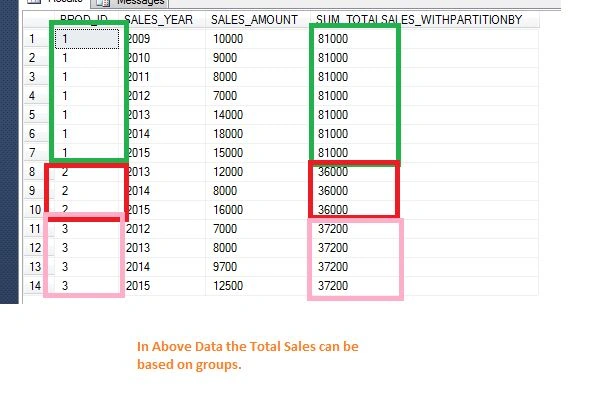
We can also specify the partition clause in the over function.
- --SUM OF SALES TOTAL TO ALL ROWS USING WINDOW AGGREGATE FUNCTION WITH PARTITION BY
- SELECT
- *,
- SUM(SALES_AMOUNT) OVER(PARTITION BY PROD_ID) [SUM_TOTALSALES_WITHPARTITIONBY]
- FROM
- DBO.SALES
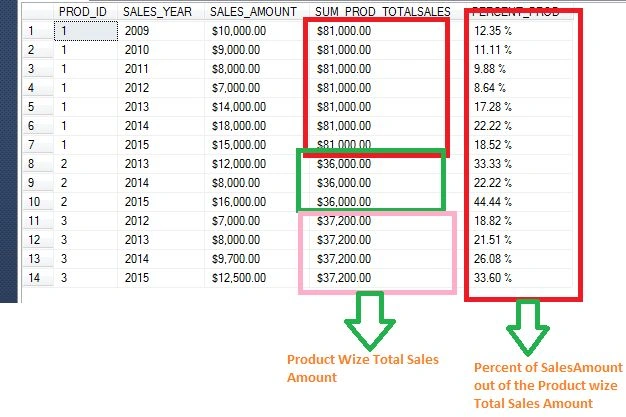
- SELECT
- PROD_ID,
- SALES_YEAR,
- FORMAT(SALES_AMOUNT, 'C') AS SALES_AMOUNT,
- FORMAT(
- SUM(SALES_AMOUNT) OVER(PARTITION BY PROD_ID),
- 'C'
- ) [SUM_PROD_TOTALSALES],
- FORMAT(
- CAST(SALES_AMOUNT AS FLOAT)/ SUM(
- CAST(SALES_AMOUNT AS FLOAT)
- ) OVER(PARTITION BY PROD_ID),
- 'P'
- ) AS [PERCENT_PROD]
- FROM
- DBO.SALES
- SELECT
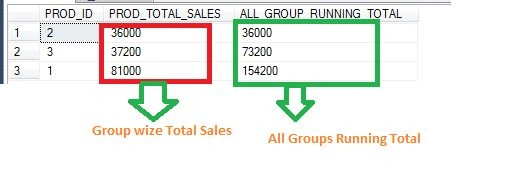
- PROD_ID,
- SUM(SALES_AMOUNT) AS [PROD_TOTAL_SALES],
- SUM(
- SUM(SALES_AMOUNT)
- ) OVER(
- ORDER BY
- SUM(SALES_AMOUNT)
- ) AS [ALL_GROUP_RUNNING_TOTAL]
- FROM
- DBO.SALES
- GROUP BY
- PROD_ID
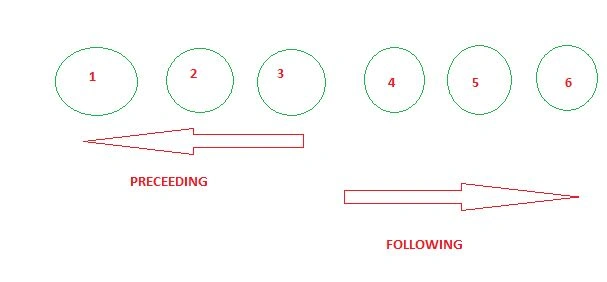
Window aggregate functions can support Window frame clause.
Window frame clause can be:
- UNBOUNDED PRECEDING OR FOLLOWING: from the beginning or ending of the rows-based partition by clause.
- CURRENT ROW: the current row.
- N ROWS PRECEEDING OR FOLLOWING: N rows before or after.
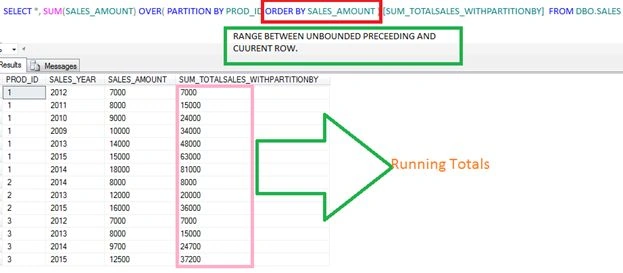
When we define a Windows aggregate function if we provide an order by clause without a frame clause then by default SQL Server provides RANGE BETWEEN UNBOUNDED PRECEEDING AND CUURENT ROW.
- SELECT *, SUM(SALES_AMOUNT) OVER( PARTITION BY PROD_ID ORDER BY SALES_AMOUNT ) [SUM_TOTALSALES_WITHPARTITIONBY] FROM DBO.SALES
The following shows the Sum of previous running totals with a partition by clause:
- SELECT *, SUM(SALES_AMOUNT) OVER( PARTITION BY PROD_ID ORDER BY SALES_AMOUNT
- ROWS BETWEEN UNBOUNDED PRECEDING AND CURRENT ROW ) [SUM_TOTALSALES_WITHPARTITIONBY] FROM DBO.SALES
- SELECT *, SUM(SALES_AMOUNT) OVER( PARTITION BY PROD_ID ORDER BY SALES_AMOUNT
- ROWS UNBOUNDED PRECEDING ) [SUM_TOTALSALES_WITHPARTITIONBY] FROM DBO.SALES
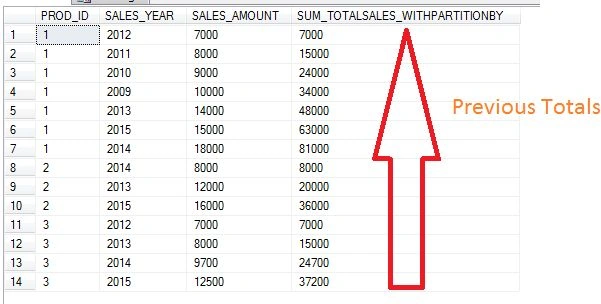
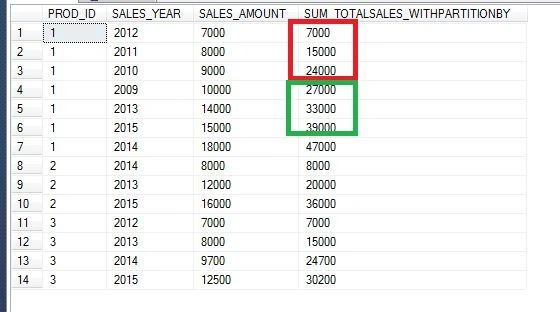
The following is a sample of Sum of the next running totals with a partition by clause:
- SELECT *, SUM(SALES_AMOUNT) OVER( PARTITION BY PROD_ID ORDER BY SALES_AMOUNT
- ROWS BETWEEN CURRENT ROW AND UNBOUNDED FOLLOWING ) [SUM_TOTALSALES_WITHPARTITIONBY] FROM DBO.SALES

The following is a sample of Sum of the Previous 2 rows totals and the current row:
- SELECT *, SUM(SALES_AMOUNT) OVER( PARTITION BY PROD_ID ORDER BY SALES_AMOUNT
- ROWS BETWEEN 2 PRECEDING AND CURRENT ROW ) [SUM_TOTALSALES_WITHPARTITIONBY] FROM DBO.SALES


Rakesh KalluriPosted Jul 29, 2015, 3:47 AM EDT
Thanks sibeesh venu
Sibeesh VenuTOP 100Posted Jul 29, 2015, 2:09 AM EDT
Nice Share.
Rakesh KalluriPosted Jul 28, 2015, 11:04 PM EDT
Thanks Debasis Saha
Debasis SahaTOP 100Posted Jul 28, 2015, 10:04 PM EDT
Nice Article..
Rakesh KalluriPosted Jul 28, 2015, 9:58 PM EDT
Thanks Rajeesh Menoth.
Rakesh KalluriPosted Jul 28, 2015, 9:58 PM EDT
Thanks Nilesh Jadav
Rakesh KalluriPosted Jul 28, 2015, 9:58 PM EDT
Thanks Rakesh Chavda
Rakesh KalluriPosted Jul 28, 2015, 9:57 PM EDT
Thanks Gopi Chand
Rajeesh MenothPosted Jul 28, 2015, 8:17 PM EDT
Good One...
Nilesh JadavPosted Jul 28, 2015, 8:05 PM EDT
NIce article sir
RakeshPosted Jul 28, 2015, 7:20 PM EDT
Good one
Gopi ChandPosted Jul 28, 2015, 7:10 PM EDT
Nice one
Rakesh KalluriPosted Jul 28, 2015, 6:19 PM EDT
Thanks van lai
Rakesh KalluriPosted Jul 28, 2015, 6:19 PM EDT
Thanks santhakumar .
Van LaiPosted Jul 28, 2015, 6:15 PM EDT
Nice article.
Santhakumar MunuswamyPosted Jul 28, 2015, 11:08 AM EDT
Good. Thanks for sharing