Description:
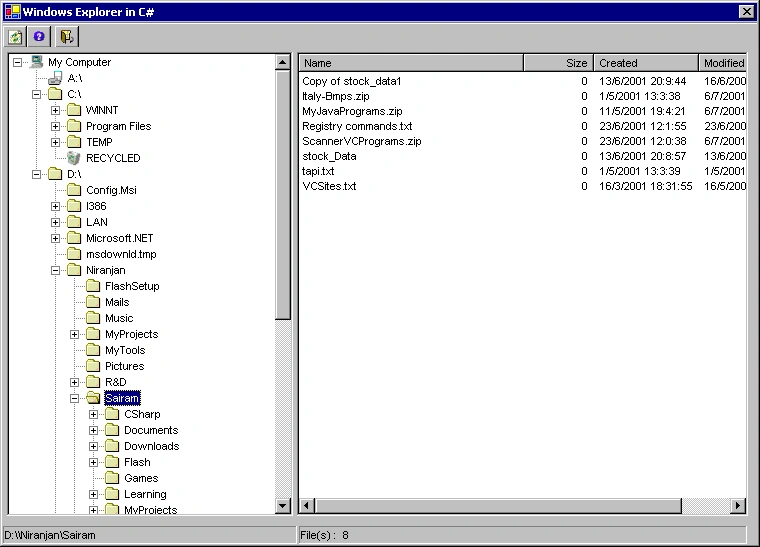
I have developed a Dialog based Windows Explorer Application in C# using Visual Studio.NET. This application gives you a picture of how to use Treeview, Listview, Imagelist, Toolbar, Statusbar, Tooltip, LinkLabel controls. This also gives you a picture on how to use System.IO namespace for Directory and file manipulations. Also throws light on System.Globalization for date formating. The treeview population is done using a PopulateFolders() recursive function. Floppy drive is read only when the tree node is clicked. The application doesn't create any folder or file. This is just a read only application of your hard-drive. Planning to add more features in next version.
Source Code:
The complete source code and executable is available in the WinExplorer.zip file. The main window code is available in WExplorer.cs


Ahmad HaghighiPosted Mar 19, 2013, 2:05 AM EDT
tnx
Nguyen vuongPosted Apr 4, 2011, 12:05 AM EDT
thank you very much
shashi mishraPosted Aug 27, 2010, 7:03 AM EDT
I am having problem in using imagelist with listview.actually I need to show files of the selected directory from the treeview on the listview with icons.so tell me the procedure.
ShruthiPosted May 31, 2010, 4:24 AM EDT
Hi...Thanks for the code..But how to create new files and folders?
dsg fgdgPosted Oct 15, 2009, 6:40 PM EDT
it is not good~
Rolando BalladaresPosted Jul 29, 2009, 2:27 PM EDT
Yeah I noticed too, it takes a long time to load, is there a reason for it, I'll have to see.
Rolando BalladaresPosted Jul 29, 2009, 2:25 PM EDT
Thankyou this might be of help, I've been stuck in a class project because of this!!! :s
Tugbay AtillaPosted Aug 21, 2008, 3:09 AM EDT
like previos comment it is time consumer and why did you get all folders on startup.
Tugbay AtillaPosted Aug 21, 2008, 3:09 AM EDT
like previos comment it is time consumer and why did you get all folders on startup.
Dipak SalvePosted Feb 12, 2008, 11:31 PM EST
It takes the lots of time to open the application .Why?
sreenivas keerthiPosted Jan 7, 2008, 12:45 AM EST
hai niranjan kumar.....!!! this code is nice and simple to understand. if we able open the files in the list view then it became very nice.