
Before reading this article, I highly recommend reading my previous articles:
- Windows Phone development for Beginner - Part 1
- Windows Phone development for Beginner - Part 2
- Windows Phone Development for Beginner - Part 3
In this part, I will explain how to write an application and access a TextBox value in Windows Phone.
Let's start to write the application.
Write first Application
Select New project from the File menu and select Windows Phone applicaton. Add three TextBoxes to the grid panel and add one button and two textboxes for entering values and a third TextBox for the result.
MainPage.xaml
- <!--LayoutRoot is the root grid where all page content is placed-->
- <Grid x:Name="LayoutRoot" Background="Transparent">
- <Grid.RowDefinitions>
- <RowDefinition Height="Auto"/>
- <RowDefinition Height="*"/>
- </Grid.RowDefinitions>
- <!--TitlePanel contains the name of the application and page title-->
- <StackPanel x:Name="TitlePanel" Grid.Row="0" Margin="12,17,0,28">
- <TextBlock x:Name="ApplicationTitle" Text="MY APPLICATION" Style="{StaticResource PhoneTextNormalStyle}"/>
- <TextBlock x:Name="PageTitle" Text="1st Application" Margin="9,-7,0,0" Style="{StaticResource PhoneTextTitle1Style}"/>
- </StackPanel>
- <!--ContentPanel - place additional content here-->
- <Grid x:Name="ContentPanel" Grid.Row="1" Margin="12,0,12,0">
- <TextBlock x:Name="lblfirst" Text="Enter 1st Number" Margin="25,38,241,527"></TextBlock>
- <TextBlock x:Name="lblsecond" Text="Enter 2nd Number" Margin="25,98,241,467"></TextBlock>
- <TextBlock x:Name="lblresult" Text="Result" Margin="25,161,241,404"></TextBlock>
- <TextBox x:Name="txtfirst" Margin="225,24,6,508"></TextBox>
- <TextBox x:Name="txtsecond" Margin="225,84,6,450"></TextBox>
- <TextBox x:Name="txtresult" Margin="225,147,6,381"></TextBox>
- <Button x:Name="btnadd" Height="95" Content="Addition" Margin="0,232,0,280" Click="btnadd_Click"></Button>
- </Grid>
- </Grid

Figure 1
Let's write the code for the button click event. The first and second TextBoxes accept the user input data and the third TextBox shows the addition of the two numbers.
MainPage.xaml.cs
- using System;
- using System.Collections.Generic;
- using System.Linq;
- using System.Net;
- using System.Windows;
- using System.Windows.Controls;
- using System.Windows.Documents;
- using System.Windows.Input;
- using System.Windows.Media;
- using System.Windows.Media.Animation;
- using System.Windows.Shapes;
- using Microsoft.Phone.Controls;
- namespace WriteFirstApplication
- {
- public partial class MainPage : PhoneApplicationPage
- {
- // Constructor
- public MainPage()
- {
- InitializeComponent();
- }
- private void btnadd_Click(object sender, RoutedEventArgs e)
- {
- int result = Convert.ToInt32(txtfirst.Text)+Convert.ToInt32(txtsecond.Text);
- txtresult.Text = result.ToString();
- }
- }
- }
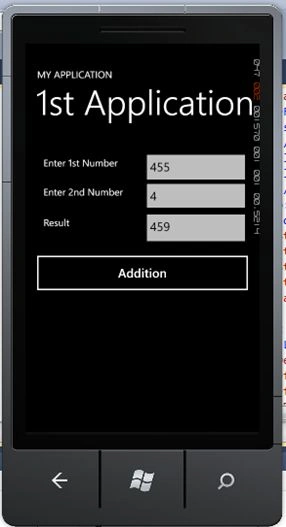
Figure 2
Now write one more code for showing the result in the messagebox. You can add only one line for the message box.
MessageBox.Show(“YourContent”)
MainPage.xaml.cs
- using System;
- using System.Collections.Generic;
- using System.Linq;
- using System.Net;
- using System.Windows;
- using System.Windows.Controls;
- using System.Windows.Documents;
- using System.Windows.Input;
- using System.Windows.Media;
- using System.Windows.Media.Animation;
- using System.Windows.Shapes;
- using Microsoft.Phone.Controls;
- namespace WriteFirstApplication
- {
- public partial class MainPage : PhoneApplicationPage
- {
- // Constructor
- public MainPage()
- {
- InitializeComponent();
- }
- private void btnadd_Click(object sender, RoutedEventArgs e)
- {
- int result = Convert.ToInt32(txtfirst.Text)+Convert.ToInt32(txtsecond.Text);
- MessageBox.Show("Addition of "+ txtfirst.Text +"&"+ txtsecond.Text +"=" +result.ToString());
- }
- }
- }
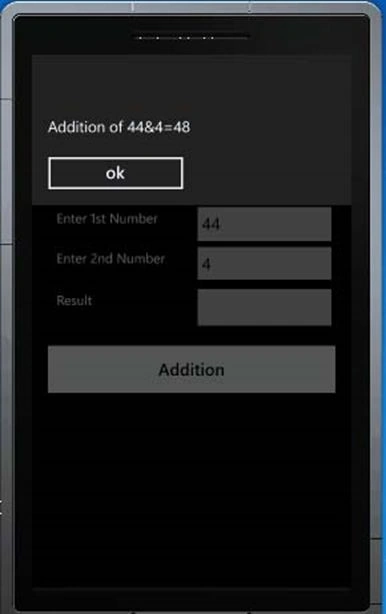
Figure 3


Ibrahim ErsoyPosted Mar 2, 2016, 10:11 PM EST
Nice one Nipesh :) Keep writing
sreenivasa kPosted Aug 17, 2015, 2:22 PM EDT
nice
Pankaj Kumar ChoudharyTOP 100Posted Aug 17, 2015, 5:49 AM EDT
Good content
Pankaj Kumar ChoudharyTOP 100Posted Aug 17, 2015, 5:46 AM EDT
Good content
Sibeesh VenuTOP 100Posted Aug 17, 2015, 4:49 AM EDT
Nice Share
Karthikeyan KPosted Aug 17, 2015, 1:58 AM EDT
Thanks for nice article...
Vaikesh K PPosted Aug 17, 2015, 12:47 AM EDT
Nice article :)
Mohammed IbrahimPosted Aug 17, 2015, 12:36 AM EDT
great..
Rajeesh MenothPosted Aug 17, 2015, 12:33 AM EDT
Good One
Nilesh JadavPosted Aug 17, 2015, 12:26 AM EDT
Great Tutorial sir
Harpreet SinghPosted Jul 25, 2015, 1:25 AM EDT
perfect for beginners
Sibeesh VenuTOP 100Posted Jul 24, 2015, 12:13 AM EDT
Nice Share. Thank you
Nipesh JanghelPosted Jul 23, 2015, 11:27 PM EDT
Thanks @sharad
SharadPosted Jul 23, 2015, 11:17 PM EDT
nice....
Santhakumar MunuswamyPosted Jul 23, 2015, 10:44 AM EDT
Thanks for nice article:)
Gopi ChandPosted Jul 23, 2015, 7:23 AM EDT
Great work
RakeshPosted Jul 23, 2015, 5:40 AM EDT
Nice one sir
Vipul MalhotraPosted Jul 23, 2015, 2:32 AM EDT
Nice Article
Sibeesh VenuTOP 100Posted Jul 23, 2015, 1:25 AM EDT
Nice Share.
Nilesh JadavPosted Jul 23, 2015, 1:11 AM EDT
Nice one sir