
Working with DropDownList SelectedIndex Changed Event
Let's make a scenario to use a SelectedIndexChanged event of a dropdownlist control by binding it with a database.
Create a Table
Here we are taking four attributes.
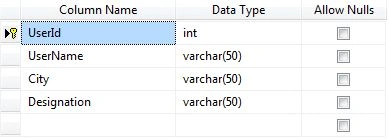
Add Content

Connection String
Setting Connection String in the web.config file.

Front-End
Here is how our aspx page looks like.

Code
Find the aspx.cs code below.
- using System;
- using System.Collections.Generic;
- using System.Data;
- using System.Data.SqlClient;
- using System.Configuration;
- using System.Web;
- using System.Web.UI;
- using System.Web.UI.WebControls;
- namespace StateManagement
- {
- public partial class WebForm2 : System.Web.UI.Page
- {
- SqlConnection con = new SqlConnection(ConfigurationManager.ConnectionStrings["dbconnection"].ConnectionString);
- protected void Page_Load(object sender, EventArgs e)
- {
- if (!IsPostBack)
- {
- String strQuery = "SELECT distinct (City) FROM UserDetails";
- SqlCommand cmd = new SqlCommand();
- cmd.CommandType = CommandType.Text;
- cmd.CommandText = strQuery;
- cmd.Connection = con;
- try
- {
- con.Open();
- DropDownList1.DataSource = cmd.ExecuteReader();
- DropDownList1.DataTextField = "City";
- DropDownList1.DataValueField = "City";
- DropDownList1.DataBind();
- // DropDownList2.SelectedIndex = 1;
- }
- catch (Exception ex)
- {
- throw ex;
- }
- finally
- {
- con.Close();
- // con.Dispose();
- }
- }
- }
- protected void DropDownList1_SelectedIndexChanged(object sender, EventArgs e)
- {
- String strQuery = "SELECT distinct (Designation) FROM UserDetails";
- SqlCommand cmd = new SqlCommand();
- cmd.CommandType = CommandType.Text;
- cmd.CommandText = strQuery;
- cmd.Connection = con;
- try
- {
- con.Open();
- DropDownList2.DataSource = cmd.ExecuteReader();
- DropDownList2.DataTextField = "Designation";
- DropDownList2.DataValueField = "Designation";
- DropDownList2.DataBind();
- // DropDownList2.SelectedIndex = 1;
- }
- catch (Exception ex)
- {
- throw ex;
- }
- finally
- {
- con.Close();
- con.Dispose();
- }
- }
- protected void Button2_Click(object sender, EventArgs e) //Gridview binding
- {
- SqlConnection con = new SqlConnection(ConfigurationManager.ConnectionStrings["dbconnection"].ConnectionString);
- SqlCommand cmd = new SqlCommand("select * from UserDetails where City = '" + DropDownList1.SelectedValue + "' and Designation='"+DropDownList2.SelectedValue+"'" , con);
- SqlDataAdapter Adpt = new SqlDataAdapter(cmd);
- DataTable dt = new DataTable();
- Adpt.Fill(dt);
- GridView1.DataSource = dt;
- GridView1.DataBind();
- }
- protected void DropDownList2_SelectedIndexChanged(object sender, EventArgs e)
- {
- //code for DropDownList2_SelectedIndexChanged
- }
- }
- }
Output
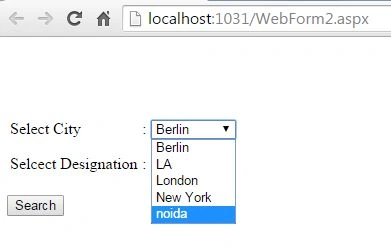
Select the City DropDownList.
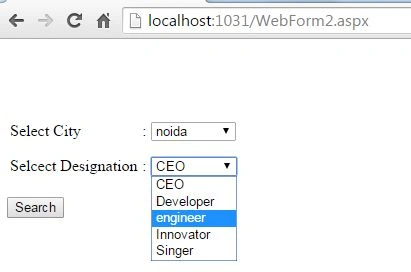
Select the Designation DropDownList.
Click the Search button to display details in the GridView.

Summary
Great! We have implemented binding with a DropDownlist, worked with the SelectedIndexChanged event of DropDownList and GridView binding.
Thanks.


Nabeel Ur Rehaman ShahPosted Feb 9, 2021, 6:33 AM EST
Very informative article for beginner keep it up
Dinesh GabhanePosted Nov 10, 2019, 8:29 PM EST
Thanks for nice article
Micha JanssenPosted Apr 9, 2019, 10:16 PM EDT
Hey there! I like the simplicity of your explanation, Next time try using otherways of sql injection and put it in using statements its the way every other programmer uses it because of protocol and then you wont have to open and close connections constantly but you can just open the connection and it closes it automatically
Bala PrasathPosted Feb 14, 2016, 7:24 PM EST
nice
Shridhar SharmaPosted May 22, 2015, 11:30 AM EDT
Thanks Friends :)
Santhakumar MunuswamyPosted May 22, 2015, 10:50 AM EDT
Thanks for nice article
Rahul Kumar SaxenaTOP 100Posted May 21, 2015, 10:44 PM EDT
Nice One...
Pankaj Kumar ChoudharyTOP 100Posted May 21, 2015, 6:40 PM EDT
Nice Article Sir...........