
Introduction
In this article we see many things we can create as a three dimentional image.
The followiong are the few multimedia objects.
Camera
We define a Camera for this, because our screen is basically two dimensional. So the camera takes the picture of the object. The camera defines the Position and the LookDirection and the UpDirection of the viewer.
Script tags
<Viewport3D.Camera>
<PerspectiveCamera Position="-30,40,50" LookDirection="30,-40,-50 " UpDirection="0,2,1" />
</Viewport3D.Camera>
Mesh
A Mesh is basically defining the surface of a 3D object. The Mesh is defined by a number of 3D Points. These 3D points are called vertices.
Viewport3D
It is used to differentiate between 2D and 3D.
3DModels
It defines the object in a particular sense. It has a Geometry, it describes the Mesh and a Material that can be a diffuse, specular or emmisive material. The material itself has a brush.
Script of <GeometryModel3D> tag.
<GeometryModel3D>
<GeometryModel3D.Geometry>
<MeshGeometry3D Positions="0,0,1 10,10,0 10,10,0 0,10,0 0,0,10
10,0,10 10,10,10 0,10,10"
TriangleIndices="0 1 2 1 3 5 0 4 3 4 7 3 4 6 7 4 5 6
0 4 1 1 4 5 1 2 6 6 5 1 2 3 7 7 6 2"/>
</GeometryModel3D.Geometry>
<GeometryModel3D.Material>
<DiffuseMaterial Brush="BlueViolet"/>
</GeometryModel3D.Material>
</GeometryModel3D>
Lights
Light is the compulsory item; without any light we see nothing. So we need to place at least one light to our scenes. WPF supports many kinds of lights.
- AmbientLight
- DirectionalLight
- PointLight
- SpotLight
Full Script
<Window x:Class="A_simple_WPF_3D_Example.Window1"
xmlns="http://schemas.microsoft.com/winfx/2006/xaml/presentation"
xmlns:x="http://schemas.microsoft.com/winfx/2006/xaml"
Title="Window1" Height="300" Width="300">
<Grid>
<Viewport3D>
<Viewport3D.Camera>
<PerspectiveCamera Position="-30,40,50" LookDirection="30,-30,-50 " UpDirection="0,2,1" />
</Viewport3D.Camera>
<ModelVisual3D>
<ModelVisual3D.Content>
<Model3DGroup>
<DirectionalLight Color="BlanchedAlmond" Direction="-2,-3,-5" />
<GeometryModel3D>
<GeometryModel3D.Geometry>
<MeshGeometry3D Positions="0,0,1 10,10,0 10,10,0 0,10,0 0,0,10,0,10 10,10,10 0,10,10"
TriangleIndices="0 1 2 1 3 5 0 4 3 4 7 3 4 6 7 4 5 6
0 4 1 1 4 5 1 2 6 6 5 1 2 3 7 7 6 2"/>
</GeometryModel3D.Geometry>
<GeometryModel3D.Material>
<DiffuseMaterial Brush="BlueViolet"/>
</GeometryModel3D.Material>
</GeometryModel3D>
</Model3DGroup>
</ModelVisual3D.Content>
</ModelVisual3D>
</Viewport3D>
</Grid>
</Window>
Output of the given script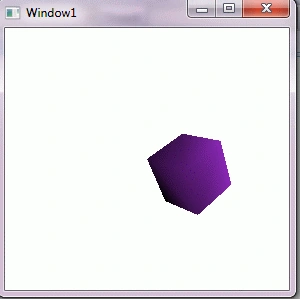


Julius AngilaPosted Feb 26, 2012, 6:47 PM EST
Hi Mahak this article is so help full for learning 3D thanks for sharing it.
Daisy KrausePosted Feb 26, 2012, 6:16 PM EST
Hi Mahak. Its a very nice and useful article.
Davin MartynPosted Feb 26, 2012, 5:52 PM EST
Good Explain...
Davin MartynPosted Feb 26, 2012, 5:51 PM EST
Good Work...
Akash GaurPosted Feb 26, 2012, 5:46 PM EST
hello mahak. ur article is really very good thanx.
Sam HobbseditedPosted Feb 26, 2012, 1:34 PM ESTEdited Feb 26, 2012, 1:35 PM EST
Thank you, Mahak; that is interesting. With slight modification, this also works as a stand-alone page.