
Before we create a Google Map application we need Signed Fingerprint SHA1 KEY. So, I already explained how to create SHA1 KEY.
Step 1:
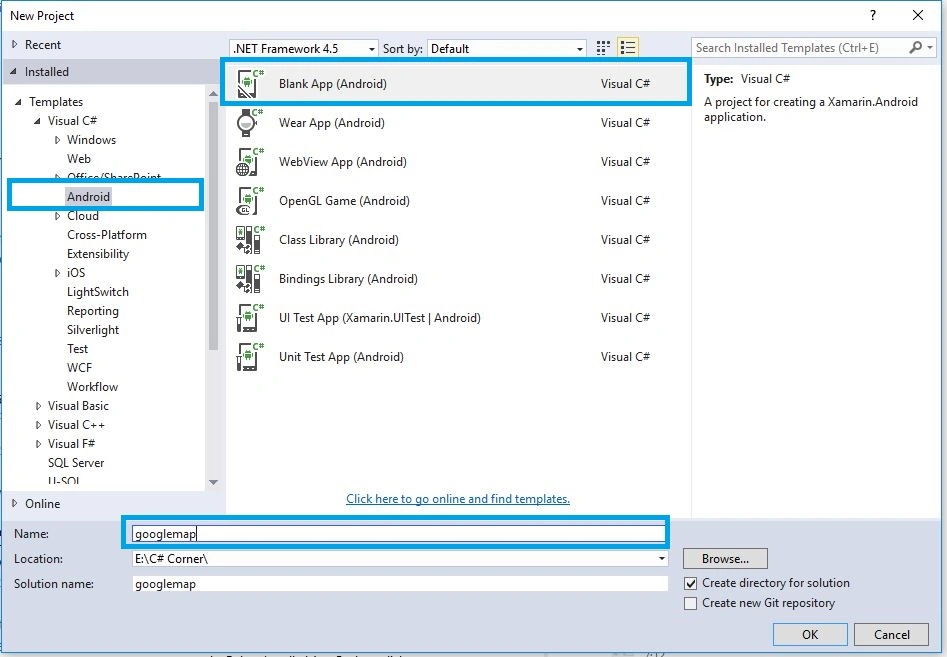
Open Visual Studio, New Project, Templates, Visual C#, Android, then click Blank App, and select Blank App. Then give Project Name and Project Location.
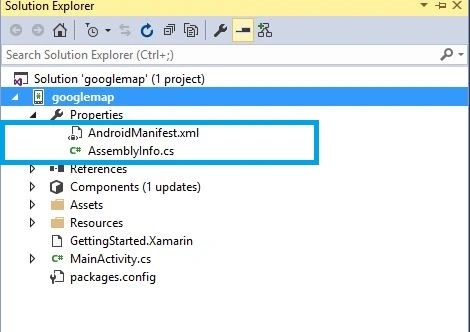
Step 2:Next Click to select Solution Explorer->Project Name->Properties-> AndroidManifest.xml file.
Step 3: Here will be Copy and paste of the already created Google Map SHA1 KEY and alsoit will give some permissions.
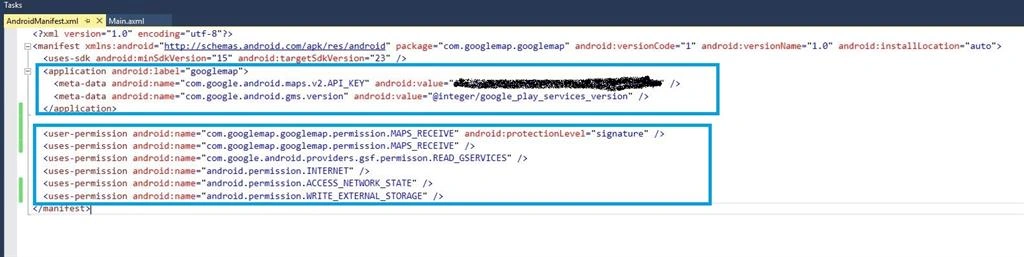
XML Code:
- <?xml version="1.0" encoding="utf-8"?>
- <manifest xmlns:android="http://schemas.android.com/apk/res/android" package="com.googlemap.googlemap" android:versionCode="1" android:versionName="1.0" android:installLocation="auto">
- <uses-sdk android:minSdkVersion="15" android:targetSdkVersion="23" />
- <application android:label="googlemap">
- <meta-data android:name="com.google.android.maps.v2.API_KEY" android:value="YOUR_API KEY" />
- <meta-data android:name="com.google.android.gms.version" android:value="@integer/google_play_services_version" />
- </application>
- <user-permission android:name="com.googlemap.googlemap.permission.MAPS_RECEIVE" android:protectionLevel="signature" />
- <uses-permission android:name="com.googlemap.googlemap.permission.MAPS_RECEIVE" />
- <uses-permission android:name="com.google.android.providers.gsf.permisson.READ_GSERVICES" />
- <uses-permission android:name="android.permission.INTERNET" />
- <uses-permission android:name="android.permission.ACCESS_NETWORK_STATE" />
- </manifest>
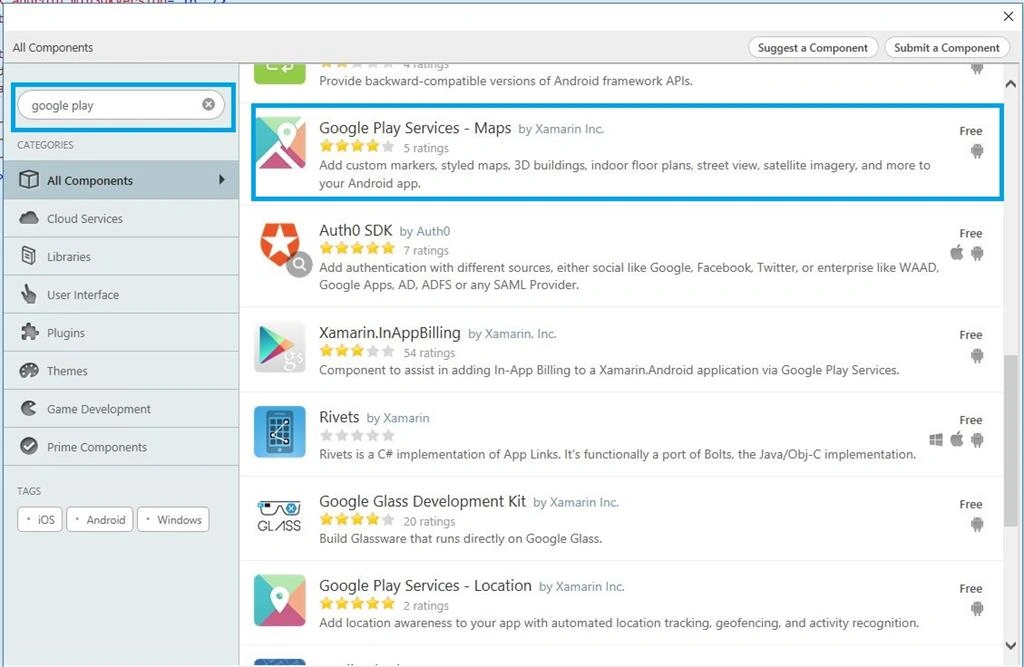
Step 5:
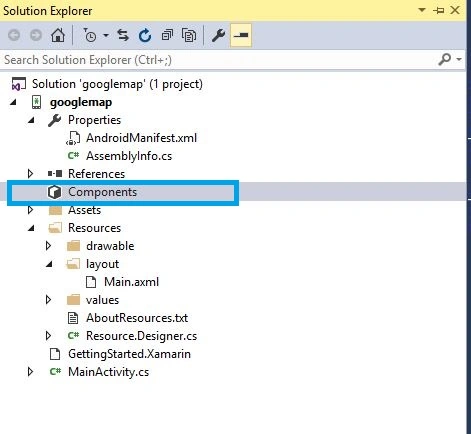
Then Add packages Google Play services - Maps, then check Solution Explorer-Project Name->References to be added Google play services packages.
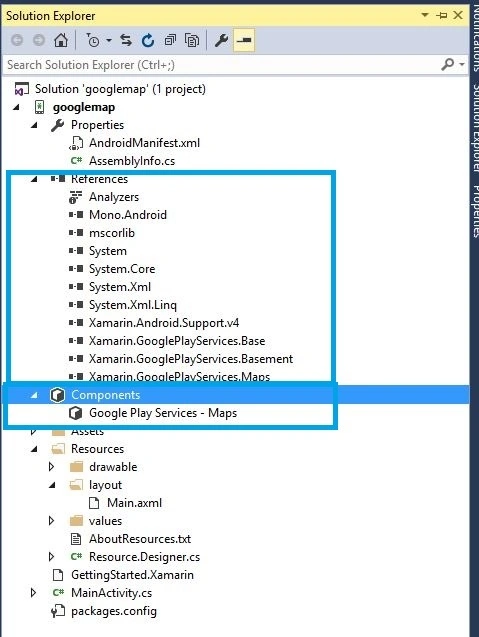
Step 6:
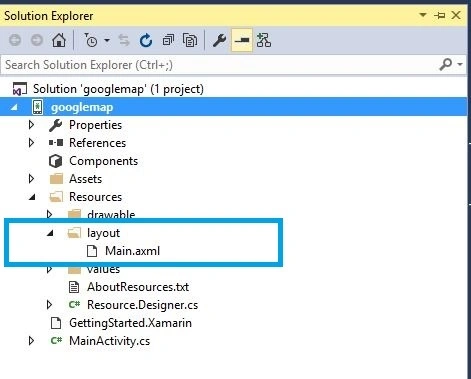
Next create Map function. In select Solution Explorer->Project Name->Resources->Layout->Main.axml, Click and open AXML Design Page to added below Code.
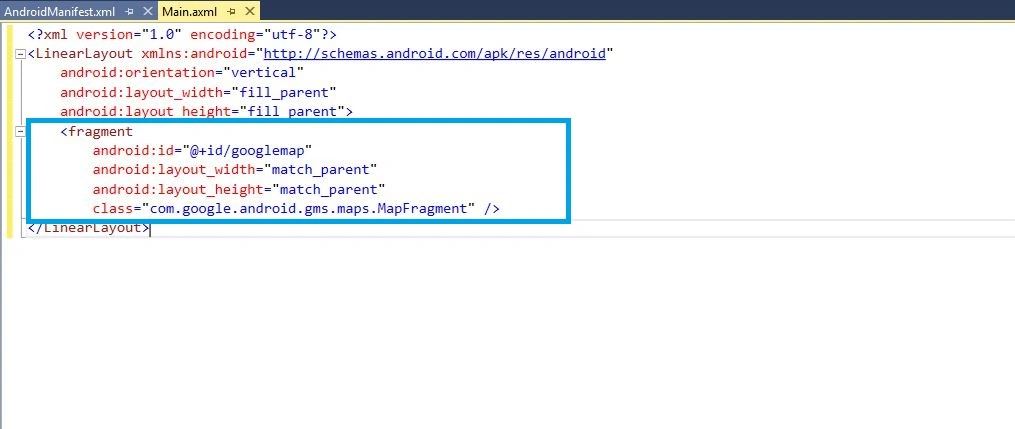
XML CODE:
- <?xml version="1.0" encoding="utf-8"?>
- <LinearLayout xmlns:android="http://schemas.android.com/apk/res/android"
- android:orientation="vertical"
- android:layout_width="fill_parent"
- android:layout_height="fill_parent">
- <fragment
- android:id="@+id/googlemap"
- android:layout_width="match_parent"
- android:layout_height="match_parent"
- class="com.google.android.gms.maps.MapFragment" />
- </LinearLayout>
Step 7: Next open MainActivity.cs page, then Add Namespace and following code.
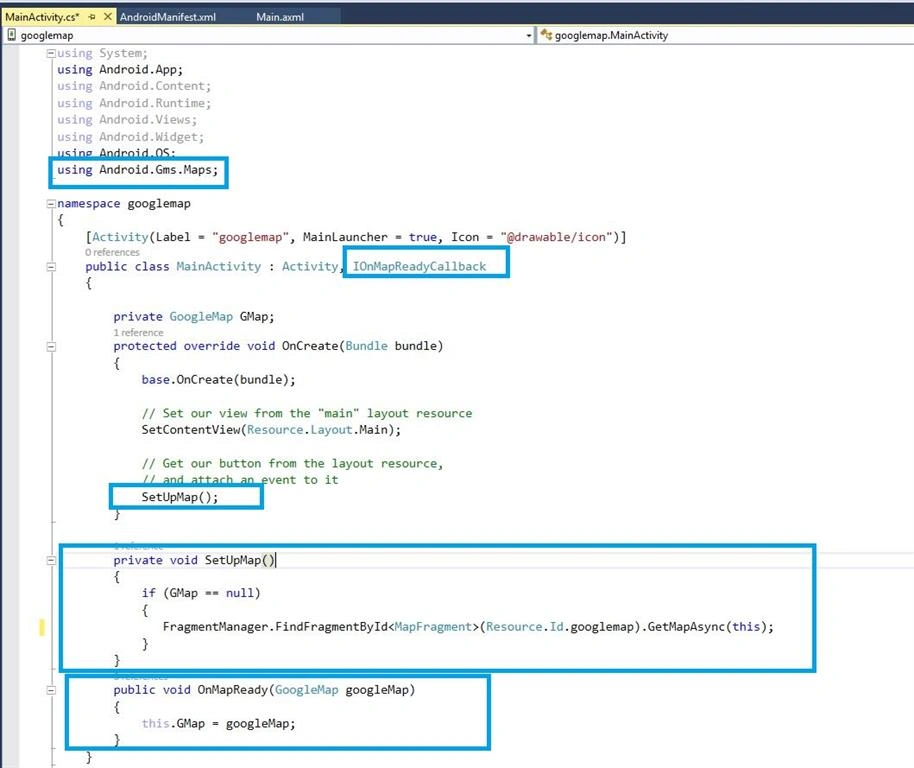
Namespace: using Android.Gms.Maps;
C# Code:
- public class MainActivity: Activity, IOnMapReadyCallback
- {
- private GoogleMap GMap;
- protected override void OnCreate(Bundle bundle)
- {
- base.OnCreate(bundle);
- // Set our view from the "main" layout resource
- SetContentView(Resource.Layout.Main);
- SetUpMap();
- }
- private void SetUpMap() {
- if (GMap == null) {
- FragmentManager.FindFragmentById < MapFragment > (Resource.Id.googlemap).GetMapAsync(this);
- }
- }
- public void OnMapReady(GoogleMap googleMap) {
- this.GMap = googleMap;
- }
- }
Step 8: Then Debug and run the application then check emulator showing Google map,
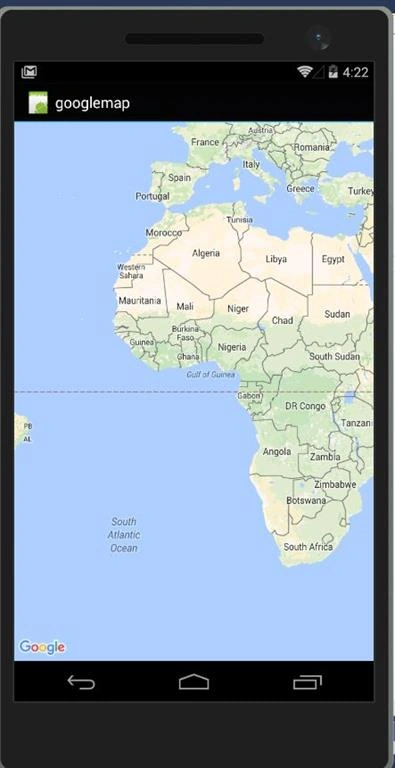
Step 9: Next Google map Marker will be added.
Step 10: Open MainActivity.cs page select section of OnMapReady Function to added following code.
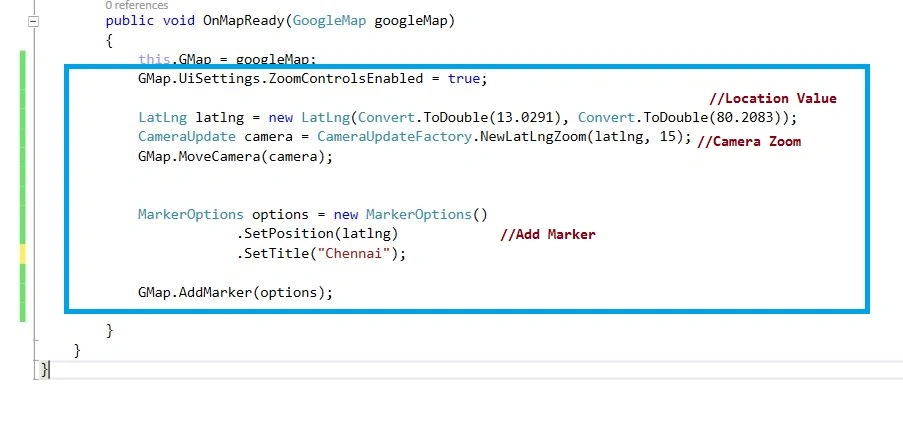
C# Code:
- LatLng latlng = new LatLng(Convert.ToDouble(13.0291), Convert.ToDouble(80.2083));
- CameraUpdate camera = CameraUpdateFactory.NewLatLngZoom(latlng, 15);
- GMap.MoveCamera(camera);
- MarkerOptions options = new MarkerOptions().SetPosition(latlng).SetTitle("Chennai");
- GMap.AddMarker(options);
Step 11: Then Run the Application,
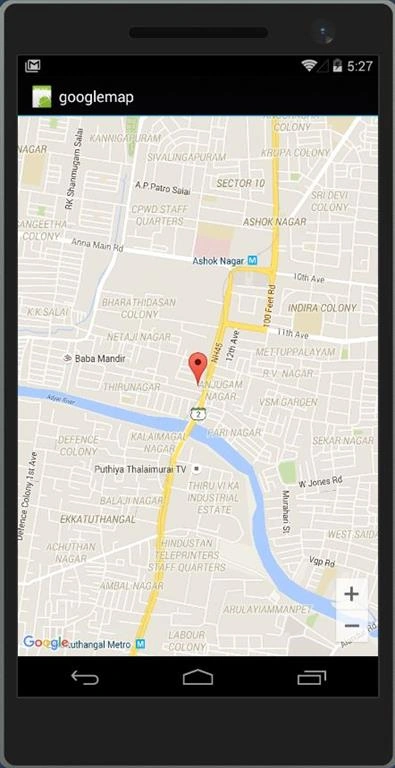
Finally, we have successfully created Xamarin Android Google Map with marker Application.


Muhammad ZubairPosted Jul 24, 2019, 9:00 AM EDT
Helpful.thanks
unknown unknownPosted Feb 19, 2019, 6:18 AM EST
Hi, and how can i set target, destination and eventually middle points between?
Thamaraiselvan TPosted May 23, 2018, 4:13 AM EDT
Hi, Everything works fine as per your tutorial. Now, I need the features as we are searching locations in Google maps. I mean, I want to show the route between my location and given location. Is it possible with this?
zohre rafieiPosted Mar 5, 2018, 10:05 AM EST
Hi. in my project android.gms.maps dont work . why?
Tany HTPosted Nov 22, 2017, 5:51 PM EST
Very good tutorial... I followed step by step and woooow, it worked!!!
Luis GualotoPosted Oct 30, 2017, 11:10 AM EDT
Porfa una ayuda con esto me aparece en blanco la pantalla del mapa solo aparece el logo de google y los botones de acercar y alejar pero que en blano la pantalla...?
Umair KhanPosted Oct 4, 2017, 3:59 AM EDT
I follow your code step by step but in last in my phone maps are not showing just yellow screen apear how to show proper map
Debdeep NandyPosted Sep 7, 2017, 11:21 PM EDT
Please send me a link json parsing example using xamarin
Guillermo AlonsoPosted Sep 4, 2017, 8:55 AM EDT
Hi , when i run the sample project, i do get the google map viewer but without any map , just google logo and zoom toolbar. No exception reported. How can I know if the API is expired? My API's KEY name is MapaME, is this WRONG? Can you help me please? Thanks
Mohsin Ali AyubPosted Aug 5, 2017, 9:18 PM EDT
Hi, I tried your solution but it throws this exception: "Unhandled Exception: Android.Views.InflateException: Binary XML file line #1: Binary XML file line #1: Error inflating class fragment"
Ruwan RatnayakePosted Jul 20, 2017, 6:24 AM EDT
I tried your source code with Visual studio 2015, but its not working, showing errors.
maxiPosted Feb 12, 2017, 11:53 AM EST
Hi Anbu, i got the same problem with the map, it doesnt render, but my api key is correct, it only shows the google logo below with a blank screen, can u help me? thank you
chandu guntiPosted Feb 7, 2017, 1:14 AM EST
I got Solution Anbu..this is all because of api
chandu guntiPosted Feb 6, 2017, 3:03 AM EST
My api key not even expired
chandu guntiPosted Feb 6, 2017, 3:02 AM EST
Hi , when i run the sample project, i do get the google map viewer but without any map , just google logo and zoom toolbar. No exception reported.
Vishnu BhangalePosted Feb 5, 2017, 8:36 PM EST
Hi i am getting error in axml class attribute is not declare
chandu guntiPosted Feb 5, 2017, 3:53 AM EST
Error 70 No resource found that matches the given name (at 'value' with value '@integer/google_play_services_version'). C:\Users\user_1601_01\Documents\Visual Studio 2013\Projects\NewTrackPool\NewTrackPool\obj\Debug\android\manifest\AndroidManifest.xml 18 NewTrackPool
chandu guntiPosted Feb 5, 2017, 3:53 AM EST
Error 69 No resource found that matches the given name (at 'value' with value '@integer/google_play_services_version'). C:\Users\user_1601_01\Documents\Visual Studio 2013\Projects\NewTrackPool\NewTrackPool\obj\Debug\android\manifest\AndroidManifest.xml 17 NewTrackPool
chandu guntiPosted Feb 5, 2017, 3:52 AM EST
Im getting error in AndroidManifest.xml
chandu guntiPosted Feb 5, 2017, 3:49 AM EST
Using Android.App;using Android.Widget; using Android.OS; using Android.Gms.Maps; using Android.Gms.Maps.Model; namespace NewTrackPool { [Activity(Label = "NewTrackPool", MainLauncher = true, Icon = "@drawable/icon")] public class MainActivity : Activity,IOnMapReadyCallback { protected override void OnCreate(Bundle bundle) { base.OnCreate(bundle); // Set our view from the "main" layout resource SetContentView (Resource.Layout.Main); MapFragment mapFragment = (MapFragment)FragmentManager.FindFragmentById(Resource.Id.map); mapFragment.GetMapAsync(this); } public void OnMapReady(GoogleMap googleMap) { MarkerOptions markerOptions = new MarkerOptions(); markerOptions.SetPosition(new LatLng(18.2019,79.3967)); markerOptions.SetTitle("My place"); googleMap.AddMarker(markerOptions); googleMap.UiSettings.ZoomControlsEnabled = true; googleMap.UiSettings.CompassEnabled = true; googleMap.MoveCamera(CameraUpdateFactory.ZoomIn()); } } } <?xml version="1.0" encoding="utf-8"?> <manifest xmlns:android="http://schemas.android.com/apk/res/android" package="NewTrackPool.NewTrackPool" android:versionCode="1" android:versionName="1.0" android:installLocation="auto"> <uses-sdk android:minSdkVersion="15" android:targetSdkVersion="23" /> <uses-permission android:name="android.permission.INTERNET" /> <uses-permission android:name="android.permission.WRITE_EXTERNAL_STORAGE" /> <uses-permission android:name="android.permission.ACCESS_NETWORK_STATE" /> <uses-permission android:name="android.permission.ACCESS_FINE_LOCATION" /> <uses-permission android:name="android.permission.ACCESS_COARSE_LOCATION" /> <uses-permission android:name="com.google.andriod.providers.gsf.permission.READ_GSERVICES" /> <uses-permission android:name="NewTrackPool.NewTrackPool.permissions.MAPS_RECEIVE" android:protectionLevel="signature" /> <uses-features android:glEsVersion="0x00020000" android:required="true" /> <application android:label="NewTrackPool"> <meta-data android:name="com.google.andriod.maps.v2.API_KEY" android:value="@string/GoogleKey" /> <meta-data android:name="com.google.andriod.gms.version" android:value="@integer/google_play_services_version" /> </application> </manifest>
chandu guntiPosted Feb 5, 2017, 3:48 AM EST
Using Android.App;using Android.Widget;using Android.OS; using Android.Gms.Maps; using Android.Gms.Maps.Model; namespace NewTrackPool { [Activity(Label = "NewTrackPool", MainLauncher = true, Icon = "@drawable/icon")] public class MainActivity : Activity,IOnMapReadyCallback { protected override void OnCreate(Bundle bundle) { base.OnCreate(bundle); // Set our view from the "main" layout resource SetContentView (Resource.Layout.Main); MapFragment mapFragment = (MapFragment)FragmentManager.FindFragmentById(Resource.Id.map); mapFragment.GetMapAsync(this); } public void OnMapReady(GoogleMap googleMap) { MarkerOptions markerOptions = new MarkerOptions(); markerOptions.SetPosition(new LatLng(18.2019,79.3967)); markerOptions.SetTitle("My place"); googleMap.AddMarker(markerOptions); googleMap.UiSettings.ZoomControlsEnabled = true; googleMap.UiSettings.CompassEnabled = true; googleMap.MoveCamera(CameraUpdateFactory.ZoomIn()); } } }
chandu guntiPosted Feb 3, 2017, 12:47 AM EST
Hi,please help me to get the solution..
chandu guntiPosted Feb 1, 2017, 1:53 AM EST
Hi,for me it is throwing No resource found that matches the given name (at 'value' with value '@integer/google_play_services_version').please let me know
Vishal NayanPosted Jan 29, 2017, 1:56 AM EST
In a new project i a getting this error when i set the content view "Android.Views.InflateException: Binary XML file line #1: Error inflating class fragment". Any idea how to fix this
Vishal NayanPosted Jan 29, 2017, 1:54 AM EST
Yes , it was key issue, thanks
Vishal NayanPosted Jan 27, 2017, 9:52 PM EST
Hi , when i run the sample project, i do get the google map viewer but without any map , just google logo and zoom toolbar. No exception reported.
Anbu ManiPosted Dec 26, 2016, 1:01 AM EST
You Installed Google Play services Package getting Error..so please reinstall that packages
selvam krPosted Dec 21, 2016, 9:32 PM EST
HI Anbu, i used your code but am getting error like "error : error: package com.google.android.gms.maps.model does not exist" nearly 100 errors how i can solve this? am using visual studio 2015, when i'll add google playservices.map then i'll get these error,
Anbu ManiPosted Nov 7, 2016, 6:09 PM EST
Pls Show me u r screenshot.....
Alamgeer AshrafPosted Nov 7, 2016, 12:45 AM EST
I m new to xamarin when i m using this tutorial i got "Android.Views.InflateException: Binary XML file line #1: Error inflating class fragment" how to fix it
Sagar KalokhePosted Aug 21, 2016, 5:02 AM EDT
Great article Mani,really help me lot
Tien Ngoc NguyenPosted Aug 7, 2016, 11:53 PM EDT
Hi, could you support to me. I use VS2015 on Win 10, when drag frament on xaml file has error "the element 'LinearLayout' has invalid child element fragment android xamarin ..." I add V4 and v7 and google play service maps. http://nhocbi.com/Capture.PNG , http://nhocbi.com/Capture1.PNG. Thanks !
Lavanya PasupuletiPosted Jul 12, 2016, 5:28 AM EDT
I'm new to xamarin,can we use google maps for UWP as well?
manu g sPosted Jun 29, 2016, 11:52 PM EDT
Hello Anbu Mani, I am getting the above error, once i drag the fragment on AXML file..pls help me out, if run the program at the end i will get like "Android.Views.InflateException: Binary XML file line #1: Error inflating class fragment" i have checked the spell and same as it is.. added v4 and v7 reference no use.. struck from 3 to 4 days no sol in internet too.
manu g sPosted Jun 29, 2016, 11:52 PM EDT
Everity Code Description Project File Line Suppression StateWarning The element 'LinearLayout' has invalid child element 'fragment'. List of possible elements expected: 'GLSurfaceView, AdapterView, AdapterViewAnimator, AutoCompleteTextView, MediaController, TextView, FragmentBreadCrumbs, AppWidgetHostView, GestureOverlayView, ExtractEditText, KeyboardView, RSSurfaceView, RSTextureView, SurfaceView, TextureView, ViewGroup, ViewStub, WebView, AbsListView, AbsSeekBar, AbsSpinner, AbsoluteLayout, AdapterViewFlipper, AnalogClock, Button, CalendarView, CheckBox, CheckedTextView, Chronometer, CompoundButton, DatePicker, DialerFilter, DigitalClock, EditText, ExpandableListView, FrameLayout, Gallery, GridLayout, GridView, HorizontalScrollView, ImageButton, ImageSwitcher, ImageView, LinearLayout, ListView, MultiAutoCompleteTextView, NumberPicker, ProgressBar, QuickContactBadge, RadioButton, RadioGroup, RatingBar, RelativeLayout, ScrollView, SearchView, SeekBar, SlidingDrawer, Space, Spinner, StackView, Switch, TabHost, TabWidget, TableLayout, TableRow, TextSwitcher, TimePicker, ToggleButton, TwoLineListItem, VideoView, ViewAnimator, ViewFlipper, ViewSwitcher, ZoomButton, ZoomControls'. Map c:\users\User\documents\visual studio 2015\Projects\Map\Map\Resources\layout\Main.axml 6
Prasanna MuraliPosted May 20, 2016, 5:31 PM EDT
Nice one...
Travis SchoeningPosted May 10, 2016, 3:49 PM EDT
Thanks for the article. With this setup, do you have an example on how to capture gesture events (Mainly zoom and pan)
RajaPosted May 3, 2016, 9:17 PM EDT
Great Work.keep It Up.:)
Manoj KulkarniPosted May 3, 2016, 7:05 PM EDT
Nice article
Del WoodcockPosted May 3, 2016, 8:49 AM EDT
Nice!