
Introduction
Controller
First, we create a new project using Visual Studio. Choose Project template MVC. Now, we create a Controller. Controller has two action methods, mentioned below:
- Action method for handling the GET operation.
Inside this Action method, only the view is returned.
- Action method for handling POST operation.
This Action method handles the form submission and it accepts the value of the form element as a parameter.
The name value fetched from the Form collection and the current Server date and time is set to a ViewBag object named “Message”.
Controller Code
- using System;
- using System.Collections.Generic;
- using System.Linq;
- using System.Web;
- using System.Web.Mvc;
- namespace AlertMessge.Controllers
- {
- public class HomeController : Controller
- {
- public ActionResult Index()
- {
- return View();
- }
- [HttpPost]
- public ActionResult Index(string name)
- {
- ViewBag.Message = String.Format("Hello{0}.\\ncurrent Date and time:{1}", name, DateTime.Now.ToString());
- return View();
- }
- }
- }
The View consists of an HTML form, which has been created using the Html.BeginForm method with the parameters, as mentioned below:
- ActionName
Name of the Action. In this case, the name is Index.
- ControllerName
Name of the Controller. In this case, the name is Home.
- FormMethod
It specifies the Form Method i.e. GET or POST. In this case, it will be set to POST.
The Form consists of two elements i.e. a TextBox and a Submit Button.
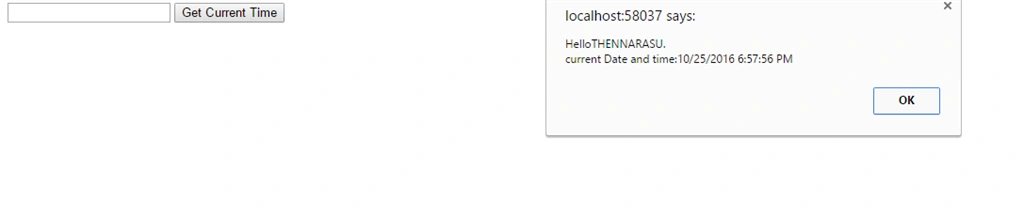
The ViewBag object named Message is checked for NULL and if it is not NULL, the value of the object is displayed, using JavaScript alert MessageBox.
View Code
- @{
- Layout = null;
- }
- <!DOCTYPE html>
- <html>
- <head>
- <meta name="viewport" content="width=device-width"/>
- <title>Index</title>
- </head>
- <body>
- @using (Html.BeginForm("Index", "Home", FormMethod.Post))
- {
- <input type="text" id="txtName" name="name"/>
- <input type="submit" id="btnSubmit" value="Get Current Time"/>
- }
- @if (ViewBag.Message != null)
- {
- <script type="text/javascript">
- window.onload = function () {
- alert("@ViewBag.Message");
- };
- </script>
- }
- </body>
- </html>
Output


Former memberPosted Feb 23, 2020, 4:49 AM EST
Rofl now that is crap
mudassar khanPosted Dec 21, 2019, 8:34 AM EST
Copied from ASPSnippets.com https://www.aspsnippets.com/Articles/ASPNet-MVC-Display-Message-from-Controller-in-View-using-JavaScript-Alert-MessageBox.aspx
imran osmanzaiPosted Jan 5, 2018, 8:15 PM EST
Good job dear brother very help full for me
Syed ShanuTOP 100Posted Oct 26, 2016, 3:56 PM EDT
Good Start keep writing more.
Anu VPosted Oct 25, 2016, 9:18 PM EDT
Nice..