
Introduction
We can change the font style and find size of the selected text in Rich TextBox, which is uniquely applied to the preferred text.
If you want to apply both, say bold and italic to the selected text, you can apply bold and then italic to the selected text, Also check for font size to the selected text.
- Form design i given below.
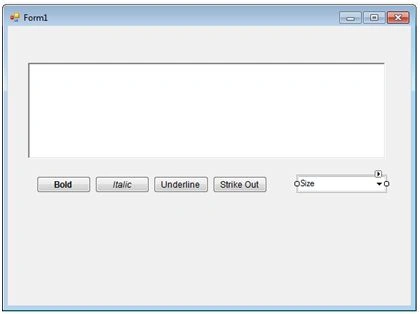
- Code to change the font size and font style is given below.
- using System;
- using System.Collections.Generic;
- using System.ComponentModel;
- using System.Data;
- using System.Drawing;
- using System.Linq;
- using System.Text;
- using System.Threading.Tasks;
- using System.Windows.Forms;
- namespace WindowsFormsApplication31
- {
- public partial class Form1 : Form
- {
- public Form1()
- {
- InitializeComponent();
- }
- private void Form1_Load(object sender, EventArgs e)
- {
- btnUnderline.Text = "Underline";
- btnUnderline.Font = new Font("Arial", 10, FontStyle.Underline,GraphicsUnit.Point);
- AddFontSize();
- }
- private void AddFontSize()
- {
- // throw new NotImplementedException();
- comboBoxSize.Items.Add("8");
- comboBoxSize.Items.Add("9");
- comboBoxSize.Items.Add("10");
- comboBoxSize.Items.Add("11");
- comboBoxSize.Items.Add("12");
- }
- private void btnBold_Click(object sender, EventArgs e)
- {
- rtfText.SelectionFont = new Font(rtfText.SelectionFont, rtfText.SelectionFont.Style | FontStyle.Bold);
- }
- private void btnItalic_Click(object sender, EventArgs e)
- {
- rtfText.SelectionFont = new Font(rtfText.SelectionFont, rtfText.SelectionFont.Style | FontStyle.Italic);
- }
- private void btnUnderline_Click(object sender, EventArgs e)
- {
- rtfText.SelectionFont = new Font(rtfText.SelectionFont, rtfText.SelectionFont.Style | FontStyle.Underline);
- }
- private void btnStrike_Click(object sender, EventArgs e)
- {
- rtfText.SelectionFont = new Font(rtfText.SelectionFont, rtfText.SelectionFont.Style | FontStyle.Strikeout);
- }
- private void comboBoxSize_SelectedIndexChanged(object sender, EventArgs e)
- {
- FontChange();
- }
- private void FontChange()
- {
- // throw new NotImplementedException();
- float fontsize = 10;
- string fontname = rtfText.SelectionFont.Name;
- if (comboBoxSize.Text != "") fontsize = float.Parse(comboBoxSize.Text);
- if (fontsize == 0) fontsize = 10;
- if (rtfText.SelectionLength > 0)
- {
- rtfText.SelectionFont = new Font(fontname, fontsize);
- }
- }
- }
- }
Note:
- We can apply the “Underline” font style to the button text by using the code given below in form load.
- button.Text = "Underline";
- button.Font=newFont("Arial",10,FontStyle.Underline,GraphicsUnit.Point);
- For Combobox, you have to write in “comboBoxSize_SelectedIndexChanged” event.


Meghdatt SharmaPosted Oct 23, 2021, 12:46 PM EDT
What is rtfText here?
SubashPosted Sep 8, 2016, 8:44 PM EDT
Very nice
ameer sharifPosted Mar 27, 2016, 9:40 PM EDT
good
Sarathkumar PalanisamyPosted Mar 21, 2016, 11:07 PM EDT
Good!
Ashish SrivastavaPosted Mar 21, 2016, 9:42 PM EDT
Great
Thiruppathi RPosted Mar 21, 2016, 9:33 PM EDT
great
Vignesh ManiTOP 100Posted Mar 21, 2016, 1:11 PM EDT
Nice