
This blog will show you how you can bind ASP.NET menu control, using C# .NET from the data set. Thus, for this blog, first we will create a new ASP.NET Application and add the code given below into the page.
- <%@ Page Language="C#" AutoEventWireup="true" CodeBehind="Menu.aspx.cs" Inherits="WebApplication7.Menu" %>
- <!DOCTYPE html>
- <html xmlns="http://www.w3.org/1999/xhtml">
- <head runat="server">
- <title>Bind Asp.net Menu Control Using C#</title>
- </head>
- <body>
- <form id="form1" runat="server">
- <div>
- <b>ASP.NET Menu Control</b>
- <asp:Menu ID="Menu1" runat="server" BackColor="#F7F6F3"
- DynamicHorizontalOffset="2" Width="50%"
- Font-Names="Verdana" Font-Size="0.9em" ForeColor="#7C6F57"
- StaticSubMenuIndent="10px" StaticEnableDefaultPopOutImage="false" Orientation="Horizontal">
- <StaticSelectedStyle BackColor="#5D7B9D" />
- <StaticMenuItemStyle HorizontalPadding="5px" VerticalPadding="2px" />
- <DynamicHoverStyle BackColor="#7C6F57" ForeColor="White" />
- <DynamicMenuStyle BackColor="#F7F6F3" />
- <DynamicSelectedStyle BackColor="#5D7B9D" />
- <DynamicMenuItemStyle HorizontalPadding="5px" VerticalPadding="2px" />
- <StaticHoverStyle BackColor="#7C6F57" ForeColor="White" />
- </asp:Menu>
- </div>
- </form>
- </body>
- </html>
- public DataSet GetData()
- {
- // In order to test, we use the memory tables as the datasource.
- DataTable mainTB = new DataTable();
- DataColumn mainIdCol = new DataColumn("mainId");
- DataColumn mainNameCol = new DataColumn("mainName");
- DataColumn mainUrlCol = new DataColumn("mainUrl");
- mainTB.Columns.Add(mainIdCol);
- mainTB.Columns.Add(mainNameCol);
- mainTB.Columns.Add(mainUrlCol);
- DataTable childTB = new DataTable();
- DataColumn childIdCol = new DataColumn("childId");
- DataColumn childNameCol = new DataColumn("childName");
- // The MainId column of the child table is the foreign key to the main table.
- DataColumn childMainIdCol = new DataColumn("MainId");
- DataColumn childUrlCol = new DataColumn("childUrl");
- childTB.Columns.Add(childIdCol);
- childTB.Columns.Add(childNameCol);
- childTB.Columns.Add(childMainIdCol);
- childTB.Columns.Add(childUrlCol);
- // Insert some test records to the main table.
- DataRow dr = mainTB.NewRow();
- dr[0] = "1";
- dr[1] = "Home";
- dr[2] = "Test.aspx";
- mainTB.Rows.Add(dr);
- DataRow dr1 = mainTB.NewRow();
- dr1[0] = "2";
- dr1[1] = "Articles";
- dr1[2] = "Test.aspx";
- mainTB.Rows.Add(dr1);
- DataRow dr2 = mainTB.NewRow();
- dr2[0] = "3";
- dr2[1] = "Help";
- dr2[2] = "Test.aspx";
- mainTB.Rows.Add(dr2);
- DataRow dr3 = mainTB.NewRow();
- dr3[0] = "4";
- dr3[1] = "DownLoad";
- dr3[2] = "Test.aspx";
- mainTB.Rows.Add(dr3);
- // Insert some test records to the child table
- DataRow dr5 = childTB.NewRow();
- dr5[0] = "1";
- dr5[1] = "ASP.NET";
- dr5[2] = "2";
- dr5[3] = "Test.aspx";
- childTB.Rows.Add(dr5);
- DataRow dr6 = childTB.NewRow();
- dr6[0] = "2";
- dr6[1] = "SQL Server";
- dr6[2] = "2";
- dr6[3] = "Test.aspx";
- childTB.Rows.Add(dr6);
- DataRow dr7 = childTB.NewRow();
- dr7[0] = "3";
- dr7[1] = "JavaScript";
- dr7[2] = "2";
- dr7[3] = "Test.aspx";
- childTB.Rows.Add(dr7);
- // Use the DataSet to contain that two tables.
- DataSet ds = new DataSet();
- ds.Tables.Add(mainTB);
- ds.Tables.Add(childTB);
- // Build the relation between the main table and the child table.
- ds.Relations.Add("Child", ds.Tables[0].Columns["mainId"], ds.Tables[1].Columns["MainId"]);
- return ds;
- }
In the function, given above, we have to create a date set for the menu. Now, check the function, given below, to bind it with the menu.
- public void GenerateMenuItem()
- {
- // Get the data from database.
- DataSet ds = GetData();
- foreach (DataRow mainRow in ds.Tables[0].Rows)
- {
- // Load the records from the main table to the menu control.
- MenuItem masterItem = new MenuItem(mainRow["mainName"].ToString());
- masterItem.NavigateUrl = mainRow["mainUrl"].ToString();
- Menu1.Items.Add(masterItem);
- foreach (DataRow childRow in mainRow.GetChildRows("Child"))
- {
- // According to the relation of the main table and the child table, load the data from the child table.
- MenuItem childItem = new MenuItem((string)childRow["childName"]);
- childItem.NavigateUrl = childRow["childUrl"].ToString();
- masterItem.ChildItems.Add(childItem);
- }
- }
- }
Now, call the function, given above, on the page load.
- protected void Page_Load(object sender, EventArgs e)
- {
- if (!IsPostBack)
- {
- GenerateMenuItem();
- }
- }
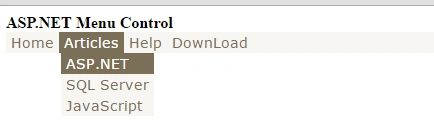
Now, we are done. Just run the Application to check the output.


kalu singh raoPosted Jul 12, 2016, 9:38 PM EDT
Nice...