
How to install jpgraph ?
Step 1
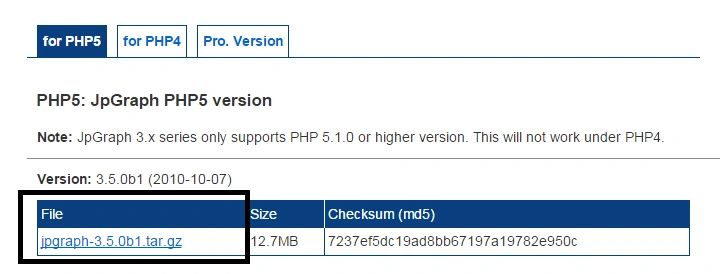
At first Download jpgraph.Then Copy and paste this file in your C drive.
Download link..http://jpgraph.net/download/
C:\php\pear>

You can also download it from attached file.
Step 2
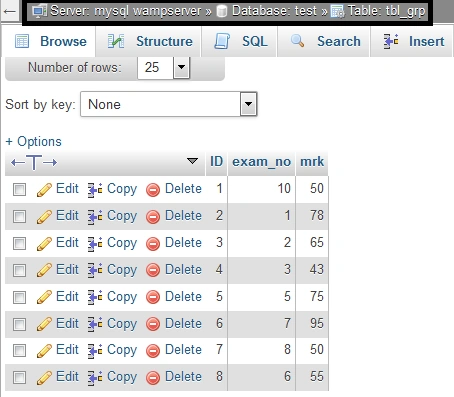
Create a new database into mysql database..
Step 3
Then Create a new php file called (lin.php)
The code is shown below.
- <?php
- require_once('jpgraph/jpgraph.php');
- require_once('jpgraph/jpgraph_line.php');
- require_once('jpgraph/jpgraph_bar.php');
- $x_axis = array();
- $y_axis = array();
- $i = 0;
- $con = mysqli_connect("localhost", "root", "", "test");
- // Check connection
- if (mysqli_connect_errno()) {
- echo "Failed to connect to MySQL: " . mysqli_connect_error();
- }
- $result = mysqli_query($con, "SELECT * FROM tbl_grp");
- while ($row = mysqli_fetch_array($result)) {
- $x_axis[$i] = $row["exam_no"];
- $y_axis[$i] = $row["mrk"];
- $i++;
- }
- mysqli_close($con);
- $width = 600;
- $height = 200;
- $graph = new Graph($width, $height);
- $graph->SetScale('textint');
- $graph->title->Set('My Example');
- $graph->xaxis->title->Set('(year)');
- $graph->xaxis->SetTickLabels($x_axis);
- $graph->yaxis->title->Set('(# example)');
- $barplot = new BarPlot($y_axis);
- $graph->Add($barplot);
- $graph->Stroke();
- ?>
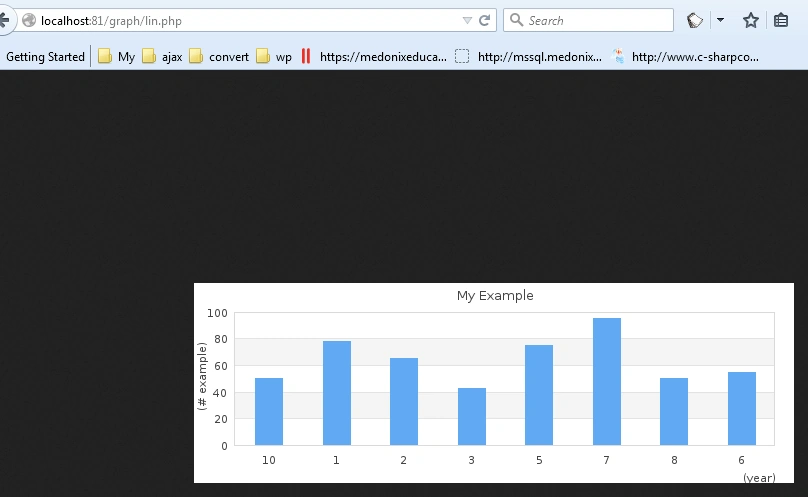
Open your Browser and see.
Thanks.


Dipankar BiswasPosted May 3, 2015, 7:58 PM EDT
Thanks..
Santhakumar MunuswamyPosted May 3, 2015, 7:48 PM EDT
good