
Look at given below points:
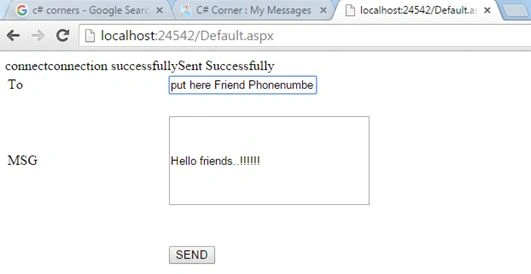
- Take new webform and give any name.
- Add two textbox one for sender and another is for Message.
- Give the name to the textbox like txtTO, and txtMSG.
- Now add Whatsapp.dll files from my website Not from others.
- Now put that code from my application and run it.
- If any query u can contact me in c# corner Thank You.
Now Add following code in webform .cs file:
- using System;
- using System.Collections.Generic;
- using System.Linq;
- using System.Threading;
- using System.Web;
- using System.Web.UI;
- using System.Web.UI.WebControls;
- using WhatsAppApi; ///when ur using this application U must use whatsapp.dll file from this application and not use from other sites
- using WhatsAppApi.Response;
- using System.ComponentModel;
- // NOTE 1:- If Your Not Use Whatsapp.dll from my apllication than u get Unauthorized error !!!!!!!!!!
- // NOTE 2 :- Your Phone Number NOT register in any whatsapp account and u must use number which is not use in whatsapp account and future use
- public partial class _Default : System.Web.UI.Page
- {
- protected void Page_Load(object sender, EventArgs e)
- {
- }
- protected void BtnSEND_Click(object sender, EventArgs e)
- {
- string number ="91**********" ; // use number which is register from WART tool
- string to = txtTo.Text;
- string msg = txtMSG.Text;
- string password = "*****************************"; // use here password which is generated from WART tool
- WhatsApp wa = new WhatsApp(number, password, "Nickname", true); // nickname u can provide any name
- wa.OnConnectSuccess += () =>
- {
- Response.Write("connect");
- wa.OnLoginSuccess += (phoneNumber, data) =>
- {
- Response.Write("connection successfully");
- wa.SendMessage(to/* Number */, msg);
- Response.Write("Sent Successfully");
- };
- wa.OnLoginFailed += (data) =>
- {
- Response.Write("login failed"+data);
- };
- wa.Login();
- };
- wa.OnConnectFailed += (ex) =>
- {
- Response.Write("connection failed: {0}"+ex.StackTrace);
- };
- wa.Connect();
- }
- }


Alexssandro DutraPosted Jul 5, 2020, 1:36 AM EDT
Muito bom sua explica??o.
krunal patelPosted Nov 27, 2018, 12:22 AM EST
Your code is not working...
purojit bharPosted Jul 6, 2018, 10:28 PM EDT
Wart from GitHub not working. It is giving old version. Please provide the exact link for WART
purojit bharPosted Jul 6, 2018, 10:27 PM EDT
Wart from GitHub not working
Gaurav LambhaPosted Jun 21, 2018, 7:50 PM EDT
How we get whatsaap password
Aditya YelgawakarPosted Mar 27, 2016, 8:26 PM EDT
i also got same exception-auth response error.how to handle this exception
madyna devPosted Mar 25, 2016, 3:07 AM EDT
Hi I got this error "Auth response error" how can I solve it? thank u
Chandu KumawatPosted Jan 13, 2016, 7:11 PM EST
hi omprakash u must use password properly .........whisch reg by WART Tool like djkdhh4545jhjhfhdfhfhfh45355jkj= and dont remove = this assignment operator
Omprakash AmarwalPosted Jan 11, 2016, 3:58 AM EST
An exception of type 'System.FormatException' occurred in mscorlib.dll but was not handled in user code... please solve it
Chandu KumawatPosted Nov 19, 2015, 3:07 AM EST
@ravi sir to avoiding failed not-authorized error u must use whatsapp.dll from this application and register phone number in WART tool note ur phone number not register any other whatsapp account
Ravi KumarPosted Nov 4, 2015, 2:40 AM EST
connectlogin failednot-authorized
Chandu KumawatPosted Oct 28, 2015, 8:58 PM EDT
which error generate
Chandu KumawatPosted Oct 28, 2015, 8:57 PM EDT
plz use correct phone number which is not register in other whatsapp account....
Mehulkumar ChauhanPosted Oct 20, 2015, 2:14 AM EDT
hi i have used it but it is not working.. it gives me error..