
Background
A few days back, I got a requirement from a client saying that they needed a package of the project which should not explicitly contain any code behind files or class files because their code had some confidential data and they didn't want to explicitly transfer it. So below is the solution for that.
Step 1
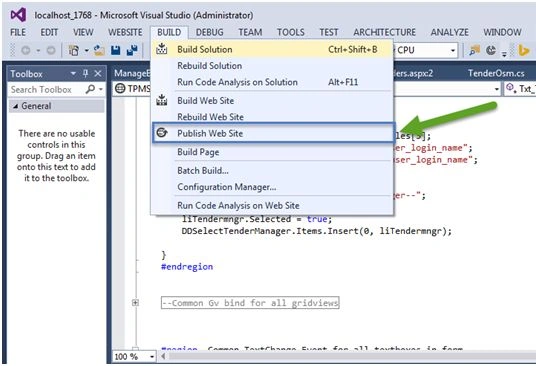
First develop your ASP.Net web application. Once everything is ready for deployment just go the option Build->Publish Web Site like the screen shot given below.
Step 2
Give any profile name appropriate to the project.

Step 3
Here select the option as Web deploy package like below:

Step 4
Very important step, just click the file publish option and tick the option that says "Precompiled during publishing".

Note
Above is the option which converts into dlls.
Step 5
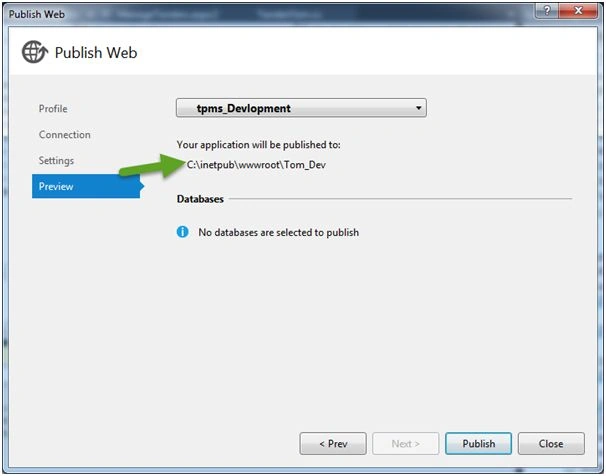
Verify the Location where you want to store the files.
Step 6
Finally click the Publish button below:
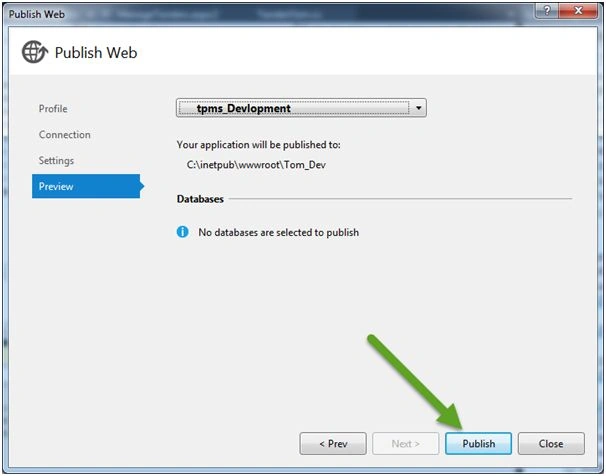
That's it, after afew times, it will generate the files required and put it like the below structure.
Output


Note
All the code behind files were converted to the APP_Code.dll, since we have placed some other class files in the APP_Code folder of the project. Even if we had plenty of code files it will just convert into this one app_Code.dll file.
Convert Code Behind Files or Class Files into One dll File in Visual Studio
In this blog, I will describe how to convert all the code behind files and class files that are used in a project into one dll file.


Karthik ElumalaiPosted Jun 9, 2016, 9:04 PM EDT
Thanks a tonBhuvanesh Mohankumar
Bhuvanesh MohankumarPosted Jun 9, 2016, 9:01 PM EDT
Good one Karthik Sachin
Karthik ElumalaiPosted Jun 9, 2016, 2:12 AM EDT
Thanks a lotAqib Shehzad
Muhammad Aqib ShehzadPosted Jun 8, 2016, 11:50 PM EDT
nice share
Karthik ElumalaiPosted Jun 8, 2016, 8:26 PM EDT
Thank you very muchRaja Ganapathy
RajaPosted Jun 8, 2016, 8:21 PM EDT
Good one...