
In this blog, we'll learn to convert the text to voice. Follow the steps below:
Step 1: Create a Windows Application, and can named it as ConvertTextToVoice.
Step 2: To convert text to speech which is called voice synthesis, you must include "System.Speech" reference in your project. So click on “References”, then “Add References”. Click on Framework tab, and then add "System.Speech".

Step 3: Add 1 textbox and a button to Form1.cs.
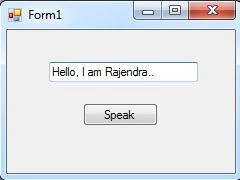
Step 4: Double click on Speak button.
- private void Speak_Click(object sender, EventArgs e)
- {
- SpeechSynthesizer speechSynthesizer = new SpeechSynthesizer();
- speechSynthesizer.Volume = 100; // 0...100
- speechSynthesizer.Rate = 0; // -10...10
- // Synchronous - Speaks the specified text string.
- // speechSynthesizer.Speak(textBox1.Text);
- // Asynchronous - Speaks the specified text string asynchronously.
- speechSynthesizer.SpeakAsync(textBox1.Text);
- }
Add the following namespace:
- using System.Speech.Synthesis;


HAFIZRAMEEZ ANSARIPosted Jun 7, 2018, 2:00 AM EDT
Good brother thanks
hemal variyaPosted Jan 28, 2015, 4:36 AM EST
Thanks sir
Hafidz AmrullohPosted Jan 20, 2015, 12:37 PM EST
nice
RakeshPosted Jan 2, 2015, 11:18 AM EST
Wao...Its really nice
Narasingh RaoPosted Nov 1, 2014, 3:20 AM EDT
nuv super anna....
VerenaJamPosted Sep 22, 2014, 3:08 AM EDT
thanks for the wonderful code :)
Antony DarwinPosted Aug 28, 2014, 9:32 PM EDT
Liked it. Thanks :)
Parminder Pal SinghPosted Aug 28, 2014, 2:24 AM EDT
Nice
Prashant PandePosted Aug 27, 2014, 2:56 AM EDT
Nice...Utility!