
Create new project
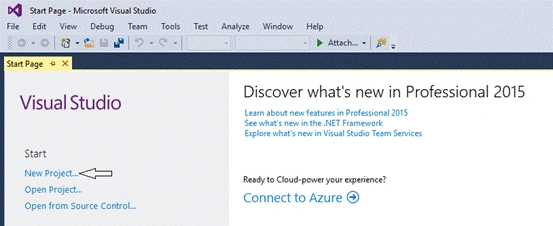
To create a new project, open Visual Studio, I am using Visual Studio 2015 Professional.
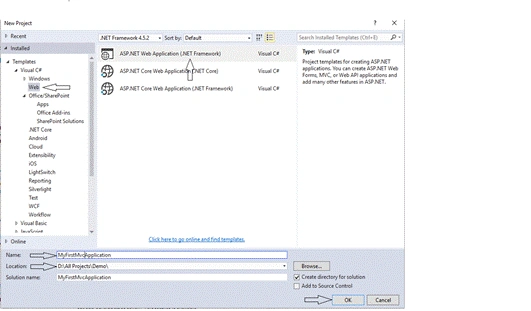
It will open a new window. Choose Visual C# Web, followed by ASP.NET Web Application(.NET Framework).
Enter the name of the application, which I have entered in MyFirstMvcApplication, followed by changing the location. If you want to save the project to some specific location, then click OK button.
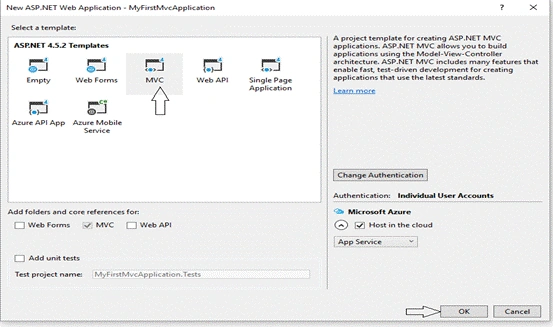
After clicking OK button, it will open a new Window. From the new Window, select MVC and then click OK button.
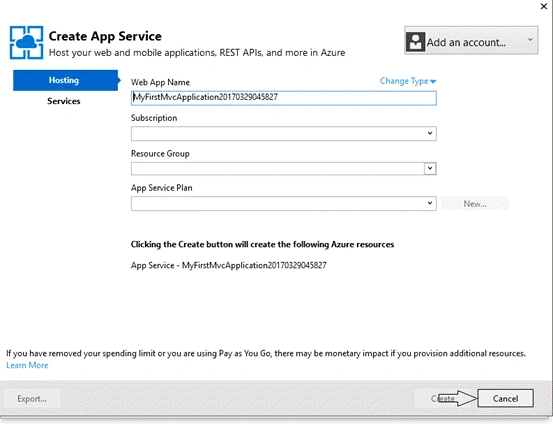
It will open a new Window, if you want to host your project on Azure. There is a need to fill the required information related to the Azure subscription. For now, just click Cancel button.
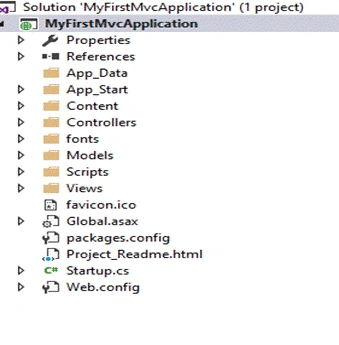
After clicking the Cancel button, it will take few seconds and afterwards, your project is created. Your default project structure looks, as shown below.
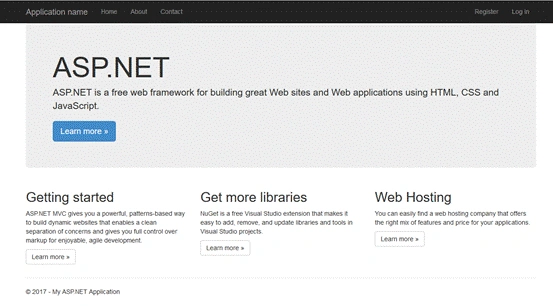
Press F5 and your Application is ready to use.


Sagar Pandurang KapPosted Dec 5, 2017, 8:22 PM EST
To Start creating MVC web app it is nicee.
Sagar Pandurang KapPosted Dec 5, 2017, 8:21 PM EST
Good One.But if any program was done then will be more useful.
Ajay SharmaPosted Apr 18, 2017, 11:08 PM EDT
Great!! very helpful for beginners
pawan jatavPosted Apr 18, 2017, 10:51 PM EDT
Very good nice Article
Sandeep VermaPosted Mar 30, 2017, 12:52 AM EDT
Good for New developer Nice article :)
Sunil SinghPosted Mar 30, 2017, 12:45 AM EDT
Good .....Keep the posting...