
This blog shows you how an AngularJS application is run in VS Code with dummy data. Also, download the angular.min js file.
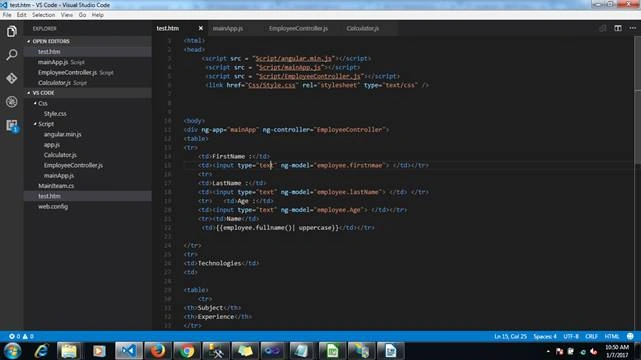
- Download and install VS Code. Now, create a new application. The application looks as shown below.
- Add a mainApp.js file to initialize the module and the query looks as shown below.
- var mainApp=angular.module("mainApp",[]);
- Add another JS file of Controller and the query looks, as shown below.
- mainApp.controller("EmployeeController", function($scope) {
- $scope.employee = {
- firstnmae: "Jayant",
- lastName: "Tripathy",
- Age: 30,
- Technologies: [{
- Name: "Asp .Net",
- Exp: "5 years"
- }, {
- Name: "C#",
- Exp: "5 years"
- }, {
- Name: "Sql Server",
- Exp: "4 years"
- }, {
- Name: "Java",
- Exp: "0 years"
- }, {
- Name: "Jquery",
- Exp: "3 years"
- }],
- fullname: function() {
- var EmployeeObject;
- EmployeeObject = $scope.employee;
- return EmployeeObject.firstnmae + " " + EmployeeObject.lastName;
- }
- }
- });
- Now, simply add a HTML file and add AngularJS cdn or you can download directly from angularjs.org site. HTML looks, as shown below.
- <html>
- <head>
- <script src="Script/angular.min.js"></script>
- <script src="Script/mainApp.js"></script>
- <script src="Script/EmployeeController.js"></script>
- <link href="Css/Style.css" rel="stylesheet" type="text/css" />
- <body>
- <div ng-app="mainApp" ng-controller="EmployeeController">
- <table>
- <tr>
- <td>FirstName :</td>
- <td><input type="text" ng-model="employee.firstnmae"> </td>
- </tr>
- <tr>
- <td>LastName :</td>
- <td><input type="text" ng-model="employee.lastName"> </td>
- </tr>
- <tr>
- <td>Age :</td>
- <td><input type="text" ng-model="employee.Age"> </td>
- </tr>
- <tr>
- <td>Name</td>
- <td>{{employee.fullname()| uppercase}}</td>
- </tr>
- </tr>
- <tr>
- <td>Technologies</td>
- <td>
- <table>
- <tr>
- <th>Subject</th>
- <th>Experience</th>
- </tr>
- <tr ng-repeat="emp in employee.Technologies">
- <td>{{emp.Name}}</td>
- <td>{{emp.Exp}}</td>
- </tr>
- </table>
- </td>
- </tr>
- </table>
- </body>
- </head>
- </html>
- To style the table, I have added Css/Style.css.
- table, th , td {
- border: 1px solid grey;
- border-collapse: collapse;
- padding: 5px;
- }
- table tr:nth-child(odd) {
- background-color: #f2f2f2;
- }
- table tr:nth-child(even) {
- background-color: #ffffff;
- }
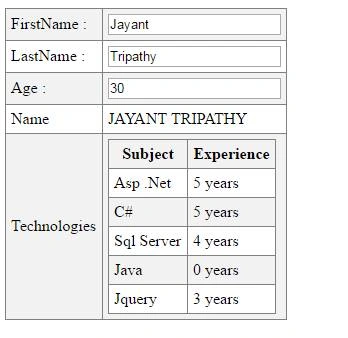
- Finally, the result looks as shown below.

Join the conversation! Your thoughts help the community grow.