
Introduction
Plug-ins are commonly used in Dynamics 365 Customer Engagement (CE) and Microsoft Dataverse implementations to execute business logic when standard configuration is not enough.
Traditionally, developing a plug-in required .NET and C# knowledge. Developers would create a class, implement the required plug-in interface, register the assembly, and configure the appropriate execution pipeline.
Dataverse also provides a low-code approach for implementing certain business rules using Power Fx. This allows makers and developers to create simpler server-side business logic without writing a traditional .NET plug-in.
In this article, we will explore what low-code plug-ins are, how they can be used for business validation, where they are created, and how they are stored and moved between environments.
What Is a Low-Code Plug-in?
A low-code plug-in is a Dataverse plug-in that uses Power Fx expressions to implement business logic instead of requiring a traditional C# plug-in assembly.
The approach is useful when the required logic is relatively simple and can be expressed through Power Fx.
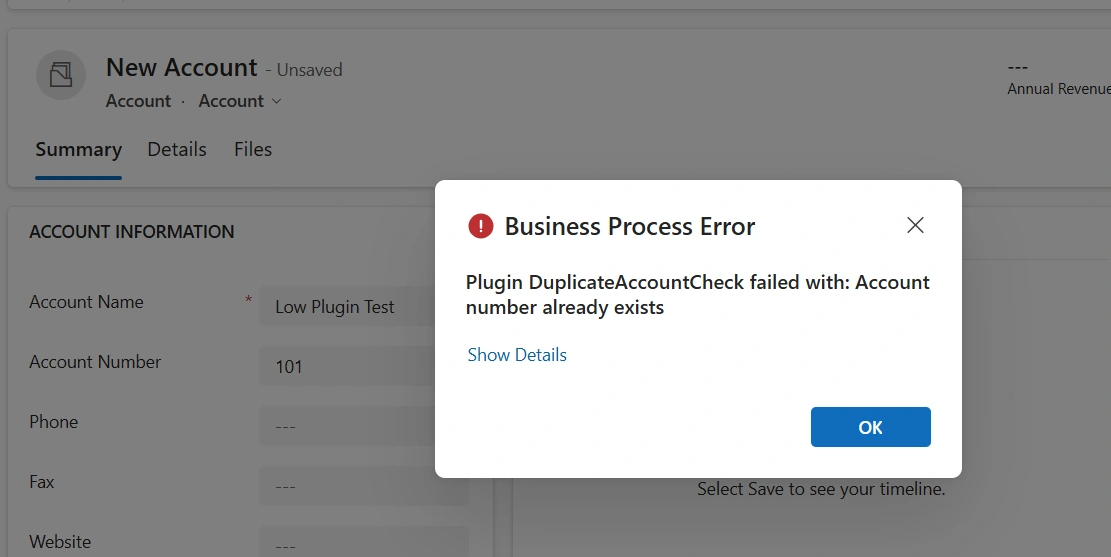
For example, consider a requirement where an organization does not want users to create a duplicate record.
Dynamics 365/Dataverse provides duplicate detection capabilities that can identify potential duplicates and warn users. However, depending on the business requirement and configuration, an organization may need server-side validation that prevents an operation from completing when a business rule is violated.
A low-code plug-in can be used for this type of validation when the requirement can be expressed using Power Fx.
Low-Code Plug-in vs Traditional .NET Plug-in
The main difference is how the business logic is implemented.
Area | Traditional .NET Plug-in | Low-Code Plug-in |
|---|---|---|
Language | C# | Power Fx |
Development | Visual Studio or similar tools | Dataverse maker experience |
.NET knowledge | Required | Not required for basic scenarios |
Complex logic | Well suited | More limited |
Dataverse pipeline | Supported | Event-based scenarios supported |
Deployment | Solution/assembly deployment | Solution-based deployment |
Low-code plug-ins do not replace traditional plug-ins in every scenario. They provide another option for implementing business logic when Power Fx is sufficient.
Real-World Example: Preventing Duplicate Records
Consider a Dataverse table called Customer.
The business requirement is:
A customer record should not be created when another customer with the same email address already exists.
A traditional implementation could use a C# plug-in registered on the Create message.
With a low-code plug-in, the validation can instead be implemented using Power Fx.
The high-level process is:
User creates Customer
        ↓
Dataverse Create Event
        ↓
Low-Code Plug-in
        ↓
Check existing records
        ↓
Duplicate found?
     /       \
   Yes        No
    ↓          ↓
Stop Save    Continue
This allows the validation to occur as part of the Dataverse operation rather than relying only on client-side validation.
Creating a Low-Code Plug-in
Low-code plug-ins can be created through the Dataverse Accelerator experience available in supported Dataverse environments.
The exact navigation and available capabilities can change as Microsoft evolves the feature, so the options shown in the maker environment should be used as the source of truth for the current environment.
Step 1: Open the Dataverse Accelerator
Open the Power Apps environment containing the Dataverse solution and launch the Dataverse Accelerator experience.
The accelerator provides tools for creating and managing Dataverse development components, including low-code plug-ins where the capability is available.
Step 2: Choose the Plug-in Type
Depending on the scenario, a low-code plug-in can be created as an instant or event-based plug-in.
An instant plug-in is intended to be invoked explicitly.
An event-based plug-in runs in response to a Dataverse event such as a table operation.
Conceptually:
Instant Plug-in
      ↓
Explicit invocation
      ↓
Business Logic
and:
Event-Based Plug-in
      ↓
Create / Update / Delete
      ↓
Power Fx Logic
Event-Based Low-Code Plug-ins
Event-based plug-ins are useful when business logic needs to execute automatically as part of a Dataverse operation.
For example:
Create Customer
       ↓
Pre-Operation Logic
       ↓
Validation
       ↓
Create Record
       ↓
Post-Operation Logic
Depending on the supported configuration, the logic can be associated with operations such as:
Create
Update
Delete
The execution stage is important because it determines when the logic runs relative to the Dataverse operation.
Pre-Operation vs Post-Operation
The Dataverse event pipeline provides different stages for processing an operation.
Pre-Operation
Pre-operation logic runs before the main database operation is completed.
This is useful for scenarios such as:
Validating incoming data
Modifying values before they are saved
Preventing an operation when a business rule is violated
For example:
Create Request
      ↓
Pre-Operation
      ↓
Validate Data
      ↓
Continue or Reject
      ↓
Database Operation
Post-Operation
Post-operation logic runs after the main operation has been completed.
It can be useful when additional processing needs to happen after the record has been created, updated, or deleted.
For example:
Create Request
      ↓
Database Operation
      ↓
Post-Operation
      ↓
Additional Business Logic
Choosing the correct stage is important because the same business rule can behave differently depending on when it executes.
Power Fx Expression for Validation
The main advantage of a low-code plug-in is that the business rule can be expressed using Power Fx.
For example, a validation scenario can check whether a matching record already exists.
A conceptual expression could use a lookup such as:
LookUp(
    Customers,
    Email = ThisRecord.Email
)
The exact formula depends on the table, columns, plug-in type, and execution context.
For a production implementation, the expression should also account for cases such as:
Empty email addresses
Existing record updates
The current record being updated
Case sensitivity requirements
Multiple matching records
Null values
The important point is that the validation is performed on the server side rather than relying only on JavaScript running in the model-driven app.
Raising a Validation Error
For a business rule that must prevent an operation, the plug-in can be designed to return an error when the validation condition is met.
Conceptually:
IF duplicate exists
       ↓
Return error
       ↓
Dataverse operation fails
The user then receives an error instead of successfully saving the invalid record.
This differs from a simple client-side warning because server-side validation is not dependent solely on the particular model-driven form being used.
Instant Plug-ins
Low-code plug-ins can also be used for actions that are explicitly invoked.
The concept is similar to calling an operation from an application:
Application
     ↓
Invoke Plug-in
     ↓
Power Fx Logic
     ↓
Result
Instant plug-ins can be useful when the logic should be reusable rather than tied directly to a Create, Update, or Delete event.
Depending on the configuration, the operation may work with a specific Dataverse table record or operate independently of a particular table record.
Where Are Low-Code Plug-ins Stored?
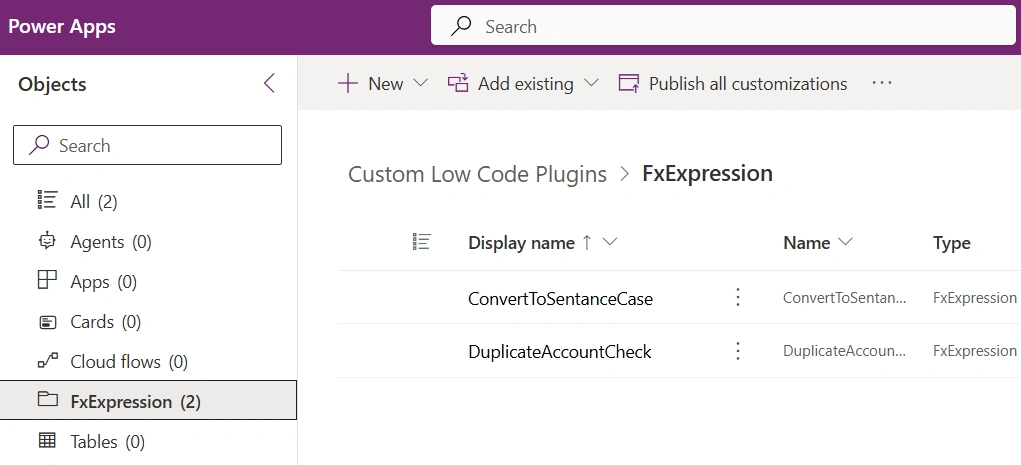
Low-code plug-ins are Dataverse solution components.
They can be included in a solution and transported between environments as part of the solution lifecycle.
The original implementation may appear under solution components associated with FxExpression.
A simplified deployment flow is:
Development Environment
        ↓
Dataverse Solution
        ↓
Export
        ↓
Import
        ↓
Test Environment
        ↓
Production Environment
The exact solution component names and behavior can vary with the Dataverse feature version.
Moving a Low-Code Plug-in Between Environments
A common Dataverse development model is to create functionality in a development environment and then move it through controlled environments.
For example:
Development
     ↓
Sandbox / Test
     ↓
UAT
     ↓
Production
The low-code plug-in should be included in the appropriate solution.
Depending on the change-management strategy, the solution can be transported as a complete solution or through a patch/update approach where appropriate.
Before deployment, verify:
The required tables exist in the target environment.
Required columns exist.
Environment-specific configuration is available.
Dependencies are included.
The Power Fx expression behaves correctly against the target schema.
Security permissions are appropriate.
When Should You Use Low-Code Plug-ins?
Low-code plug-ins are a good fit when:
The business logic is relatively simple.
The logic can be expressed clearly using Power Fx.
A server-side validation or automation is required.
Makers need to maintain the logic.
Introducing a C# plug-in would add unnecessary development overhead.
For example:
Good Fit
--------
Simple validation
Field calculations
Basic business rules
Simple record processing
When Should You Use a .NET Plug-in?
A traditional C# plug-in remains appropriate when the requirement involves more complex processing.
Examples include:
Complex algorithms
Advanced external integrations
Sophisticated exception handling
Complex transaction logic
Functionality that cannot be expressed effectively in Power Fx
Reusable .NET libraries
Scenarios requiring capabilities unavailable through low-code plug-ins
The decision should therefore be based on the complexity of the requirement rather than treating low-code as a replacement for traditional plug-in development.
Low-Code Plug-ins and Citizen Developers
One of the biggest advantages of low-code development is that it can reduce the amount of traditional programming required for suitable scenarios.
A maker who understands Dataverse tables, relationships, and Power Fx can implement certain business rules without creating and registering a C# assembly.
However, low-code does not eliminate the need for good solution design.
Developers and makers still need to consider:
Data integrity
Performance
Security
Error handling
Solution dependencies
ALM
Maintainability
Testing
A low-code implementation can still become difficult to maintain if expressions are poorly designed or business rules are duplicated across multiple components.
Common Mistakes to Avoid
Using Low-Code for Complex Business Logic
If the expression becomes difficult to understand or maintain, a traditional plug-in or another architecture may be more appropriate.
Ignoring the Execution Stage
A validation that belongs in pre-operation should not automatically be implemented as post-operation logic.
Understand when the business rule needs to execute.
Forgetting Solution Dependencies
Always verify that the target environment contains the tables, columns, and other components required by the plug-in.
Relying Only on Client-Side Validation
If a rule is critical to data integrity, consider whether it also needs server-side enforcement.
Users may access Dataverse data through different applications, APIs, integrations, or automation flows.
Not Testing Update Scenarios
A rule that works during record creation may behave differently during updates.
For example, when checking for duplicates during an update, the query needs to avoid treating the current record itself as a duplicate.
Low-Code Plug-in Development Workflow
A practical development workflow looks like this:
Identify Business Requirement
          ↓
Decide Whether Power Fx Is Suitable
          ↓
Create Low-Code Plug-in
          ↓
Choose Instant or Event-Based
          ↓
Configure Table and Event
          ↓
Write Power Fx Logic
          ↓
Test the Scenario
          ↓
Add to Solution
          ↓
Deploy Through Environments
This approach keeps the implementation focused on the actual business requirement.
Key Benefits
Low-code plug-ins provide several benefits for suitable Dataverse scenarios:
Less traditional code: Business rules can be implemented with Power Fx.
Faster development: Simple server-side logic can be created without building a .NET assembly.
Maker accessibility: Users familiar with Power Fx can work on suitable business logic.
Server-side execution: Business rules can be enforced at the Dataverse level.
Solution-based ALM: Plug-in components can participate in the Dataverse solution lifecycle.
Flexible scenarios: Instant and event-based approaches support different types of business logic.
Conclusion
Low-code plug-ins provide another option for implementing business logic in Microsoft Dataverse and Dynamics 365 CE.
Instead of creating a traditional C# plug-in for every requirement, makers and developers can use Power Fx for simpler server-side scenarios such as validation and record processing.
The important distinction is that low-code plug-ins are not intended to replace traditional .NET plug-ins completely. They are most useful when the required logic is simple enough to express and maintain effectively with Power Fx.
For complex integrations, advanced algorithms, or business logic that exceeds the capabilities of Power Fx, a traditional .NET plug-in may still be the better choice.
Used appropriately, low-code plug-ins can give Dataverse teams another practical way to implement business rules while reducing the amount of custom code required.

Join the conversation! Your thoughts help the community grow.