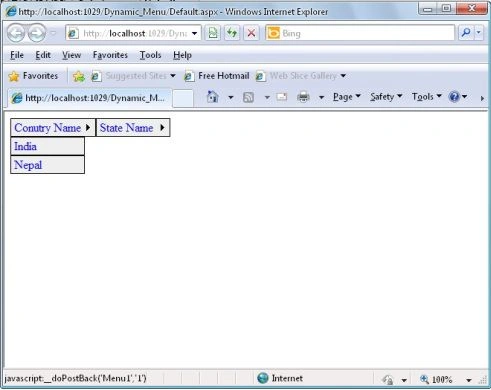
While working on asp.net project, we will get situation to create a dynamic menu control which will be configurable by admin.
For doing this task we can do like this
Step 1: I have created a table like below

Step 2: Configure the asp.net menu control like this
<%@
Page Language="C#" AutoEventWireup="true" CodeFile="Default.aspx.cs" Inherits="_Default" %>
<!DOCTYPE html PUBLIC "-//W3C//DTD XHTML 1.0 Transitional//EN" "http://www.w3.org/TR/xhtml1/DTD/xhtml1-transitional.dtd">
<html xmlns="http://www.w3.org/1999/xhtml">
<head id="Head1" runat="server">
<title></title>
<style
type="text/css">
.menuItem
{
border:
Solid 1px black;
width:
100px;
padding:
2px;
background-color:
#eeeeee;
}
.menuItem
a
{
color:
blue;
}
.IE8Fix
{
z-index:
1000;
}
</style>
</head>
<body>
<form
id="form1"
runat="server">
<div>
<asp:Menu ID="Menu1" Orientation="horizontal"
StaticMenuItemStyle-CssClass="menuItem"
DynamicMenuItemStyle-CssClass="menuItem" runat="server">
<%– This CSS used for fixing the browser
problem with IE8–%>
<DynamicMenuStyle CssClass="IE8Fix" />
</asp:Menu>
</div>
</form>
</body>
</html>
Step 3: Write the code for binding asp.net menu on basis of category like this
using System;
using
System.Collections.Generic;
using System.Linq;
using System.Web;
using System.Web.UI;
using
System.Web.UI.WebControls;
using System.Data.SqlClient;
using System.Data;
public partial class _Default : System.Web.UI.Page
{
protected void
Page_Load(object sender, EventArgs e)
{
if
(!IsPostBack)
{
populateMenuItem();
}
}
private void
populateMenuItem()
{
DataTable
menuData = GetMenuData();
AddTopMenuItems(menuData);
}
private DataTable
GetMenuData()
{
using (SqlConnection con = new
SqlConnection("Data
Source=.\\SQLEXPRESS;AttachDbFilename=|DataDirectory|\\Database.mdf;Integrated
Security=True;User Instance=True"))
{
using
(SqlCommand cmd = new
SqlCommand("SELECT
Id,ParentId,Name FROM tblProduct", con))
{
SqlDataAdapter
da = new SqlDataAdapter(cmd);
DataTable
dt = new DataTable();
da.Fill(dt);
return
dt;
}
}
}
/// Filter the
data to get only the rows that have a
/// null
ParentID (This will come on the top-level menu items)
private void
AddTopMenuItems(DataTable menuData)
{
DataView
view = new DataView(menuData);
view.RowFilter = "ParentID IS NULL";
foreach
(DataRowView row in
view)
{
MenuItem
newMenuItem = new MenuItem(row["Name"].ToString(), row["Id"].ToString());
Menu1.Items.Add(newMenuItem);
AddChildMenuItems(menuData,
newMenuItem);
}
}
//This code is used to recursively add child
menu items by filtering by ParentID
private void
AddChildMenuItems(DataTable menuData, MenuItem parentMenuItem)
{
DataView
view = new DataView(menuData);
view.RowFilter = "ParentID=" + parentMenuItem.Value;
foreach
(DataRowView row in
view)
{
MenuItem
newMenuItem = new MenuItem(row["Name"].ToString(), row["Id"].ToString());
parentMenuItem.ChildItems.Add(newMenuItem);
AddChildMenuItems(menuData,
newMenuItem);
}
}
}


Azad ChouhanPosted Apr 19, 2013, 3:45 AM EDT
blogs for beginners and freshers http://dotnetlover006.blogspot.in/
Ningappa kanaviPosted Apr 10, 2013, 2:52 AM EDT
sir i am getting error with this code on line view.RowFilter = "ParentID=" + parentMenuItem.Value; i am not possible to resolve this error is Syntax error: Missing operand after '=' operator. please help me on this... Thanks in Advance