Enhance your Power Apps experience
Learn how to send emails effortlessly from a gallery control in Power Apps when specific conditions are met. In this blog will show you how to set up a ‘Send Email’ button that appears only when needed, making your app smarter and more user-centric.
Step-by-Step Email Setup
- Button Creation: Add a button within the gallery control to initiate email sending.
- OnSelect Setup: Configure the button’s OnSelect property to use the SendEmailV2 function with the necessary parameters.
Simple Email Function Syntax
SendEmailV2(
    "[email protected]",  // The recipient's email address
    "Email Subject",          // The email subject line
    "Email Body"              // The content of the email
)
Intelligent Email Dispatch
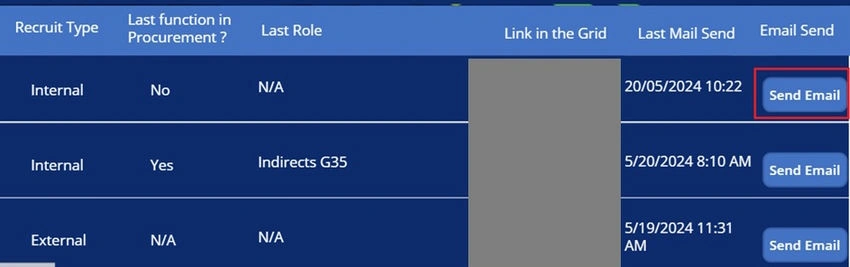
Set up conditional logic to send emails only when the gallery item meets certain criteria, such as being marked “Internal” and having a last function status of “Yes”.
Gallery Snap for ref
Button OnSelect Code
If(
    gallOnboard.Selected.lblRecrtTyp.Text = "Internal" &&
    gallOnboard.Selected.lblLastFunPrco.Text = "Yes",
    Office365Outlook.SendEmailV2(
        gallOnboard.Selected.lblUserEmail.Text,
        "Welcome Onboarding Training",
        // HTML email template with placeholders for dynamic content
    )
)
Fetching User Details
Retrieve the display name of a user based on their email with the Office365Users connector.
Code for User Display Name
Office365Users.UserProfileV2(gallOnboard.Selected.lblUserEmail.Text).displayName &Adding Links to Emails
Easily insert hyperlinks into your email body, directing users to training materials or other resources.
Code for Hyperlinks
"<a href='" & gallOnboard.Selected.lblLinkinGrid.Text & "'>View Trainings</a>"Personalized Email Sign-off
Concatenate the report’s name with the user’s email for a customized closing in your automated emails.
Code for Email Closure
"Best regards," & gallOnboard.Selected.gallOnbReporto.Text & ", " & User().Email & "</body></html>"This concise guide is designed to make email automation in Power Apps accessible and easy to implement, even for those new to the platform. Enjoy enhancing your app’s communication capabilities!
Thanks for reading
Happy coding

Join the conversation! Your thoughts help the community grow.