
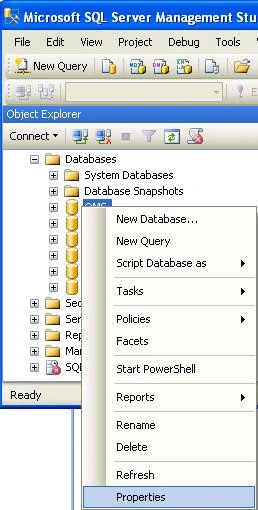
Image 1.
By clicking on Properties A Dialog box will appear like
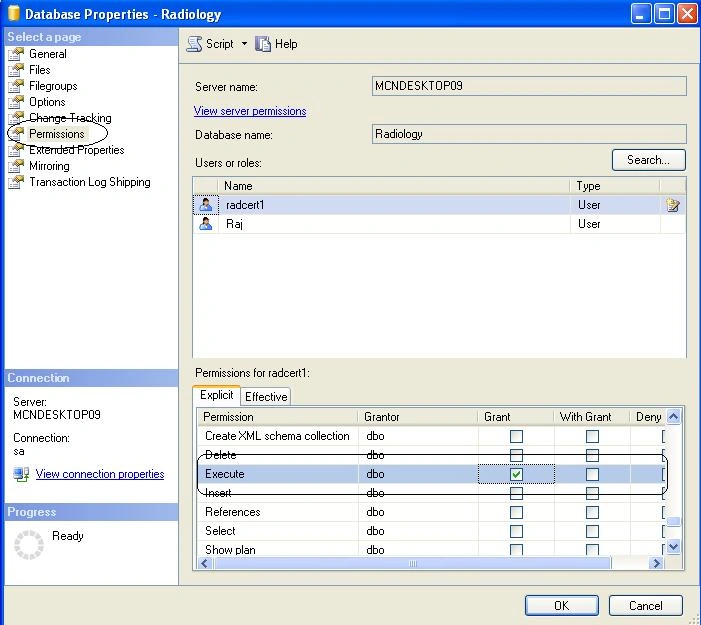
Image 2.
Here Select Permission and checked Execute Option and click on OK.
If you try to connect to a database in SqlSever and it denied then set Execute permission of that database as...
Join the conversation! Your thoughts help the community grow.

Join to leave a comment
Members earn 10 SHARP for a comment, 10 SHARP for a reaction, and 250 SHARP for every blog they publish.
 DevSocialUpcoming · 3rd editionAI Agents ConferenceDec 1–3, 2026Live onlineFree to attend5days leftRegisterMembers onlyeBook · Learn .NETCSharp 13 and .NET 9 Scripting Guide (Run .cs Without Projects)Download now
Write a blog post and earn +250 SHARP when it is approved.
Write a blog
Abhimanyu K VatsaTOP 100Posted Jul 26, 2010, 3:24 AM EDT
at the very first time when I was beginner in hosting, i faces such problem on shared database server. and at the end I ordered to my hosting company to enable the EXECUTE permission. great blog