
In this blog, we will learn, how to filter a DataSet, based on the value of a particular column. Suppose, we have a DataSet ‘ds’ with the records of some users, given below:
Now, we want to filter this DataSet, based on States.
For example, we have to get the records with State as “Maharashtra” only
Afterwards, we can write the code, given below:
- ds.Tables[0].DefaultView.RowFilter = "State = 'Maharashtra'";
- DataTable dt = (ds.Tables[0].DefaultView).ToTable();
Now, in DataTable dt, we will get the records from DataSet ds with State=Maharashtra.

We can also set this filtered DataSet directly as the DataSource of Gridview.
- ds.Tables[0].DefaultView.RowFilter = "State = 'Karnataka'";
- GridView1.DataSource = ds.Tables[0].DefaultView;
- GridView1.DataBind();
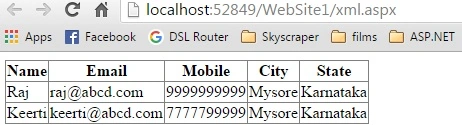
We can also give multiple conditions in filtering with “and” or “or” operators.
- ds.Tables[0].DefaultView.RowFilter = "State = 'Maharashtra' and City='Nagpur'";
- DataTable dt = (ds.Tables[0].DefaultView).ToTable();
Hoping that this will be helpful for someone!


Torgeir UllestadPosted Sep 19, 2019, 12:02 PM EDT
Thanks alot. Great stuff!
Maruthi PalllamalliPosted Nov 2, 2017, 6:46 AM EDT
Super bro.. Really people would need this kind of things :-)
SubashPosted Sep 8, 2016, 6:16 PM EDT
Good one
Midhun TpPosted Aug 24, 2016, 8:07 PM EDT
Thanks Humayun Kabir Mamun
Humayun Kabir MamunPosted Aug 24, 2016, 7:29 AM EDT
Nice