
Steps Involved:
- Open SharePoint 2010 Management Shell by going to Start | All Programs | SharePoint | Microsoft SharePoint 2010 Products | SharePoint 2010 Management Shell (Run as Administrator).
- Run the following script.
Powershell Script:
PowerShell## Input Parameters required for getting a particular content type for the specified SharePoint 2010 list
$uri="http://serverName:10736/sites/ECT/_vti_bin/Lists.asmx?wsdl"
[string] $contentTypeId="0x0100A9275C964475E34399003198B8DB7616"
[string] $listName="List"
$listWebServiceReference = New-WebServiceProxy -Uri $uri -UseDefaultCredential
[System.Xml.XmlNode]$xmlNode=$listWebServiceReference.GetListContentType($listName,$contentTypeId)
write-host -ForegroundColor Green "Content Type Information: "
$xmlNode
Output: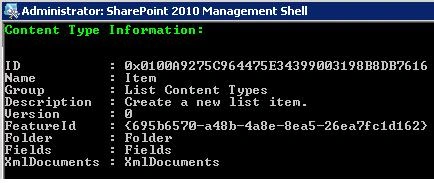

Join the conversation! Your thoughts help the community grow.