
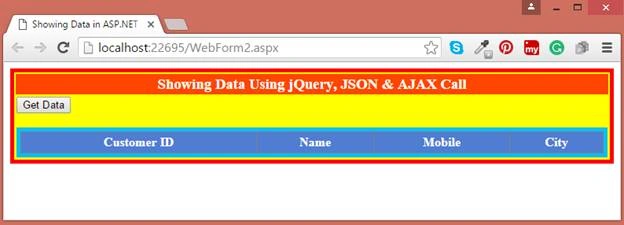
I am writing this article on demand as I got a request from one of my friends. He told me that he is looking for this requirement so I created this. As per his requirement, he needs to show data from SQL Server database table in ASP.NET GridView using jQuery, JSON and AJAX call.
Below is my Data Table from which I am showing data.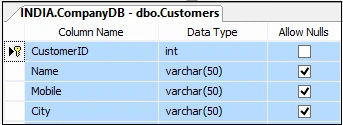
Script of my Table
- CREATE TABLE [dbo].[Customers](
- [CustomerID] [int] IDENTITY(1,1)NOTNULL,
- [Name] [varchar](50)NULL,
- [Mobile] [varchar](50)NULL,
- [City] [varchar](50)NULL,
- CONSTRAINT [PK_Customer] PRIMARYKEYCLUSTERED
- (
- [CustomerID] ASC
- )WITH (PAD_INDEX=OFF,STATISTICS_NORECOMPUTE=OFF,
- IGNORE_DUP_KEY=OFF,ALLOW_ROW_LOCKS=ON,
- ALLOW_PAGE_LOCKS=ON)ON [PRIMARY]
- )ON [PRIMARY]
- GO

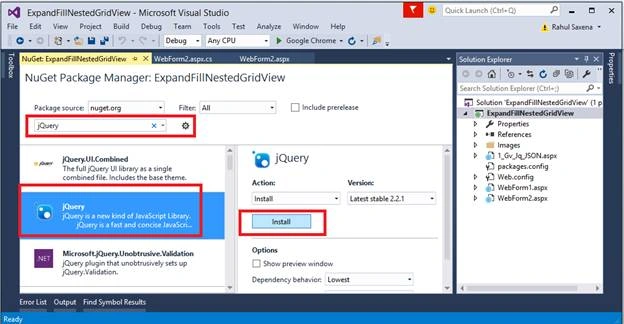
Now right click on Project’s Solution Explorer, then click Manage Nuget
Type jQuery and Install
Below is my aspx code
- <%@PageLanguage="C#"AutoEventWireup="true"CodeBehind="WebForm2.aspx.cs"Inherits="ExpandFillNestedGridView.WebForm2"%>
- <!DOCTYPE html>
- <html xmlns="http://www.w3.org/1999/xhtml">
- <head runat="server">
- <title>Showing Data in ASP.NET Grid View Using jQuery, JSON & AJAX Call</title>
- <script src="Scripts/jquery-2.2.0.min.js">
- </script>
- <script type="text/javascript">
- $(document).ready(function ()
- {
- $("#btnShowData").click(function ()
- {
- $.ajax
- ({
- type: "POST", contentType: "application/json; charset=utf-8", url: "WebForm2.aspx/BindCustomers", data: "{}",
- dataType: "json", success: function (result) { for (vari = 0; i<result.d.length; i++)
- {
- $( "#gvData").append( "<tr><td>" + result.d[i].CustomerID + "</td><td>" + result.d[i].Name + "</td><td>" + result.d[i].Mobile + "</td><td>" + result.d[i].City + "</td></tr>");
- }
- }, error: function (result)
- {
- alert( "Error");
- }
- });
- });
- });
- </script>
- </head>
- <body>
- <tablestyle="background-color: yellow; border: solid 5px red; width: 100%" align="center">
- <tr>
- <tdstyle="background-color: orangered; padding: 2px; text-align: center; color: white; font-weight: bold; font-size: 14pt;">Showing Data Using jQuery, JSON & AJAX Call</td>
- </tr>
- <tr>
- <td>
- <buttonid="btnShowData" runat="server">Get Data</button>
- <br/>
- <br/>
- <formid="form1" runat="server" style="background-color:deepskyblue; padding:5px;">
- <asp:GridViewID="gvData" runat="server" CellPadding="4" ShowHeaderWhenEmpty="true" ForeColor="White" Width="100%">
- <HeaderStyleBackColor="#507CD1" Font-Bold="True" ForeColor="White" />
- <RowStyleBackColor="#EFF3FB" />
- </asp:GridView>
- </form>
- </td>
- </tr>
- </table>
- </body>
- </html>
- using System;
- using System.Data;
- using System.Linq;
- using System.Web.Services;
- using System.Data.SqlClient;
- using System.Collections.Generic;
- namespace ExpandFillNestedGridView
- {
- public partial class WebForm2: System.Web.UI.Page
- {
- protected void Page_Load(object sender, EventArgs e)
- {
- if (!IsPostBack)
- {
- BindDummyGridrow();
- }
- }
- public void BindDummyGridrow()
- {
- DataTable dt = new DataTable();
- dt.Columns.Add("Customer ID");
- dt.Columns.Add("Name");
- dt.Columns.Add("Mobile");
- dt.Columns.Add("City");
- gvData.DataSource = dt;
- gvData.DataBind();
- }
- [WebMethod]
- public static Customer[] BindCustomers()
- {
- string connectionString = @ "Data Source=.; database=CompanyDB;Integrated Security=true";
- DataTabledt = newDataTable();
- List < Customer > custList = newList < Customer > ();
- using(SqlConnection con = newSqlConnection(connectionString))
- {
- using(SqlCommand command = newSqlCommand("select * from Customers", con))
- {
- con.Open();
- SqlDataAdapter da = newSqlDataAdapter(command);
- da.Fill(dt);
- foreach(DataRowdtrowindt.Rows)
- {
- Customercust = newCustomer();
- cust.CustomerID = dtrow["CustomerID"].ToString();
- cust.Name = dtrow["Name"].ToString();
- cust.Mobile = dtrow["Mobile"].ToString();
- cust.City = dtrow["City"].ToString();
- custList.Add(cust);
- }
- }
- }
- return custList.ToArray();
- }
- public class Customer
- {
- public string CustomerID
- {
- get;
- set;
- }
- public string Name
- {
- get;
- set;
- }
- public string Mobile
- {
- get;
- set;
- }
- public string City
- {
- get;
- set;
- }
- }
- }
- }



mohamed souilmiPosted Jul 29, 2019, 2:48 AM EDT
The data binding works perfectly but for some reason i can't activate the paging of the datagrid any idea why ??
Girish SoniPosted Jul 12, 2017, 11:56 PM EDT
This is not working why??
Yogi SPosted Feb 8, 2017, 12:34 AM EST
What role json played here?
Rahul Kumar SaxenaTOP 100Posted Apr 5, 2016, 4:55 AM EDT
Thanks Imtiyaz Ansari
Rahul Kumar SaxenaTOP 100Posted Apr 5, 2016, 4:55 AM EDT
Thanks Humayun Kabir Mamun
Rahul Kumar SaxenaTOP 100Posted Apr 5, 2016, 4:55 AM EDT
Thanks Debasis Saha
Imtiyaz AnsariPosted Apr 5, 2016, 12:45 AM EDT
Nice Article ..
Humayun Kabir MamunPosted Apr 4, 2016, 7:44 PM EDT
Nice...
Debasis SahaTOP 100Posted Apr 4, 2016, 9:44 AM EDT
Good One..